Toxic backlinks are links that a backlink tool flags as likely to hurt your rankings. "Toxic" is a tool label, not a Google term, and most of what gets flagged (scrapers, junk directories, stats pages) is already ignored by Google. The links that can cost a client rankings or earn a manual action are the ones somebody built to manipulate them, and for an agency that buys placements, those are usually paid links that went live without a sponsored tag.
So the audit that matters starts with your own order records, not a toxicity score. This guide covers what Google targets, how to find the few links that need action, when a disavow file is worth uploading, and how to handle a negative SEO attack.
What toxic backlinks are, and what Google calls them
Google's spam policies have no "toxic" category. They describe link spam: links made mainly to manipulate rankings, such as buying or selling links that pass ranking credit, excessive link exchanges, automated link programs, and widely distributed links in footers and templates. A paid link is fine under those policies when it carries rel="sponsored" or rel="nofollow".
Toxicity scores come from backlink tools. Each vendor weighs its own signals: low authority, spammy top-level domains, odd anchors, sites with thin content. A score is a prompt to look, not a verdict. When asked about tools that sell toxic link audits, Google's John Mueller replied that it is "all made up & irrelevant" and told site owners to spend the time building up their sites instead.
That does not make every link harmless. It moves the question from "what does the tool score say?" to "who built this link, and was it built to pass ranking credit?"
The numbers that set the rules
Most toxic link advice is opinion. These figures are not, and they decide what an audit can and cannot do.
| Fact | Number | What it means for your audit |
|---|---|---|
| Rows in each Search Console Links report table | 1,000 | The report is a sample. Export the latest links (up to 100,000 rows) rather than the top tables. |
| Does the Links report show nofollow? | No | You have to check the rel tag on each page yourself, or from your own records. |
| Disavow file limit | 100,000 lines and 2 MB | Big enough for any client. File size is never a reason to disavow by domain instead of by URL. |
| Time for a disavow to take effect | A few weeks | Google applies it as it recrawls the linking pages, so judge results over months. |
| Reconsideration review after a manual action | Several days or weeks, longer for links | Clean up fully before you request a review. Do not resubmit while one is pending. |
| Link spam sites detected after SpamBrain retraining | 50 times more than the previous link spam update | Google's classifier finds most link spam on its own and discounts it. |
Sources: Google's help page on the Links report. The disavow rows come from its help page on the disavow tool.
Review times come from the Manual Actions report help page. The SpamBrain figure is from Google's 2022 webspam report.
The last row explains why most flagged links do nothing. Link spam updates mostly neutralize spammy links rather than punish the site they point to, and, per Google's spam updates page, any ranking benefit those links produced is lost and cannot be regained. For a link buyer, that is the real cost of a bad placement: the money is gone even when nothing else happens.
Three kinds of "toxic" link
Every link a tool flags falls into one of three groups, and each needs a different response.
Spam cruft nobody asked for
Scraper sites that copy your content, auto-generated "site worth" pages, directories that list every domain on the web. Every site with traffic collects these. Google already ignores them, so disavowing them changes nothing, and pulling them out one by one costs billable hours you will not get back.
Links someone pointed at you on purpose
A burst of links from hacked or spam sites, usually with gambling, loan, pharma or adult anchors. This is negative SEO. Google's systems discount most of it, but it is worth documenting, because the client will ask, and because a pattern like this is now evidence in court (more on that below).
Links you or a vendor built
Paid guest posts and niche edits without a sponsored tag, link swaps, private blog network posts and sitewide footer links. These are what Google's link spam policy describes, and they are what manual actions for unnatural links target. For a link building agency, this group is small and fully knowable, because every link in it came through an order. Vendors often sell these placements as "editorial", and our guide to how to tell an editor's link from a bought one sets out the test.
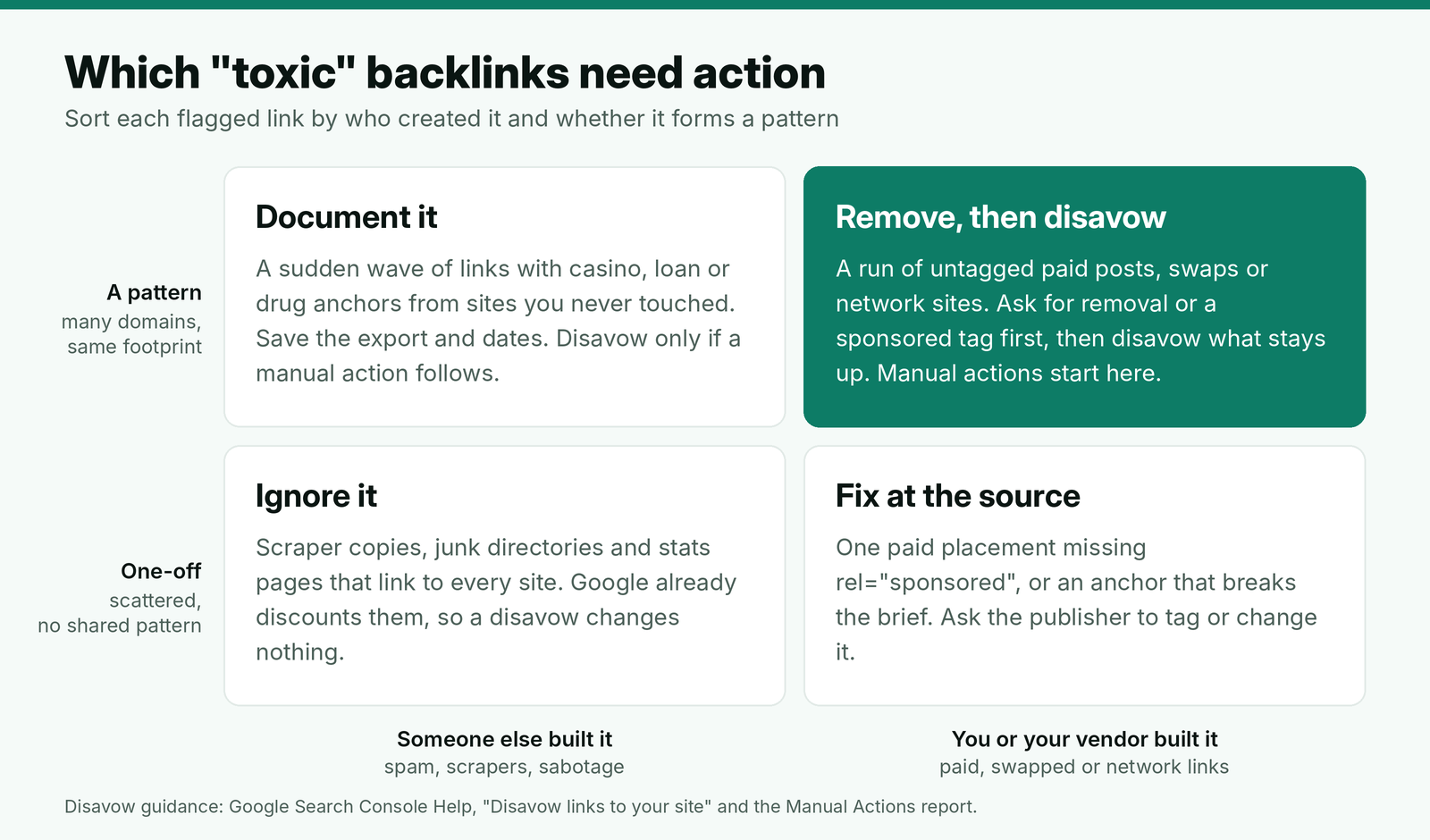
Use the matrix before you open any tool. A link you did not build and that fits no pattern goes straight to the bottom left, whatever its score.
How to find the toxic backlinks that matter
Start from the placements you paid for, then use a backlink export to catch anything your records missed. Running it the other way round, from a list of 200 flagged domains, is how audits turn into week-long exercises with nothing to show for them.
Step 1: Pull your placement log
List every link you ordered for the client: live URL, domain, target page, anchor, rel tag, vendor and live date. If your monthly link report keeps a placement log that records the rel tag on every link, this takes minutes. If the details sit in vendor emails, rebuilding the log is the first job, and the main lesson of the audit.
Step 2: Check each paid link against what the client agreed
Open each live URL and read the link's rel attribute in the page source. Three problems account for most of the risk:
- No sponsored or nofollow tag on a placement where the client chose tagging. Read the tag from the rendered page, as in a rel sponsored check.
- An exact-match commercial anchor above the share the brief allows for that page. We cap exact-match anchors page by page under our anchor text strategy.
- A site that has since turned into a link farm that sells to any buyer: recent posts linking to casino, loan or essay sites, or dozens of unrelated outbound links per article.
The third one changes after you buy. A site that passed the outbound link checks in our website vetting process a year ago can fail them today, which is why old niche edits on pages a publisher keeps editing deserve a second look. If the vendor's replacement window is still open, a placement that changed like this may be a claim rather than a disavow; our guide to when a changed placement is still a replacement claim covers the timing. Topic drift counts too: a site that has moved away from the client's subject since the order no longer passes the relevance checks we run before buying. The differences in control between guest posts and niche edits matter here.
Step 3: Look for footprints across vendors
Sort the log by vendor and look at the domains side by side. Several sites with the same theme, the same author names, the same hosting or the same "write for us" page are a network. One network site is a weak link. Ten of them pointing at one client is a pattern Google's link spam policy names. The footprints we compare and the threshold we use are set out in our checks for private blog networks.
Step 4: Scan the backlink export for patterns, not scores
Export the latest links from Search Console and from your backlink tool. Ignore the toxicity column at first. Sort by first-seen date and by anchor, and look for spikes: dozens of new domains in a week, or anchors in a language or niche the client has nothing to do with. A spike that matches no order is either sabotage or a vendor you were not told about. Ask the client whether anyone else builds links for them before you assume the first; that question belongs in the intake questions for every new link building client. For a client whose whole profile you have just inherited, there is no order log to start from, so run a full link audit across every referring domain instead.
Remove, tag or disavow
For links you built, the order of fixes matters. Removal comes first, and the disavow tool is for links you cannot get removed. Mueller made the same point about paid links: use the disavow tool where you paid for links and cannot get them removed, not for random links a tool flagged.
With paid placements there is a better first step than removal: ask the publisher to add rel="sponsored". The client keeps the referral traffic and the brand mention, the link meets Google's rules for qualifying outbound links, and the publisher keeps a live article. Most publishers agree when the request is short and does not ask for money back.
Subject: Link tag update on [article title]
Hi [first name],
Thanks again for publishing [article title] on [site] in [month]. We are tidying up our client's link records and need one small change: please add rel="sponsored" to the link pointing to [target URL]. The article, anchor and placement can stay exactly as they are.
If adding the tag is not possible on your side, please remove the link instead and let us know once it is done. We are not asking for a refund either way.
[Your name]
[Title, agency, URL]
Give each publisher seven days. Whatever is still live and untagged after a second request goes into the disavow file, along with any network domain where you cannot reach an owner.
When a disavow file is worth uploading
Disavow only when two conditions both apply: a considerable number of spammy, artificial or low-quality links point to the site, and those links have caused a manual action or likely will. One untagged guest post does not meet that bar. Twenty untagged posts from one vendor network might.
Used incorrectly, the tool can harm a site's performance in search. The usual mistake is disavowing by domain because a tool listed the domain, which throws away credit from good pages on large sites; judge those pages by the strength of the individual page, not by the domain's score. Disavow a whole domain only when the domain itself is the problem: a network, a link seller or a site that refused removal.
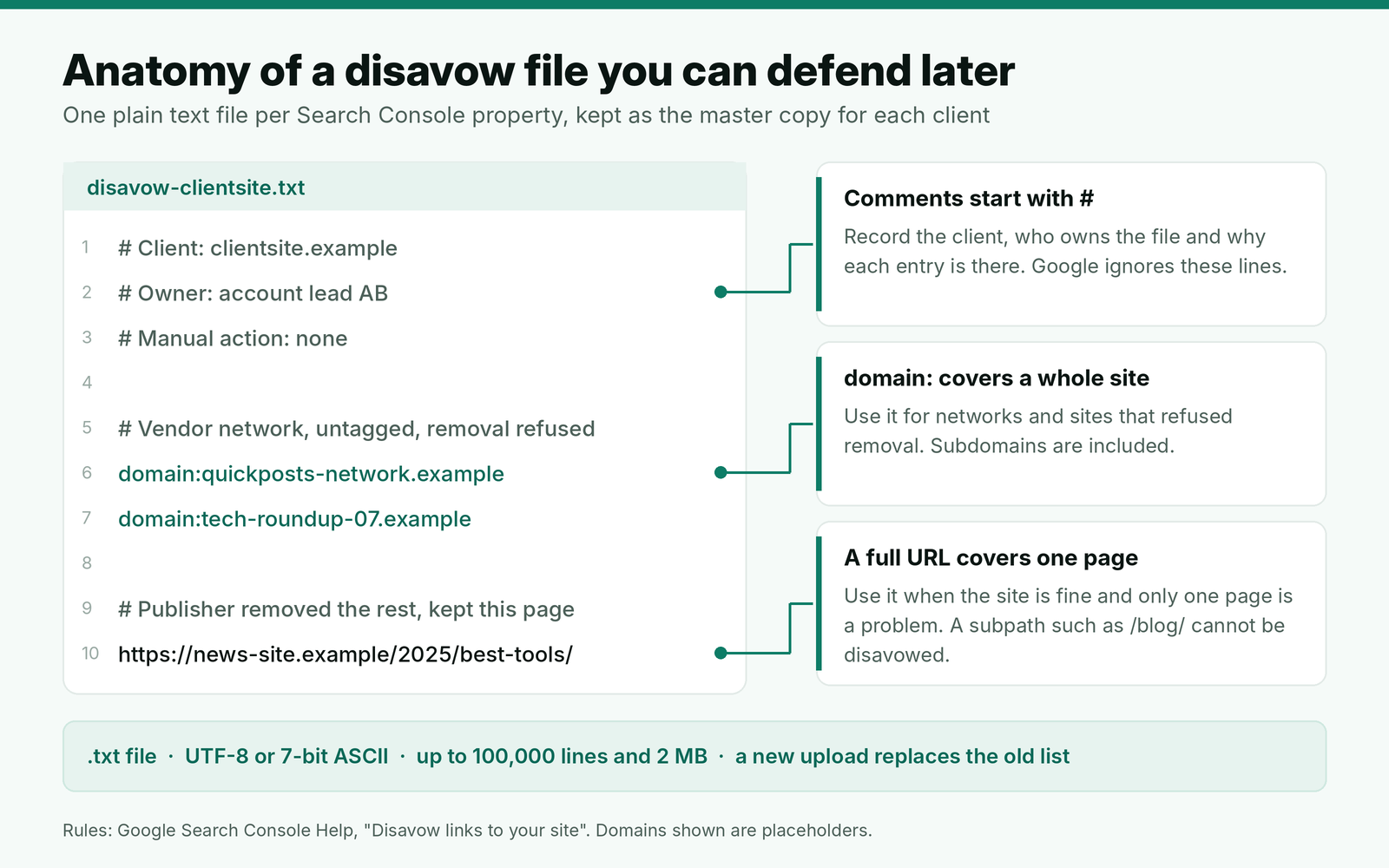
Two mechanics catch agencies out. The disavow tool does not support Domain properties in Search Console, so you need a URL-prefix property for the client's site. And each property holds one list: a new upload replaces the old one completely. Keep the master file with the client's records and add to it, rather than uploading a fresh file that quietly drops last year's entries.
Negative SEO and the new legal route
For a sabotage wave, the default is to document and wait. Google discounts most of these links, and a client with no manual action and no traffic drop gains nothing from a disavow beyond peace of mind.
What has changed is that a sabotage campaign can now be challenged in court. In Montway LLC v. Nexus AT LLC, a federal judge ruled in June 2026 that a campaign of more than 2,350 links with anchors such as "buy steroids online" and "Payday loan services" could support false advertising and trademark claims under the Lanham Act. The ruling only let the case proceed and decided nothing about liability. It still gives a targeted client a new reason to keep dated exports, screenshots of the anchors and a record of when the links appeared.
Timing matters for the client conversation too. Google's September 2026 spam update finished rolling out on October 8 and did not target link spam. If a client lost traffic in that window, compare the drop against your placement dates before anyone blames the links.
Example: auditing a client's paid links
Here is a made-up example. A SaaS client has bought 48 placements through the agency over 18 months, from four vendors. A backlink tool flags 212 of the site's referring domains as toxic. There is no manual action.
| Finding | Links | Action |
|---|---|---|
| Flagged domains with no matching order | 203 | No action. Spam cruft, no spike, no pattern. |
| Flagged domains that are paid placements | 9 | Checked one by one below. |
| Paid links missing the agreed sponsored tag | 7 | Tag request sent. 5 tagged within a week, 1 removed, 1 no reply. |
| Paid links on two sites from one vendor network | 3 | Vendor refused removal. Both domains disavowed. |
| Untagged link after two requests | 1 | Single URL disavowed. |
The disavow file ends up with two domains and one URL, plus comment lines explaining each. The audit took about three hours because it started from 48 orders, not 212 flags. The bigger fix is upstream: the vendor that supplied the network sites is dropped, and the sponsored tag becomes part of the live check on every new order, agreed with the client before the first order as part of your process for buying backlinks.
Where BuildLinks fits
A toxic link audit is only fast when every paid link already has a record. That is the job we built BuildLinks to do. In BuildLinks, each link is an order with its domain, target URL, anchor and status, and orders in the order pipeline are rechecked against the live link the moment a guest post or niche edit publishes, before they are marked Completed. The target URL and anchor are locked once placed and every order keeps its full history, so Step 1 of the audit is a filter rather than an email search.
New domains need approval before anyone can quote them, which is where a vendor network gets stopped before it reaches a client. BuildLinks does not scan a site's full backlink profile or score toxicity, so pair it with Search Console and a backlink tool for the export in Step 4.
Conclusion
Treat a toxicity score as a list of places to look, not a list of links to remove. Start every audit from the paid placements you ordered, check each one for the agreed tag, the anchor cap and a site that has turned into a link seller, and look for vendor networks across the log.
Fix paid links in order: ask for rel="sponsored", then removal, then disavow what stays. Upload a disavow file only for a manual action or a pattern that could cause one, keep it as one commented master copy per client, and leave scattered spam alone. For a sabotage wave, keep dated exports and screenshots instead.