A link audit is a review of every site linking to a domain, done to decide which links help, which do nothing and which are a liability someone has to act on. For an agency, a well run audit usually ends with a short action list: a few dozen paid or patterned links to fix, remove or disavow, and hundreds of junk links to leave alone because Google already ignores them.
Below: when an audit is worth running, a five-step process from scoping to disavow file, how to audit the placements you bought yourself, a client summary template and a worked audit of 1,140 referring domains.
When a link audit is worth running
Run a full audit when the answer will change what you do next. In practice that means five situations:
- A new client. You inherit every link previous agencies and freelancers bought, and the client rarely has a list.
- A manual action. An "Unnatural links to your site" notice in Search Console is the one case where an audit and a disavow file are clearly required.
- A drop that lines up with a spam update. Not a core update, and not a drop that started on a different date.
- Before a migration, merger or domain purchase. Links come with the domain, and so do the paid ones.
- Every quarter, for clients with paid placements. A lighter version that checks what you bought since the last baseline.
Timing matters as much as the trigger. Every confirmed ranking update is listed on the Search Status Dashboard with its start date and rollout length, and the windows add up. In 2024, a core or spam update was rolling out on 112 days, close to a third of the year. The November 2026 core update began on November 10, so a drop in the weeks after that date needs a long look at the update before anyone blames the link profile.
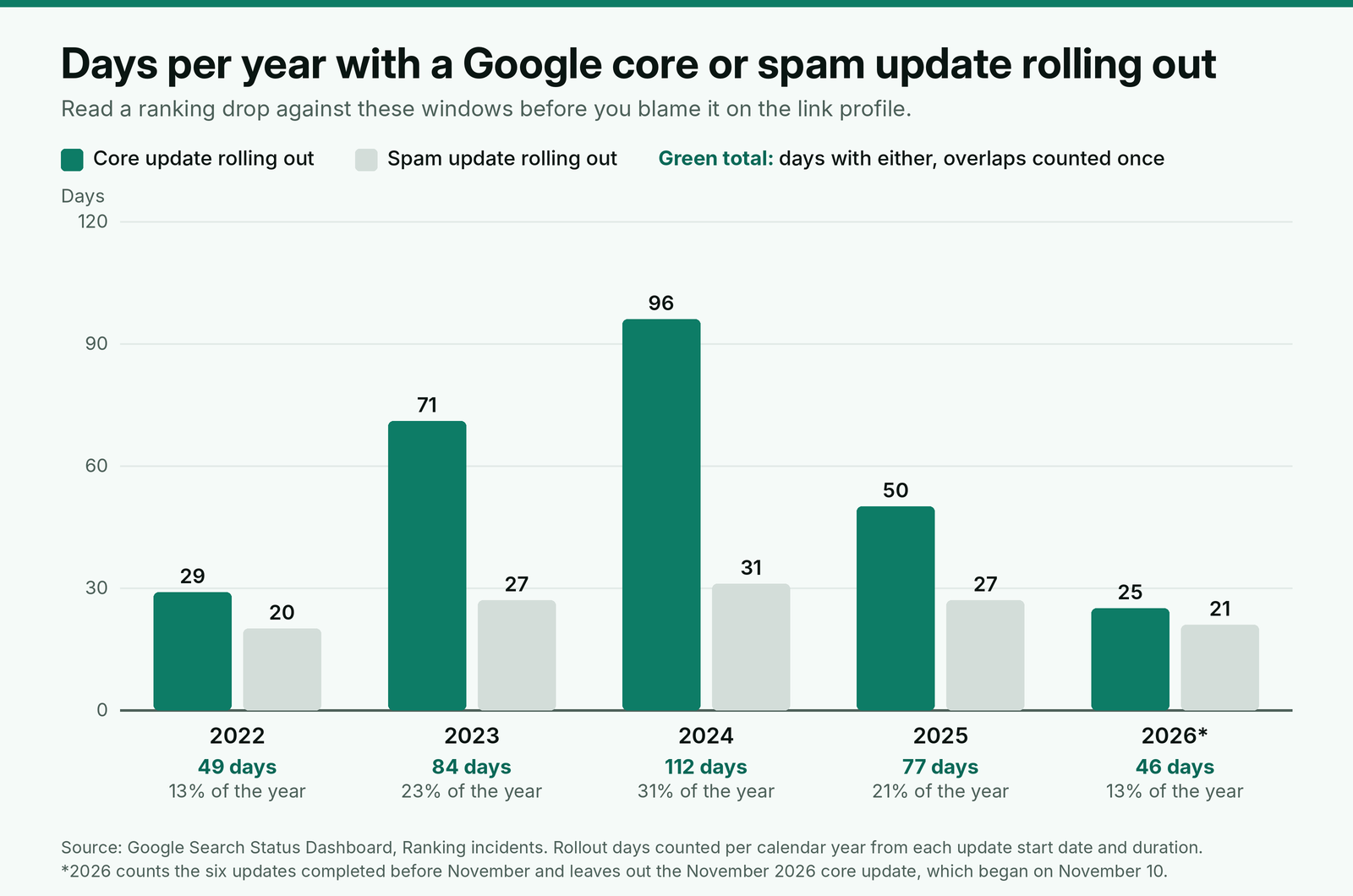
An audit commissioned to explain a core update drop tends to find what it was asked to find: a disavow file full of domains that were never hurting the site, and a client still waiting for the recovery it implied.
What a link audit is for, now that Google ignores most bad links
Since the December 2022 link spam update, SpamBrain has been used to neutralize the impact of unnatural links, and it can detect both sites buying links and sites used to pass them. A neutralized link passes nothing, good or bad. That changes what an audit is for.
Google's own guide to the disavow tool says most sites will not need to use this tool, and sets two conditions that both have to be true: a considerable number of spammy, artificial or low-quality links, and a manual action that has happened or is likely. John Mueller was blunter in April 2025: "internally we don't have a notion of toxic backlinks," and random foreign links pointing at a site are "not bad nor are they causing a problem."
So the audit has three jobs, and deleting links is the smallest of them:
- Find every link someone paid, gifted or swapped for, because those are the links a manual action is about and the ones the client is responsible for.
- Record the earned links worth protecting, with their anchors and target pages, as the baseline for every later report.
- Read the profile as a whole (anchors, target pages, monthly growth) so the next link plan corrects it instead of repeating it.
Third-party "toxic" scores are a tool's estimate of risk, not Google's view of the link. Use them to sort a long list, never as the list itself. Our guide to choosing between a rel change, a removal request and a disavow covers how to read those scores link by link.
Step 1: Scope the audit before you pull any data
Ask the client for four things before the first export, because each one changes the result.
Every past link vendor and agency, with invoices. An invoice is the only proof a link was bought. Without it, a paid placement on a decent site looks like an earned link, and it stays on the profile unlabeled.
The current disavow file, if one exists. Download it from the disavow tool first. Uploading a new list replaces the old one, so an agency that uploads its own file without merging can silently undo years of earlier work.
The Manual actions report. A screenshot dated on the day you start. If it shows an unnatural links action, the audit's job and deadline both change.
Which Search Console properties exist. The disavow tool does not work on Domain properties, and a list applies only to the property it was uploaded to, so a site with both http and https URL prefix properties needs a list on each. Find this out on day one rather than at the upload step.
Then fix the unit of the audit: the referring domain, not the individual backlink. A sitewide footer link can add thousands of backlinks from one site, and every decision you make (keep, fix, ignore, disavow) is made once per domain.
Step 2: Pull link data from more than one source
No single source sees every link. Search Console shows a sample, each third-party index crawls on its own schedule, and only your own records know which links were paid for. Pull from all of them and merge.
| Source | What it gives you | Limit to plan around |
|---|---|---|
| Search Console Links report, on screen | Top linking sites, top linked pages, top link text | Tables limited to 1,000 rows; a sample, not every link; subdomains folded into the root domain |
| Search Console Links export | "Latest links" and "More sample links" | Up to 100,000 rows per export; may include links that have since been removed; no rel value |
| One or two third-party link indexes | Linking URL, anchor, rel value, first and last seen dates | Each index crawls on its own schedule, so counts differ between tools |
| Your order log and the client's invoices | Every placement that was bought: live URL, anchor, rel, vendor, date | Complete only for what was recorded |
| Disavow file (your output) | The domains and URLs Google should not count | 100,000 lines and 2MB at most, URLs up to 2,048 characters; one list per property |
Merge everything into one sheet with a row per referring domain and these columns: domain, sources that saw it, number of linking URLs, target pages, anchors, rel values, first seen, and a yes or no for "in the order log or an invoice". The last column does more work than any metric. It turns Q1 in the triage below from a guess into a lookup.
Normalize before you dedupe: strip "www.", treat http and https as one site, and fold subdomains into the root unless the subdomain is a separate publication, such as a blog on a hosting platform.
Step 3: Triage each referring domain
Two questions settle most domains: did anyone pay, gift or swap for this link, and is the linking site a real publication? Everything else follows from those answers.
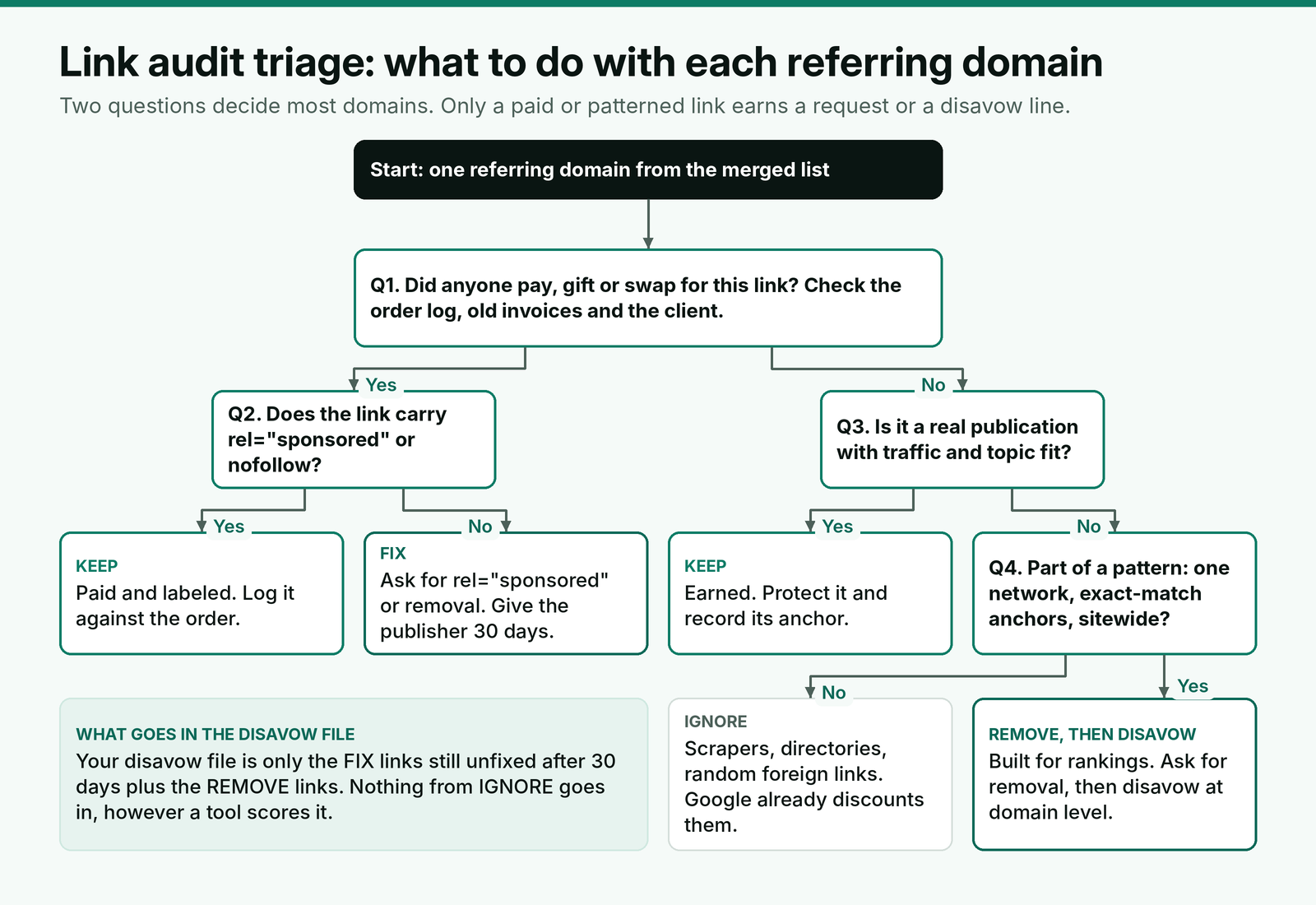
A few cases cause most of the arguments.
Links a previous agency bought. They are the client's links now, whatever the client knew at the time. This is the case the disavow tool was built for: bad links that "you or an SEO that you've hired may have built". Treat them exactly like your own paid placements. On a real site, ask for rel="sponsored" first, because the placement may still send readers; disavow only what stays unlabeled.
Scrapers, directories and foreign-language junk. These make up the bulk of most profiles and look alarming in a tool. If nobody paid for them and they follow no pattern tied to the client, leave them in the ignore pile. Disavowing them costs time and achieves nothing.
Exact-match anchors on otherwise good sites. An exact-match anchor alone is not a pattern. Ask Q1 first. A journalist who linked "project management software" to a software company's feature page did nothing wrong; forty sites with the same anchor, bought in the same quarter, are a different matter.
Real sites that fail on quality. For Q3, use the same tests you would use before buying a placement: organic traffic, topic fit, outbound link patterns and whether the site sells links openly. We run the site review we do before any purchase on these, which keeps audit and purchase decisions consistent.
To move fast, sort the sheet by the order log column, then by anchor type; that is where the decisions are. The ignore pile can usually be cleared in bulk by its patterns: machine-generated domain names, no organic traffic, pages that copy the client's content.
Step 4: Read the profile as a whole
Domain-by-domain triage misses problems that only show up in aggregate. Four checks cover them.
Anchor mix by target page. Calculate the share of exact-match and partial-match commercial anchors for each target page, not for the site. A homepage with mostly branded anchors can hide a pricing page where half the links use the same money phrase. Compare each page against anchor shares that look natural for each page type, and set the next quarter's anchors to pull the outliers back.
Target page spread. If most non-branded links point at two or three commercial pages and almost none at the content that would earn links naturally, the profile was built, and anyone reviewing it by hand will see that.
New referring domains per month. Plot first-seen dates by month. A spike that matches a vendor's delivery month, made of sites with no traffic and the same anchor style, is a pattern even if each domain passes on its own.
Lost and changed links. Links the client paid for that are now gone, noindexed or switched to a different rel value are an audit finding too, and some may still be inside a vendor's replacement period. We keep a recheck schedule tied to each vendor's replacement window so these are caught while a claim is still possible.
Step 5: Act on the short list, then record it
Work the action list in this order: requests first, disavow last.
Rel and removal requests. For paid links on real sites, ask the publisher or the vendor for rel="sponsored" or removal, with the live URL and the client's domain in the first line. Give it 30 days and log every reply.
Disavow at the right level. Use domain level (domain:example.com) for networks and sites that exist only to sell links. Use URL level for a single paid placement on a site whose other links to the client are earned, so you do not throw away the good ones with the bad.
Merge, comment and date the file. Start from the client's existing list, add your lines in a dated block, and keep a copy of every version, because each upload replaces the last. A new list can take a few weeks to be incorporated as Google recrawls the linking pages, so do not read results in the week after upload.
# Disavow file for [client domain], [property: https://www.example.com/]
# Previous list merged below, uploaded [date of previous upload]
[previous lines, unchanged]
# [Audit date] audit by [agency]: link network built by previous vendor, removal requested [date], no reply
domain:[network-site-one.com]
domain:[network-site-two.com]
# [Audit date] audit: paid placements still unlabeled 30 days after rel request
[https://real-site.com/paid-post-url/]
[https://another-site.com/sponsored-article/]
Google ignores lines that start with #, so comment freely. When the next agency inherits the client, the comments are the only record of why each line is there.
Auditing the links you bought yourself
The quarterly audit for a client with paid placements is narrower and faster, because the order log already holds the list. For every order since the last audit, check the live page against what was ordered:
- The page returns 200 at the URL on the order, and is still indexable with a canonical pointing to itself.
- The link points to the exact target URL with the agreed anchor.
- The rel value matches the order: none if the client's policy allows it, rel="sponsored" if the policy requires it.
- The link sits in the article body, not moved to a bio or sidebar.
Then check the sites, not only the pages. A publisher that has since filled its blog with casino and loan links is a risk to every client placed there. Look for the page signs of a placement sold as editorial on any site a vendor added since the last audit.
Score each vendor on the share of its placements that pass every check, and let that number decide who gets next quarter's orders.
A link audit summary to send the client
Clients read the first paragraph and the action list. Put the decision there, and keep the domain sheet as an attachment.
Subject: Link audit for [client domain]: findings and next steps
Hi [first name],
We reviewed [number] referring domains linking to [domain], merged from Search Console, [number] link indexes and the invoices you shared. The short version: [number] need action, and the rest need nothing.
Keep: [number] domains with earned links, recorded as your baseline for future reports.
Paid and labeled correctly: [number], no action.
Paid but unlabeled: [number]. We have asked each publisher to add rel="sponsored" or remove the link and will report replies on [date].
Link network: [number] domains built by [previous vendor or "an earlier campaign"], with exact-match anchors to [pages]. We will disavow these at domain level on [date].
Ignore: [number] scraper, directory and spam domains. Google already discounts links like these, so we will not disavow them.
Anchor mix: [page] receives [share]% exact-match anchors. Next quarter's plan uses branded and URL anchors for that page.
Your existing disavow file has been merged, not replaced. Search Console showed no manual action on [date].
[Your name]
[Agency, URL]
Say what you will not do and why. A client who later runs a tool that flags 800 "toxic" domains should already know those were reviewed and left alone on purpose.
Worked example: auditing 1,140 referring domains for a new client
Here is a made-up example. An agency takes on a B2B software client whose previous agency ran link building for two years. The client shares invoices from that agency and from one freelance vendor. Merging the Search Console export with two third-party indexes gives 1,140 referring domains after normalizing, and a third-party tool flags 310 of them as toxic.
| Group | Domains | What the audit found | Action |
|---|---|---|---|
| Earned, keep | 212 | Real publications, mostly branded or URL anchors | Recorded as the baseline |
| Paid, labeled | 6 | On the freelancer's invoices, rel="sponsored" in place | None |
| Paid, unlabeled | 24 | On the previous agency's invoices, real sites, no rel value | Rel or removal requests: 9 tagged, 4 removed, 11 no reply after 30 days, disavowed at URL level |
| Network | 38 | Shared hosting and templates, same author names, exact-match anchors to two pricing pages, all first seen within one quarter | Removal request to the vendor, no reply; disavowed at domain level |
| Ignore | 860 | Scrapers, directories, foreign-language spam, no payment, no pattern tied to the client | None; listed in the report as reviewed |
The final disavow file has 49 lines: 38 domains and 11 URLs, below the client's existing list from 2023, which was merged rather than replaced. Of the 310 domains the tool flagged, 288 sat in the ignore pile. A disavow file built from the tool's flags would have been six times longer and would have missed the 11 paid placements on decent sites, because none of them looked toxic to the tool. Those 11 were the links most likely to matter in a manual review: bought, unlabeled and on sites good enough to be worth buying.
The profile checks changed the plan. The network had pushed exact-match anchors to 41% of links pointing at the client's pricing page, so next quarter's orders for that page use branded and URL anchors only, and new links go to the comparison and integration pages that had almost none.
How often to repeat the audit
Run the full audit once, at onboarding, and again only after a manual action, an acquisition or a drop that lines up with a spam update. Every quarter, run the narrower version: the order log check above plus a review of referring domains first seen since the last baseline. Fold the first full audit into the baseline export in a new client's first two weeks, so every later report compares against the same list.
Disavow files need the same discipline. Mueller said in September 2026 that the tool "does have effects" and "has its place & time", which cuts both ways: a file that grows every quarter with lines nobody can explain is a risk of its own. Review it at each full audit and remove lines that no longer have a reason in the comments.
Where BuildLinks fits
The question that settles most audit decisions is whether a link was paid for, and that answer has to come from records, not a crawler. That is the record we built BuildLinks to keep. In BuildLinks, every placement is an order with a status, the target URL and anchor locked on each order once it is placed, and a full history kept on the record, so the paid rows of an audit come straight from the order list instead of from a hunt through old invoices.
Guest posts and niche edits are rechecked automatically the moment the link publishes, and each client's requirements page is where the audit's anchor targets and excluded vendors belong afterwards. BuildLinks does not crawl the open web for links you did not buy; pull those from Search Console and your link index, and use the order list for everything you paid for.
Conclusion
Run a link audit when the result will change a decision: a new client, a manual action, a drop that matches a spam update, or a quarter of paid placements to check. Merge Search Console, at least one link index and every invoice into one sheet per referring domain, and triage on two questions first: was the link paid for, and is the site real.
Ask for rel="sponsored" or removal on paid links, give it 30 days, and disavow only what stays unfixed plus clear networks. Merge any existing disavow file instead of replacing it, comment every line, and leave the junk Google already ignores out of it. Then use the anchor and target page checks to set next quarter's plan.