Lost backlinks are links that were live on a page and no longer pass anything to the site they point at, either because the link is gone or because the page around it changed. For an agency that buys placements, a lost link is mostly a contract problem: catch it inside the vendor's replacement window and it costs a support ticket; find it a week after the window closes and it costs the full price of the link again.
This guide covers how often links disappear, the ways a placement gets lost (including the ones a basic "is the link still there" check misses), how to find lost links without trusting a sampled report, a recheck schedule built around replacement windows, what to do with each type of loss, a replacement claim you can send to any vendor, and a worked example of a month 9 audit.
How often backlinks get lost
More often than most clients expect, and more the older a page gets. When Pew Research Center tested pages collected between 2013 and 2023, it found that a quarter of them were no longer accessible. The split matters for link buyers: 16% were single pages that had gone missing on domains that still worked, and 9% sat on root domains that no longer worked at all. Age drives the rate. Of pages collected in 2013, 38% were gone a decade later; of pages collected in 2023, 8% were already gone within months.
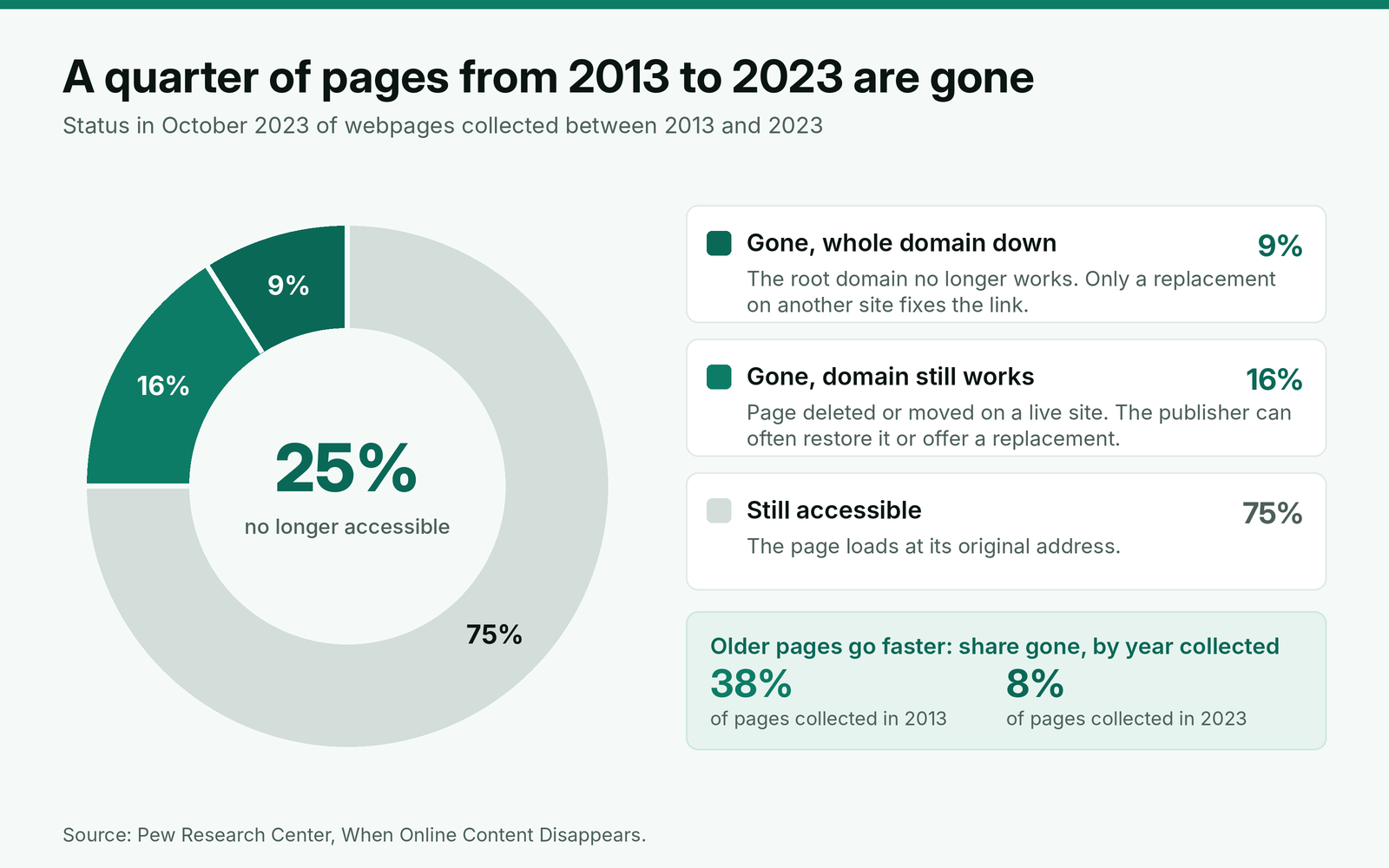
Those figures cover whole pages. A paid link can also disappear while its page survives: an editor trims outbound links, a redesign drops author bios, a publisher who stopped selling links removes the paid ones. No public dataset measures that rate for bought placements, which is one more reason to keep your own numbers. Track the share of placements lost per year by vendor, and you will know within a year which vendors' sites hold.
The ways a link gets lost, and who should fix each one
"Lost" covers several different failures, and they do not all point to the same fix. Sort each one by what changed, who changed it and whether the vendor's replacement terms should cover it.
| What you find | Usual cause | Who fixes it | Replacement claim? |
|---|---|---|---|
| Page loads, link is gone | Editor removed it, or the publisher cleaned out paid links | Vendor or publisher | Yes, inside the window |
| Page returns 404 or 410 | Post deleted, site restructured | Publisher, or a replacement | Yes |
| Whole domain down or parked | Domain expired or sold | Replacement only | Yes |
| Page redirects to an equivalent page that keeps the link | URL change during a migration | Nobody | No, but update your record |
| Page redirects to the homepage or an unrelated page | Post removed with a blanket redirect | Vendor | Yes; treat it as removed |
| Page now carries noindex, or its canonical points elsewhere | Publisher moved paid posts out of search | Vendor | Yes, if the brief required an indexable page |
| Anchor, target URL or rel value changed | Edit by the publisher | Vendor | Yes, if it no longer matches the order |
| Link intact, but the client's target page moved or broke | Client site change | Client | No; fix the redirect on the client side |
Three rows cause most arguments. A redirect to an equivalent page is not a loss: Google's Gary Illyes said back in 2016 that "30x redirects don't lose PageRank anymore," so a link that survives a clean migration still counts. A redirect to the homepage is a different case. The article your link sat in no longer exists, so we treat it as removed, whatever the vendor's dashboard says.
The noindex row is the one vendors resist. When Googlebot sees the tag, Google says it will drop that page entirely from Google Search results. Some publishers move every paid post into a noindexed section once they have sold enough of them. The link is still on the page, but the page has left search, and links from pages outside the index are not what the client paid for. Write "indexable page, canonical to itself" into every brief so this row becomes a covered claim rather than a debate.
The last row is yours to prevent. If the client renames the target URL without a redirect, every link to it is lost on the client's side, and no contract should make a vendor pay for that. Our guide to wording a replacement window with an end date and exclusions covers the clause that keeps these cases off your bill.
Lost on paper, still "live" in a basic check
Most link checkers answer one question: is there an anchor tag with the client's URL on this page? A placement can pass that test and still have stopped working. The figure below shows the same page on delivery day and eight months later.
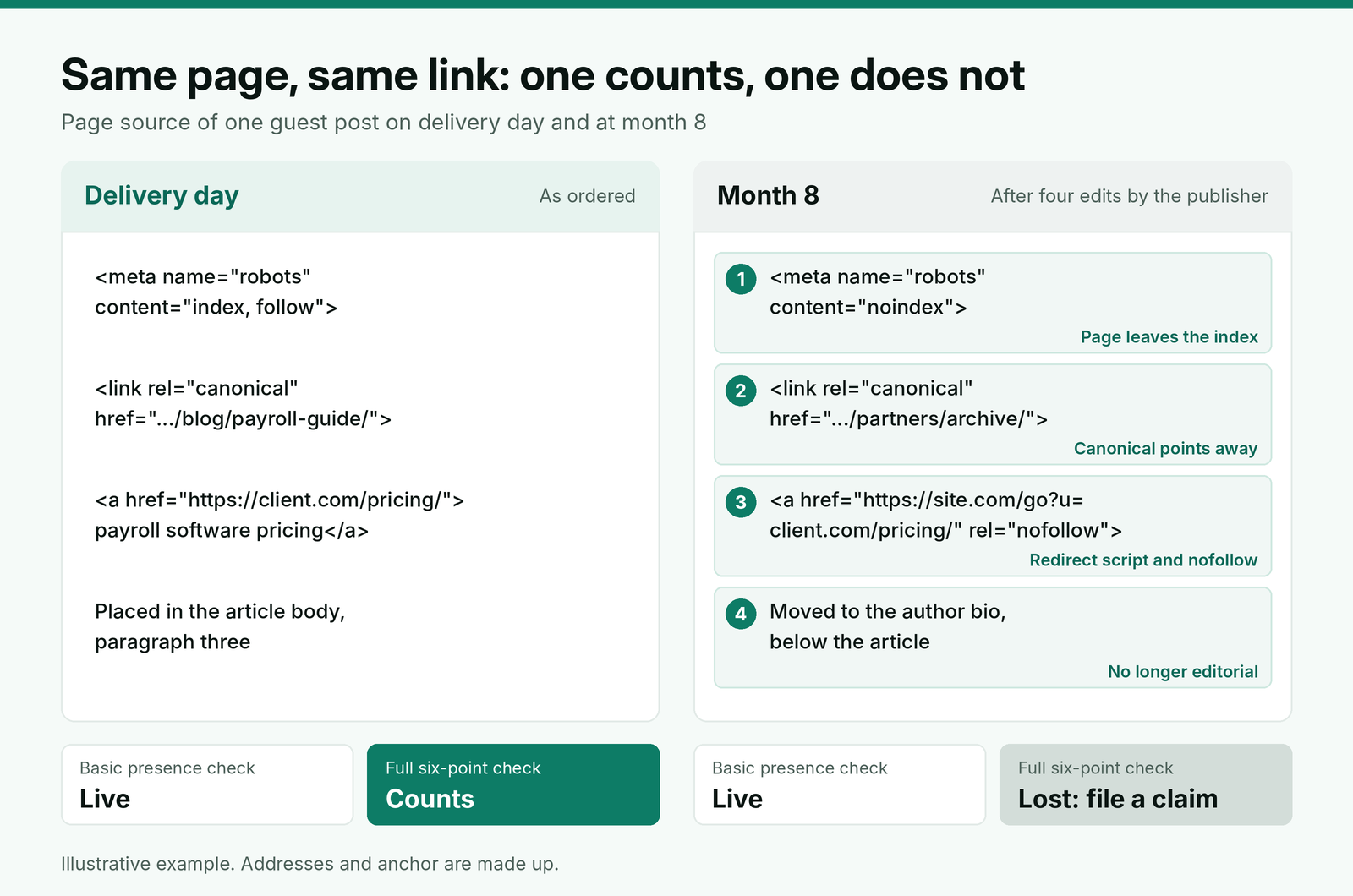
A rel change needs context. If the client's policy says paid links carry rel="sponsored", that tag is the agreed state, and Google says links with nofollow, sponsored or ugc "will generally not be followed". What matters is whether the live tag matches what was ordered. Our guide to which rel value a paid placement should carry covers how to set that policy per client.
How to find lost backlinks
Use three sources, in this order of trust.
Your own order log. Every placement you bought is a row with a live URL, target URL, anchor, rel value, live date and replacement end date. That list is complete by definition, which no crawler-based report is. Check from it, not from a tool's export.
A crawl of each live URL. Once a month, fetch every URL in the log and record the answers to these questions:
- Does the page return 200, and does the final URL match the one on the order?
- Is there a link to the exact target URL, with the agreed anchor?
- Does the link's rel value match the order?
- Is the page free of a noindex robots tag or X-Robots-Tag header?
- Does the canonical point to the page itself?
- Is the link in the article body, not moved to a bio, sidebar or footer?
A short script can do all six checks for a few hundred URLs in minutes, and the output becomes the evidence for any claim. Run it from a normal browser user agent, because some publishers serve different HTML to known crawlers.
An SEO tool's lost links report. Useful for earned links you never logged, and as a second opinion, but it is a crawler's view on its own schedule. A link the tool calls lost may have been missed in one crawl, and one it still shows may be gone.
Do not use Search Console as a lost links monitor. Google's Links report help says the report is not a complete list and includes links found over time that "may have since been removed". Google's John Mueller made a similar point on October 29, 2026, when asked about links missing from the report: "I wouldn't anchor on whether Search Console shows them." Use it for the client's target pages, not for proof that a placement exists.
When to recheck: a schedule built around the replacement window
A lost link found inside the window is free to fix; the same link found a day after the window closes costs its full price. So the schedule follows the window, not the calendar. Of the five vendors we compared in our guide to vendor replacement terms and margins for resold links, replacement promises ran from 6 months to the life of the link, and one did not state a period at all.
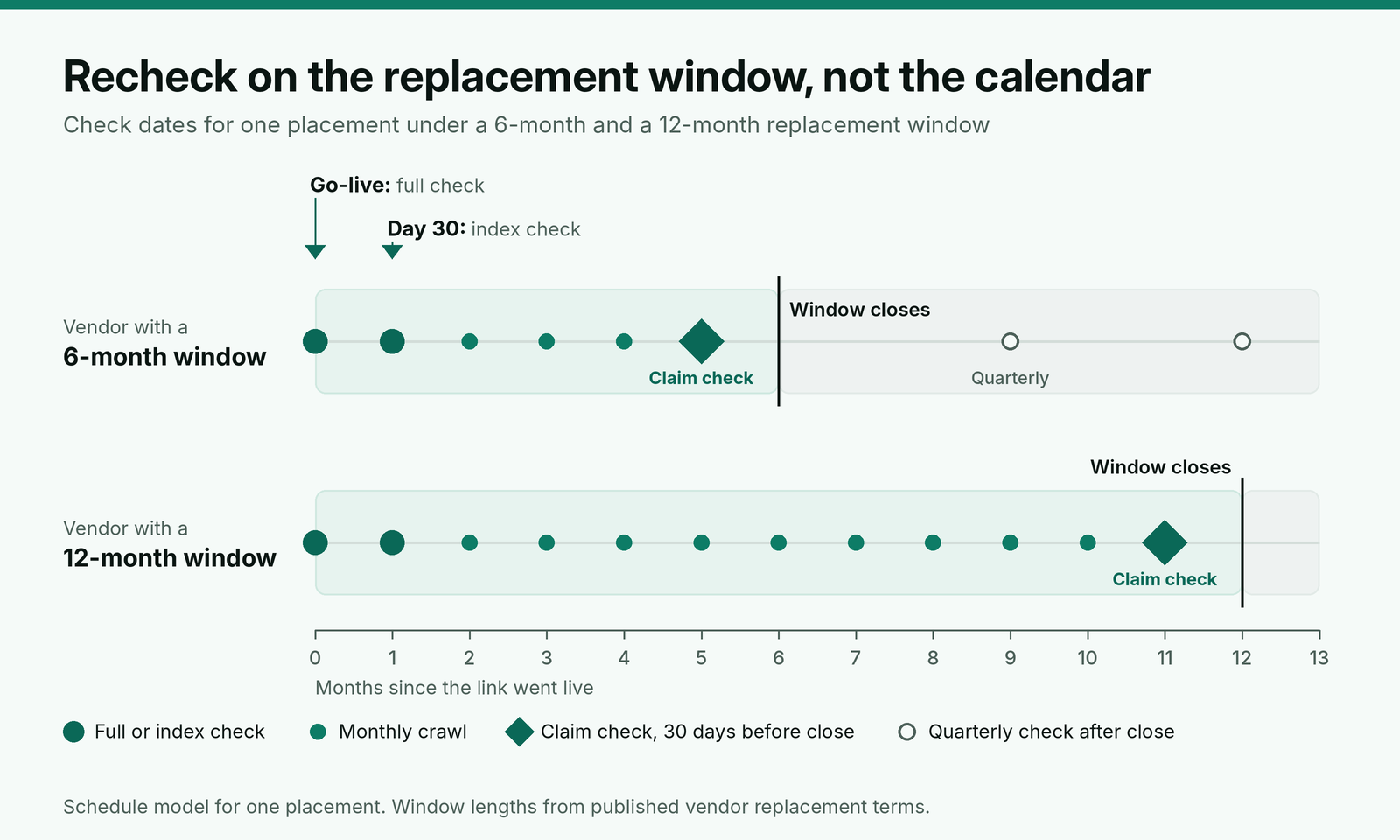
Our rule: a full check on the day the link goes live, an index check at day 30, monthly crawls while the window is open, and one deliberate claim check 30 days before the window closes, with time left for the vendor to answer. After the window, check quarterly. Losses found then are a planning matter, not a claim, so they belong in next quarter's link plan.
Put the replacement end date on the order the day it is placed. Our record we keep from brief to live link lists the other fields that belong next to it.
What to do with each lost link
Triage by two questions: is the link inside its replacement window, and was it worth keeping?
Inside the window. File the claim with the evidence the same week. Ask for a replacement on a site that meets the original brief, not "a similar DR". If the vendor offers a site you would not have approved first time, reject it on the same standard you used for the original. Our checks we run before a site goes on the approved list apply to replacements too.
Outside the window, worth keeping. If the page still exists and only the link went, one short note to the publisher asking whether the removal was intentional often gets it restored, particularly after a redesign. If the page is gone or the domain is dead, budget a new placement and note which vendor sold the original.
Outside the window, low value. Record it as lost and move on. A placement on a site that has since stopped getting traffic was not doing much for the client, and rebuying it would repeat the mistake.
Not lost, just moved. If the page redirected to an equivalent URL that still carries the link, update the live URL on the order so the next crawl checks the right page.
A replacement claim to send your vendor
Claims stall when the vendor has to go and find the order. Send everything in the first message, with the window end date stated, so the clock is on record.
Subject: Replacement claim: [order ID], [live URL], window ends [date]
Hi [vendor name],
One placement from [order date] no longer meets the order, and it is inside your [6 or 12] month replacement period, which ends on [date].
Order: [order ID], for [client or project name]
Live URL: [URL]
Target URL and anchor ordered: [target URL], "[anchor]"
Rel value ordered: [none / sponsored]
Went live: [date]
What we found on [check date]: [link removed / page returns 404 / page set to noindex / canonical now points to [URL] / anchor changed to "[text]"]
Evidence: [screenshot link] and [saved HTML or crawl export]
Please either restore the link as ordered or propose a replacement site that meets the original brief, by [date seven days out]. We will check any replacement against the same standard before accepting it.
Thanks,
[Your name]
[Agency, URL]
The date in the subject line does the most work. A claim filed with the window end date visible is hard to delay past it.
Worked example: a month 9 audit of a 60-link campaign
Here is a made-up example. An agency has placed 60 links for one client over nine months, at an average all-in cost of $400 each, through two vendors: Vendor A replaces lost links for 6 months, Vendor B for 12. The month 9 crawl of the order log finds seven placements that no longer match their orders.
| Placement | Finding | Age | Window | Action |
|---|---|---|---|---|
| 1 | Link removed, page intact | 4 months | A, 6 months: open | Claim filed |
| 2 | Page returns 404 | 8 months | B, 12 months: open | Claim filed |
| 3 | Domain parked | 9 months | B, 12 months: open | Claim filed, replacement only |
| 4 | Page set to noindex with all paid posts | 5 months | A, 6 months: open, closes in 4 weeks | Claim filed the same day |
| 5 | Link removed in a redesign | 8 months | A, 6 months: closed | Note to the publisher asking for it back |
| 6 | Redirect to an equivalent URL, link kept | 7 months | Not needed | Live URL updated on the order |
| 7 | Client renamed the target page without a redirect | 6 months | Excluded | Client adds a 301 on their side |
Four claims are inside their windows, worth $1,600 at cost. Placement 4 shows why the claim check matters: one more month and that $400 would have been the agency's loss. Placement 5 is the only real write-off, and it would not have been one if the redesign had been caught in month 5, when the monthly crawl should have been running. A campaign that only checked links when the client asked would have found all seven at once, probably after two or three of the windows had closed.
Two vendor numbers come out of the same audit. Vendor A lost 3 of its placements in 9 months, Vendor B lost 2, and both figures go into next quarter's choice of who gets the orders.
How to report lost backlinks to clients
Report lost links before the client finds them in their own tool. One status column does it: live, lost (claim filed), replaced, or lost (outside window). Pair it with the replacement end date, so the client can see that losses inside the window cost them nothing. We show how that column sits in the lost and replaced column of our client report, next to indexing and anchor checks.
Count a replacement as a replacement, not a new link. Reporting a replaced placement as fresh delivery inflates the month and gets found out the first time a client compares two reports.
Where BuildLinks fits
Catching lost links is a records problem before it is a crawling problem: you need the ordered URL, anchor, rel value, live date and vendor for every placement, in one place, years later. That is the job we built BuildLinks to do. In BuildLinks, each link is an order with a status, the target URL and anchor lock once the order is placed, and each order keeps its full history, so the evidence for a claim is already attached to it. Guest posts and niche edits are rechecked automatically the moment the link publishes, so every order starts from a link you know went live as agreed.
Support tickets sit next to the order they are about, which keeps a replacement claim and the vendor's reply on the same record. BuildLinks checks a link when it publishes, not on a monthly schedule, so run the recurring crawl from your own script or SEO tool and work from the order list as the master record.
Conclusion
Treat lost backlinks as a deadline, not a surprise. About a quarter of pages from the last decade are already gone, and older pages go faster, so plan for losses on every campaign. Keep your own order log as the master list, crawl every live URL monthly for status, link, anchor, rel, noindex and canonical, and put a claim check on the calendar 30 days before each replacement window ends.
File claims with full evidence and the window end date in the subject line, reject replacements that would not have passed your original checks, and treat homepage redirects and noindexed pages as lost. Track losses by vendor, and let those numbers decide who gets next quarter's orders.