To buy backlinks without wasting money, write an order spec for each target URL before you look at a single site, pick the route (direct, marketplace or managed vendor) per placement, vet and score every domain against the spec, get the terms in writing, and close the order only after you have checked the live link yourself. Skipping the first step is where expensive mistakes start: the buyer shops by DR and price, then works out afterwards what the client needed.
This guide is the buyer's process we use, written for agencies and freelancers who buy placements for clients. It covers what Google's policy means for a paid link, the order spec to copy, how to choose a route, the terms to ask for, a worked example of three quotes against one budget cap, and the acceptance check that decides whether you pay.
What Google's policy means before you buy a backlink
Google's spam policies list "buying or selling links for ranking purposes" as link spam, along with "exchanging money for links, or posts that contain links". The same page says buying and selling links is "a normal part of the economy of the web" for advertising and sponsorship, and that such links are not a violation as long as they are qualified with rel="nofollow" or rel="sponsored". Google's guide to qualifying outbound links says sponsored is the preferred value for paid placements, and nofollow is still acceptable.
That gives every purchase two possible shapes. A paid placement marked sponsored is within the policy, and on a relevant site it still sends readers and puts the client's name in front of their buyers. A paid placement that passes as an ordinary editorial link is the thing the policy describes as link spam, and sites that violate the policy "may rank lower in results or not appear in results at all". Plenty of buyers take the second risk. Whichever one a client takes, it should be their decision, made in writing before the first order, and recorded as the rel attribute on every order so nobody finds out from a ranking drop.
The most recent spam update does not change the picture. Google's September 2026 spam update ran from September 24 to October 8, and it did not target link spam. A placement bought in that window should be judged on rankings after the rollout finished, not during it.
What buyers pay and expect
A useful recent picture of buyer behavior is a 2025 survey of 518 SEO professionals run by a link building agency and reported by Search Engine Land. The sample may lean toward people who rely on link building more than the wider SEO field, so read the budget figures as the view of active buyers.
| Finding | Figure | What it means for a buyer |
|---|---|---|
| Average acceptable cost of one high-quality link | $508.95 | A useful ceiling for a single placement; most quotes should come in under it |
| Monthly budget needed to compete in high-difficulty niches | $8,406 | At about $500 a link, that is roughly 16 placements a month |
| Share of SEO budget spent on links, in-house teams | 36.0% | Links are a third of the budget, so they deserve a buying process |
| Share of SEO budget spent on links, agencies | 32.1% | Close to the in-house figure |
| Outsource at least part of their link building | 56% | Most buyers use a vendor for some of the work |
| Say premium links are too expensive | 75.1% | Price pressure pushes buyers toward cheap quotes, which is where vetting matters most |
| Expect link building costs to keep rising over the next two to three years | 80.9% | Lock prices into saved rates where a publisher agrees |
The same survey shows how buyers think about the risk and how they screen. Belief and practice sit side by side: most respondents assume their competitors buy links, and most also drop a site the moment its outbound links or content look bad.
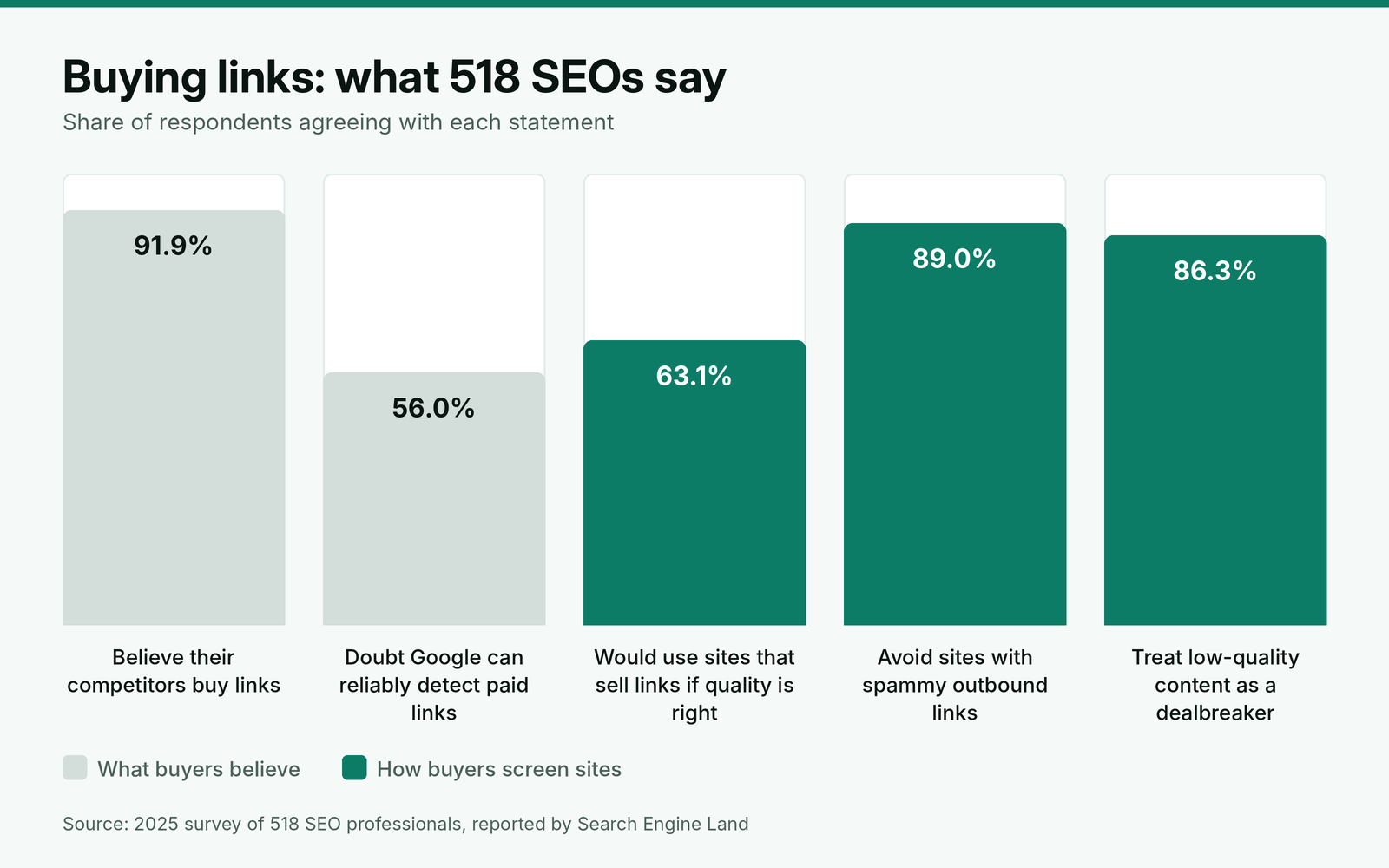
The two screening numbers are the ones to copy. Dropping a site for spammy outbound links or thin content removes the sites most likely to sell a link to anyone who pays, whatever the rel attribute.
Step 1: write the order spec before you look at sites
An order spec is one short record per target URL that says what a placement must be before anyone quotes it. It prevents two buying errors that cost real money: a link from a strong site that does not fit the page, and an anchor chosen by whoever happened to fill in the order. Write it with the client, get it approved once, and quote every domain against it.
Order spec: [Client], [target URL]
Target page: [page title], [page type: product, feature, guide or comparison]
Topic and buyer: [what the page is about] for [who buys it]
Placements this month: [number], of which [number] guest posts and [number] niche edits
Site floor: organic traffic of [number] or more a month, checked by us; main traffic country [country]; site covers [topic] or an adjacent topic for the same buyer
Relevance: score of 6 or more out of 10 on our five-layer check
Hard stops: casino, CBD, essay or loan links in recent posts; multi-niche sites; no indexed posts on [topic]
Anchors: [branded, URL, partial match and exact match targets for this page]; next anchor: [anchor]
Rel attribute agreed with the client: [sponsored or as published]
Article approval: [required or not required]
Landed cost cap per placement: $[amount]
Replacement window required: [number] months
Deadline: [date]
Three lines carry most of the weight. The traffic floor is checked by you, not taken from a listing. The relevance score comes from a 0 to 10 relevance score for each domain, so "relevant" means the same thing to everyone who quotes. The anchor line comes from the anchor mix each target page can carry, so the next placement is chosen against what the page already has.
Step 2: choose the route for each placement
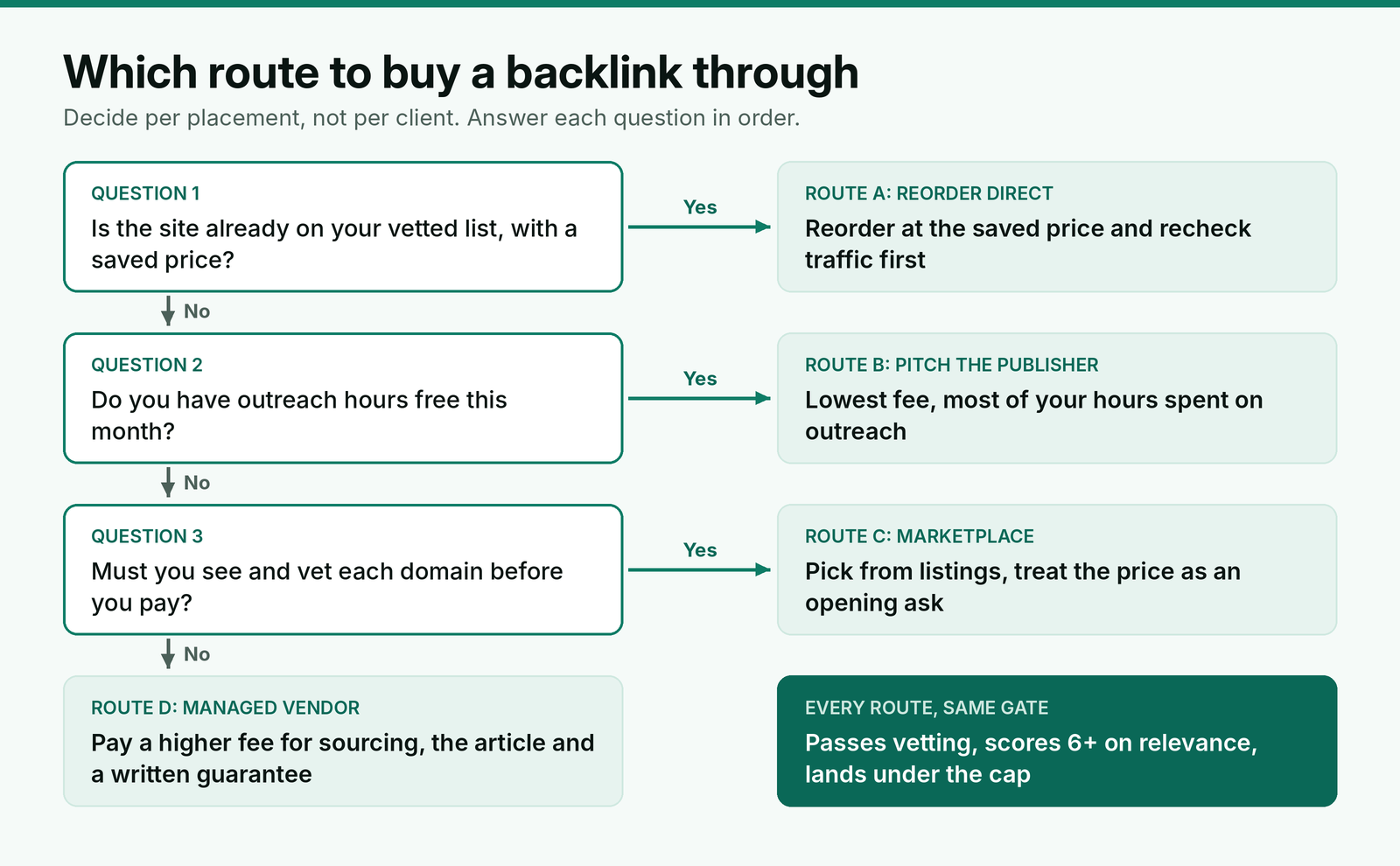
There are three ways to buy a backlink, and most agencies use all of them in the same month. Buying directly from the publisher gives the lowest fee and the most control over the article, but you pay for it in outreach hours. A marketplace lets you see the inventory and pick, but listed prices are opening asks and the platform takes a cut. A managed vendor costs the most per link and includes finding the site, writing the article and, usually, a replacement guarantee. Our breakdown of current guest post prices by route and DR tier shows how wide the gap between those routes runs.
Choose per placement, not per client. The first question is whether you already know the site: a domain you have vetted and bought on before, with a saved price, is almost always the cheapest and safest option, provided its traffic still clears the floor. After that, the choice turns on your own hours and on whether you need to inspect each domain before money moves.
For the direct route you need a way to reach publishers at volume. For email outreach to publishers we recommend linkOreach, whose AI agent Linkzy finds prospect sites with DR and traffic data, writes personalized pitches sent from your own domain, and runs follow-ups until someone replies.
Step 3: vet and score the shortlist
Every domain on the shortlist goes through the same checks, whichever route it came from. Start with the cheap eliminations: confirm traffic and its main country in your own tool, open the five most recent posts and read their outbound links, and search the site for the client's topic. Anything that hits a hard stop in the spec is out before you score it. The full sequence of traffic trend, content and outbound link checks is in our step-by-step site vetting process.
Then score relevance on the five layers (site topic, page topic, link context, audience and outbound neighborhood) and drop anything under 6. Record the score, the date and the URLs you checked against the domain, not against the order. The next client in a similar niche starts from that record instead of repeating the work.
Expect the shortlist to shrink hard, and do not read that as a bad vendor. Only the domains that survive both passes are worth negotiating on.
Step 4: get the terms in writing
A price on its own is not a quote. Before you pay, get each of these in the vendor's or publisher's own words, in an email or order form you can point to later.
| Term | What to ask for | Red flag |
|---|---|---|
| Price | Every fee in dollars: placement, writing, extra links, labeling | "From $X" with extras confirmed after payment |
| Page | For a niche edit, the exact URL and the paragraph the link goes in | "A relevant article on the site", chosen after you pay |
| Anchor and target | Your anchor and target URL, unchanged | The seller rewrites anchors without asking |
| Rel attribute | The attribute the link will carry, matching the spec | No answer, or an answer that changes later |
| Article approval | A draft before publication for guest posts | No approval and no right to request edits |
| Turnaround | A date, counted from payment | "Usually two to four weeks" with no date |
| Indexing | What happens if the page is not indexed after a set number of days | Indexing excluded from every guarantee |
| Replacement | A window in months, and what does not trigger a replacement | No written window |
| Payment | When money is due, and how much before the link is live | Full payment upfront from a publisher you have never bought from |
On payment, set your own rule and keep it. With a new direct publisher, pay after the post is live where they agree, and where they insist on paying upfront, make the first order a single placement. With a vendor whose terms require prepayment, the written replacement window is your protection, so do not order from one that will not give you a window.
Worked example: three quotes against one cap
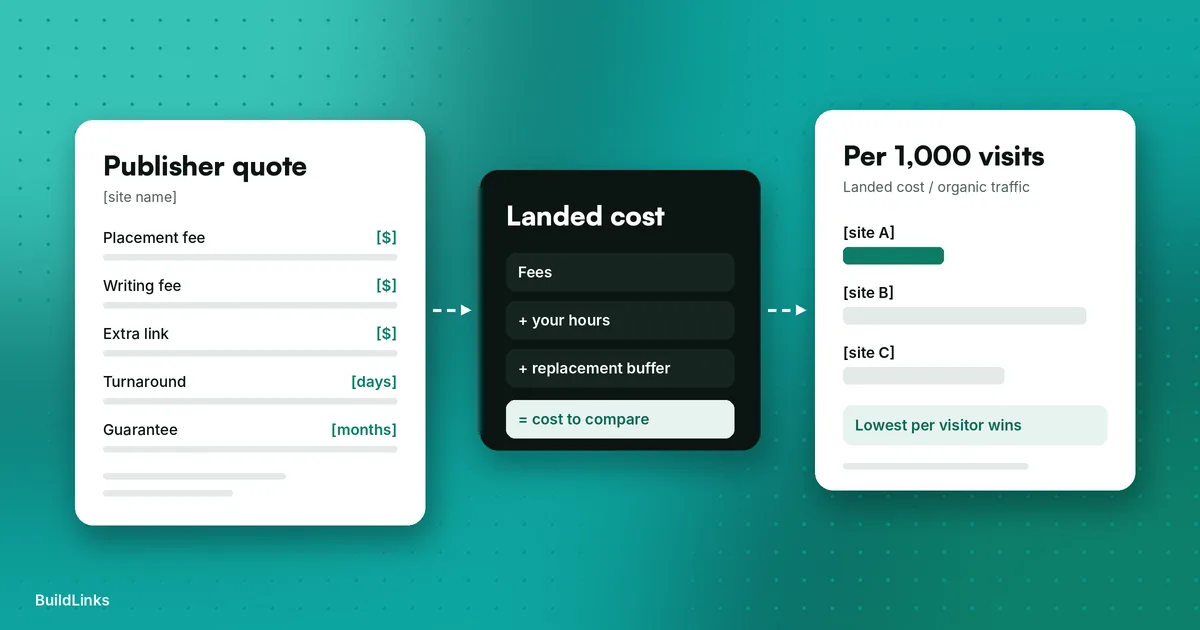
The client, sites and prices below are illustrative, not real. The spec for a B2B invoicing client sets a landed cost cap of $450 per placement. Landed cost is the placement fee plus any writing fee, plus your hours at your loaded rate (here 1.25 hours at $60, so $75), plus a replacement buffer of 5% of the fee, the share of links you lose outside the guarantee in your own records.
| Quote A: direct publisher | Quote B: marketplace listing | Quote C: managed vendor | |
|---|---|---|---|
| Placement fee | $260 | $320 | $390, article included |
| Writing fee | $60 | $0 (you supply the article) | $0 |
| Your time | $75 | $75 plus 1 hour writing ($60) | $75 |
| Replacement buffer (5% of fee) | $13.00 | $16.00 | $19.50 |
| Landed cost | $408.00 | $471.00 | $484.50 |
| Against the $450 cap | $42 under | $21 over | $34.50 over |
| Relevance score | 8 | 7 | 9 |
| Replacement window | 6 months | None stated | 12 months |
Quote A is the only one under the cap, and it is a buy. Quote B looks cheaper than Quote C on the fee, but once you price the hour of writing it lands within $14 of the vendor, with no replacement window. Ask the seller to come down by at least $21, and drop it if they will not, because a link with no window can cost you the whole fee again.
Quote C is the interesting one. It scores 9 on relevance and carries the longest guarantee, and it is $34.50 over the cap. If the client's cap was set without a high-relevance exception, ask them for one in writing: a 9 on a page that matches the target is the placement the spec exists to find. If they say no, offer the vendor a two-link order at a lower unit price rather than accepting the overage quietly.
Step 5: verify the live link before you close the order
A vendor's "it's live" email is the start of the check, not the end of it. Run this on every placement before you mark it complete, pay the balance or bill the client.
Acceptance checklist (copy this)
- The live URL loads, and the link sits in the body of the article, not in a bio, footer or sidebar.
- The link points to the exact target URL in the order, with no redirect or tracking parameter you did not ask for.
- The anchor matches the order word for word.
- The rel attribute in the page source matches the one agreed with the client.
- For a guest post, the published article is the approved draft; for a niche edit, the paragraph around the link is the one you were shown.
- The page is not set to noindex, and you have checked it is indexed or recorded the date to check again.
- The site's traffic and main country still clear the floor in the spec.
- The date verified, the replacement end date and the landed cost are recorded on the order.
Anything that fails goes back to the seller before payment where you can hold it, and into the replacement claim where you cannot. Do not bill the client for a placement that has not passed.
Step 6: record it and recheck it
A bought link is an asset with an expiry date. Recheck every placement at least once before its replacement window ends, because a claim made the day after the window closes costs you the full fee. Keep each check on the order rather than in a separate sheet, so the order history shows when the link was live and when it changed.
The same records feed the client. Verified date, live URL, anchor, rel attribute and replacement status are the columns of the placement log your monthly client report is built on, so a buying process that records them at acceptance makes the report a matter of filtering, not rebuilding.
Mistakes that cost buyers the most
Buying by DR band alone is the expensive one. A DR filter puts high-authority, multi-niche sites at the top of every list, and those are the sites buyers screen out for spammy outbound links and thin content. Score relevance first and treat DR as a tiebreaker.
Paying before the terms exist is the second. If the anchor, page, rel attribute and replacement window are not in writing, you have no claim when one of them changes. Bundling is the third: a "10 links for $X" package priced as a unit hides which of the ten you would have rejected one by one. Price and vet each placement separately, even when you pay for them together.
The last is hiding the purchase from the client. A client who did not agree to the rel attribute and the risk that comes with it will blame you for any drop. Agree it once, record it on every order, and show it in the report.
Where software fits
This process breaks down when specs sit in one document, quotes in email threads, scores in a buyer's spreadsheet and invoices somewhere else. That is the job we built BuildLinks to do. In BuildLinks, each client's brief, reference links and SOPs sit on the client's account, so the spec is in front of whoever quotes the next order. The domain inventory filters by DA, DR, traffic, service type, turnaround and country, holds guest post and niche edit rates on the same listing, and keeps a saved domain list with your price for each client. A new domain has to be approved before anyone can quote it.
Each placement is then an order with a status (Pending, In Progress, Completed or Rejected). A guest post or niche edit is rechecked when the link publishes, before the order is marked Completed, the target URL and anchor text are locked once the link is placed, and the invoice is generated from the completed order. On the agency side, you see the vendor cost next to the price you set for each client, and the client sees only their price; here is how a single order moves from brief to invoice. When you turn buy-side costs into client prices, our guide to setting your resale price on top of the buy price covers the markup. BuildLinks manages the orders, inventory and invoicing. It does not find publishers or score relevance for you.
Conclusion
Buy backlinks against a written spec, one per target URL: a traffic floor you check yourself, a relevance score of 6 or more, hard stops for spammy outbound links, an anchor chosen from the page's plan, the rel attribute the client agreed to, and a landed cost cap. Choose the route per placement, starting with sites you have already vetted, and expect most of a vendor's list to fail before you negotiate.
Get every fee, the page, the anchor, the rel attribute and a replacement window in writing before you pay, and treat a quote over the cap as a negotiation, not a quiet exception. Close each order only after the live link passes your own acceptance check, then recheck it before its window ends.