An SEO onboarding checklist for a link building client has one job that a general SEO checklist skips: record what the client's link profile and link rules look like before the first order goes out. Most problems in month three, from a disavow file nobody knew about to an anchor the client never approved, trace back to a question nobody asked in week one.
This is the checklist we use to take a new link building client from signed contract to first live orders in 14 days. It covers six stages, the access to request and the limits that come with it, a baseline you cannot rebuild later, the link rules to agree in writing, a kickoff agenda, a welcome email and a worked example.
What link building onboarding adds to a general SEO checklist
The general steps are well covered elsewhere: welcome email, contract, access, a questionnaire, a kickoff call. A link building client needs all of that plus four things that decide whether each placement helps or hurts:
- Link history. Every vendor and agency that built links for the client before you, what they bought, and whether anyone ever filed a disavow file.
- A baseline. Referring domains, anchor text and the search performance of each target page on the day you start, so every later report compares against a fixed point.
- Link rules. The paid link tag policy, anchor targets per page, a minimum site standard, domains to avoid and a price ceiling per placement.
- An approval route. Who on the client side approves sites and anchors, and how long they have before an order moves on without them.
Skip any of the four and the cost shows up later as a rework request, a refund or a client who reads a ranking drop as your fault.
The SEO onboarding checklist, stage by stage
The stages overlap, and the critical path is shorter than the full list suggests. Access gates the baseline, the baseline gates the profile review, and nothing gets ordered until the link rules are signed off. Intake, past records and the welcome email run alongside.
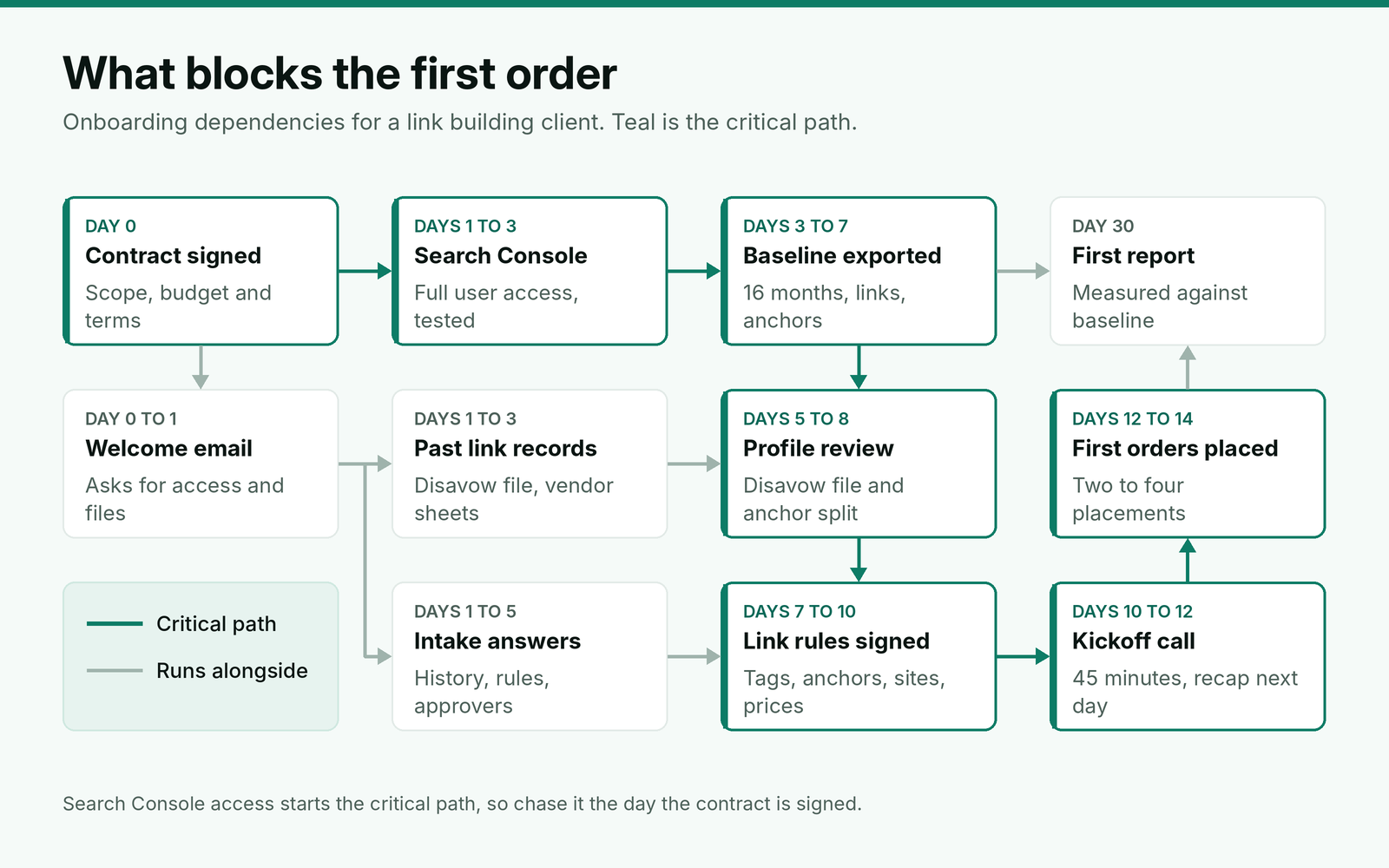
Stage 1: Paperwork and welcome (day 0 to 1)
- Countersigned contract with the delivery definition, replacement window and payment terms. Our clauses for delivery, replacements and payment cover what each one should say.
- Scope copied from the signed proposal into the client record: links per month, placement types, target markets and monthly budget.
- First invoice or deposit raised, using the due-date rule the contract sets.
- Welcome email sent the same day (template below), naming one contact on each side.
- Internal owner assigned, plus a backup who can approve orders when the owner is away.
Stage 2: Access (days 1 to 3)
Ask for the lowest level that lets you do the job, in writing, and test each login the day it arrives. For link building that means Search Console at Full user level, read-only analytics, and copies of past link records. CMS access is only needed if you also publish on the client's site.
| What to request | Level to ask for | The limit that shapes the request |
|---|---|---|
| Google Search Console | Full user | Full users can use the Disavow links and Submit sitemap tools; Restricted users can view most reports but not those tools. A property can have at most 100 non-owner users (Search Console permissions), so a large client may need to remove a former agency first. |
| Search Console Links report | Included with any user level | It shows a sample of links, not every link. On-screen tables stop at 1,000 rows; the export gives up to 100,000 rows each of latest links and more sample links (Links report help). |
| Current disavow file | A copy from whoever uploaded it | Uploading a new list replaces the existing one for that property, and a file holds at most 100,000 lines and 2MB (Google's disavow rules). Never upload until you have the old file. |
| Google Analytics 4 | Read-only | Needed for referral visits and conversions on target pages. Check the data retention setting in the same session. |
| Past vendor orders and reports | File copies, not logins | Tells you which domains, anchors and dates were already bought, and by whom. |
The disavow row causes the most damage when it is missed. A new agency that uploads its own list over a predecessor's file has quietly reversed every decision in the old one, and Google's John Mueller said in September 2026 that the disavow tool "does have effects". Treat the existing file as client data you inherit, not a setting you overwrite.
Stage 3: Intake questionnaire (days 1 to 5)
Send the questions in one document with a five-day deadline. A general SEO questionnaire covers goals, audience and competitors; keep those, and add the questions below, which are the ones that change a link plan.
Link building intake: [client name]
1. Which agencies, freelancers or vendors have built or bought links for this site, and in which years?
2. Do you have their order sheets or reports? Please send copies.
3. Has anyone uploaded a disavow file? If so, who holds the current version?
4. Has the site ever had a manual action or an unexplained traffic drop? When?
5. Which pages should links point to, in order of priority?
6. Which brand names, product names and phrases may we use as anchor text, and which are off limits?
7. Should paid placements carry rel="sponsored", or is that decided per placement?
8. Which sites must we avoid: competitors, partners, sites you already have links from, any you were warned about?
9. What is the most you will pay for one placement, by type?
10. Who approves sites and anchors on your side, and who covers when they are away?
11. Which markets and languages count for this campaign?
12. Are any launches, migrations or redesigns planned in the next six months?
Five answers change the first month's plan, so read for them first.
An unexplained disavow file. Review it line by line before you add to it. Old files often include domains that now send the client real referral traffic, and our notes on when a disavow is worth filing set out which entries to keep.
Untagged paid links from an earlier vendor. Record them in the baseline, ask the vendor which sites they were, and decide with the client whether to request tags or removal. Do not add more placements on those domains until that is settled.
A manual action or a drop nobody can explain. Pause the first orders until you know the cause. Building links into a site with an open manual action makes the reconsideration request harder to write.
Heavy exact-match anchors. Our rule: if more than 1 in 10 referring links use the client's main commercial phrase, the first 60 days use branded and URL anchors only.
No approver with time. If nobody on the client side can answer within two business days, agree in writing that sites meeting the signed standard proceed after that window. Otherwise the calendar is set by the client's inbox.
Stage 4: Baseline (days 3 to 7)
The baseline is the one part of onboarding you cannot redo later, because two of its sources forget. Search Console's date filter reaches back 16 months, and keeping more than that means storing it yourself through the API or bulk data exports. In GA4, a standard property keeps user and event data for 2 or 14 months, and that setting limits explorations and funnel reports only, not the standard reports.
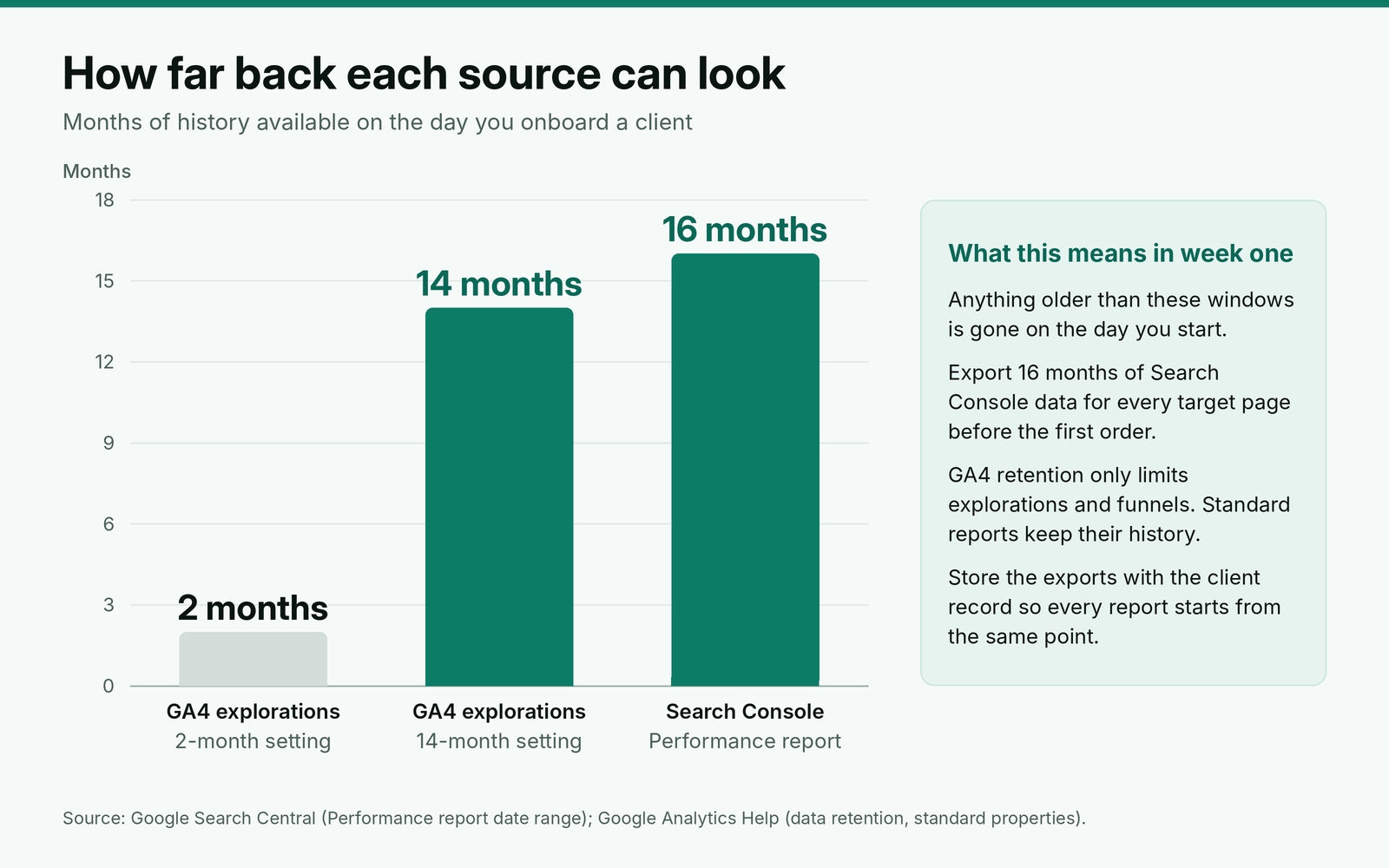
- Export 16 months of Search Console performance, by query, for every target page.
- Export the Links report: top linking sites, top linking text, and the latest links and more sample links files.
- Record from your SEO tool the referring domain count, the anchor split by type (branded, URL, generic, partial match, exact match) and the referring domains to each target page.
- Save the current disavow file with its line count and the name of whoever last uploaded it.
- Check the index status and canonical of each target page with URL Inspection.
- Note any Google update inside the baseline window. The September 2026 spam update ran from September 24 to October 8 and did not target link spam, so a drop in those weeks is not a link problem by default.
Store all of it with the client record. The first report compares against this snapshot, and so does every monthly report built on the same baseline after it.
Stage 5: Link rules (days 5 to 10)
Turn the intake answers and the baseline into one page, and get it signed off in writing before the first order. It should state:
- Paid link tag policy. rel="sponsored" on every paid placement, or a documented decision not to. Our guide to checking the tag on every live placement covers how to confirm it.
- Target pages and anchors. Each target page in priority order, with an anchor mix for it based on the baseline split. We set these using anchor targets for each page in the profile.
- Site standard. Minimum organic traffic, topic fit, a cap on unrelated commercial outbound links in recent posts, and a list of site types the client refuses.
- Domains to avoid. Competitors, partners, the client's own properties, and sites that already link to the client unless a second link is approved.
- Price ceilings. The most the client pays per placement type, with the tier each ceiling covers.
- Approval window. Two business days for sites, after which sites meeting the standard proceed. Anchors never change without written approval.
Stage 6: Kickoff and first orders (days 10 to 14)
Hold the kickoff once the link rules are drafted, so the call confirms decisions instead of making them. Forty-five minutes is enough:
- Goals, target pages and what counts as success at 90 days (10 minutes).
- Baseline findings: link history, disavow file, anchor split (10 minutes).
- Link rules, line by line, with any changes agreed on the call (15 minutes).
- Approvals, owners and reporting dates (5 minutes).
- First orders and what the client will see in week three (5 minutes).
Send a written recap within 24 hours with the final rules attached, then place the first two to four orders on the highest-priority pages. Starting small gives you one full cycle of brief, approval, publication and live check before volume goes up.
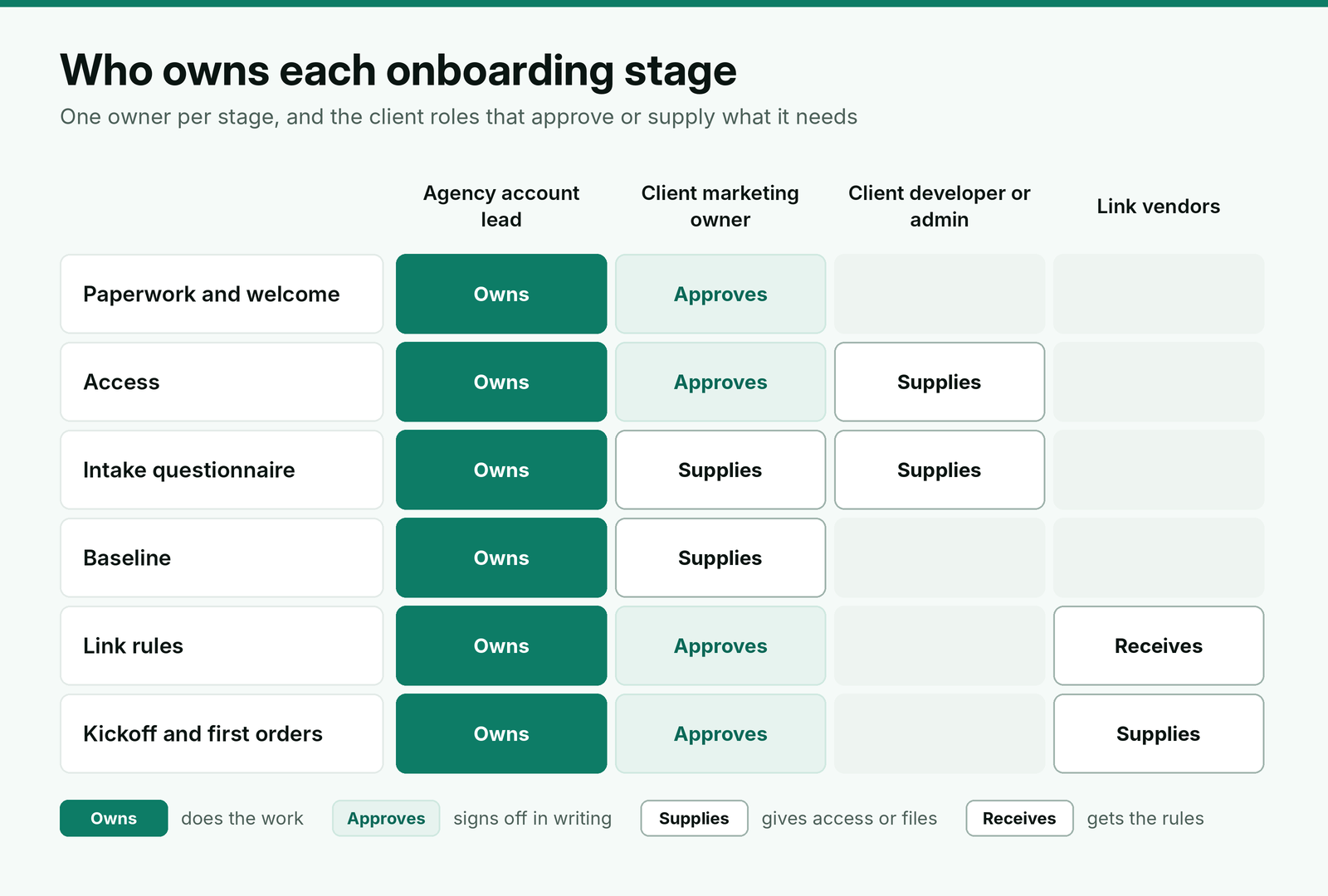
A welcome email to send on day 0
Send it within a few hours of the signature. It sets the 14-day plan and asks for the two things that hold everything else up: Search Console access and past link records.
Subject: Welcome to [agency]: your first 14 days
Hi [first name],
Thanks for signing. Here is what happens next, so nothing waits on a missed email.
This week we need two things from you. First, please add [email] as a Full user in Google Search Console for [property]. Second, please send any order sheets or reports from past link building vendors, and your current disavow file if one exists.
Our intake questions are here: [link]. They take about 30 minutes, and we need them back by [date]. Once they are in, we will record your starting point and draft the link rules for your sign-off.
Your kickoff call is set for [date and time]. First orders go out within two days of it.
I am your day-to-day contact, and [backup name] covers when I am away.
[Your name]
[Title, agency, URL]
Worked example: a SaaS client from contract to first order
Here is a made-up example. A B2B SaaS company signs for eight placements a month after a previous agency spent two years on its links. The account lead runs the checklist above.
| Day | What came back | What it changed |
|---|---|---|
| 2 | Search Console access added as a Restricted user | Asked for Full user, since Restricted users cannot use the disavow tool. Fixed on day 3. |
| 4 | The previous agency's disavow file: 1,180 lines, 214 of them domain entries | Nine disavowed domains still sent referral signups. Flagged for review before anything new is uploaded. |
| 5 | Intake answers, plus order sheets from two past vendors | 41 domains already carry paid links, 30 of them untagged. All 41 added to the avoid list pending a decision. |
| 6 | Baseline: 312 referring domains, 14% of links using the main commercial phrase | Over the 1 in 10 threshold, so the first 60 days use branded and URL anchors only. |
| 9 | Link rules signed, with a $450 ceiling per guest post | Vendor lists filtered against the avoid list and the site standard. |
| 11 | Kickoff call held, recap sent the next morning | Client approved 6 of 9 proposed sites within the two-day window. |
| 13 | First four orders placed on the two highest-priority pages | Remaining four for the month scheduled after the first live checks. |
Two findings changed the plan, and neither shows up in a general SEO checklist: the old disavow file and the 41 domains with existing paid links. Without the order sheets, the new agency would likely have bought on some of the same sites again, and an upload of its own disavow list would have erased the previous one.
Where BuildLinks fits
Onboarding produces a lot of decisions, and they are only useful if whoever places the next order can see them. That is the job we built BuildLinks to do. In BuildLinks, the intake answers and link rules live on a requirements page on each client's account, with a title, description, reference links and your SOPs, visible to whoever picks up that client next.
Each client gets their own due-date rule, applied to every invoice once an order completes, and Client Staff logins let the client's approver see their own orders and nothing else. On the Agency plan, that client portal runs on your own domain with your logo. New domains wait for approval before anyone can quote them, which is where the site standard from stage 5 gets enforced. BuildLinks does not pull Search Console data or store disavow files, so keep the baseline exports in the client's shared folder. If you are still comparing systems for this, our roundup of tools for running link orders across many clients covers the options.
Conclusion
Run onboarding as a 14-day project with one critical path: Search Console access as a Full user, a baseline exported before the first order, a review of the existing disavow file and anchor split, and link rules signed in writing. Ask every new client for past vendor order sheets and their current disavow file in the welcome email, because those two files change the plan more often than anything in a general questionnaire.
Keep the first orders to two to four placements, set a two-day approval window, and switch to branded and URL anchors if more than 1 in 10 existing links use the main commercial phrase. The baseline you save in week one is what every report after it will be judged against.