Sitewide links are links that appear on every page of a site, or nearly every page, because they sit in a shared template: the footer, the header, a sidebar or a blogroll. However many pages carry one, it still comes from a single referring domain, and when it is paid for and followed it matches a pattern Google's spam policies name outright.
For an agency, that makes sitewide links mostly a buying and auditing question. Below: what counts as one, what Google has said about them, how they distort link reports, when they are fine, what to do when a vendor offers one, and a worked example of turning a paid footer link into something you can defend.
What counts as a sitewide link
A link is sitewide when it lives in the template rather than in the content, so it appears on every page the template renders. The common placements:
- Footer credits. "Website by", "Powered by" and "Hosted by" links that designers, theme authors and platforms add to every page they build.
- Blogroll and partner widgets. A list of "friends" or "partner sites" in a sidebar, often the oldest form of link selling on small blogs.
- Sidebar and header placements. A banner or text link sold as advertising, shown on every page.
- Group and portfolio links. A company linking to its other brands or properties from a shared footer.
- Internal navigation. Your own menu and footer links are sitewide too, but they are internal links and not the subject here.
The arithmetic is what confuses clients. A followed footer link on a blog with 1,800 indexed pages shows up as 1,800 backlinks in most link tools, and still as one referring domain. Every decision about it, from keeping it to disavowing it, is a decision about one site.
What Google says about sitewide links
Google's spam policies list "widely distributed links in the footers or templates of various sites" and "keyword-rich, hidden, or low-quality links embedded in widgets that are distributed across various sites" among its examples of link spam. The same page says buying and selling links for advertising and sponsorship is not a violation, as long as the link is qualified with rel="nofollow" or rel="sponsored". So the policy does not ban the placement. It bans a followed placement that someone paid for, or that is spread across many sites to pass ranking credit.
Organic sitewide links are a different case. John Mueller's advice on natural links from a blogroll or a site template has been to leave them alone: "That's not something you need to disavow just because maybe it's a sitewide link or in the blogroll." For links a site owner places deliberately, his advice was to put a nofollow on the footer link so it reads as something people can click, not as an editorial vote.
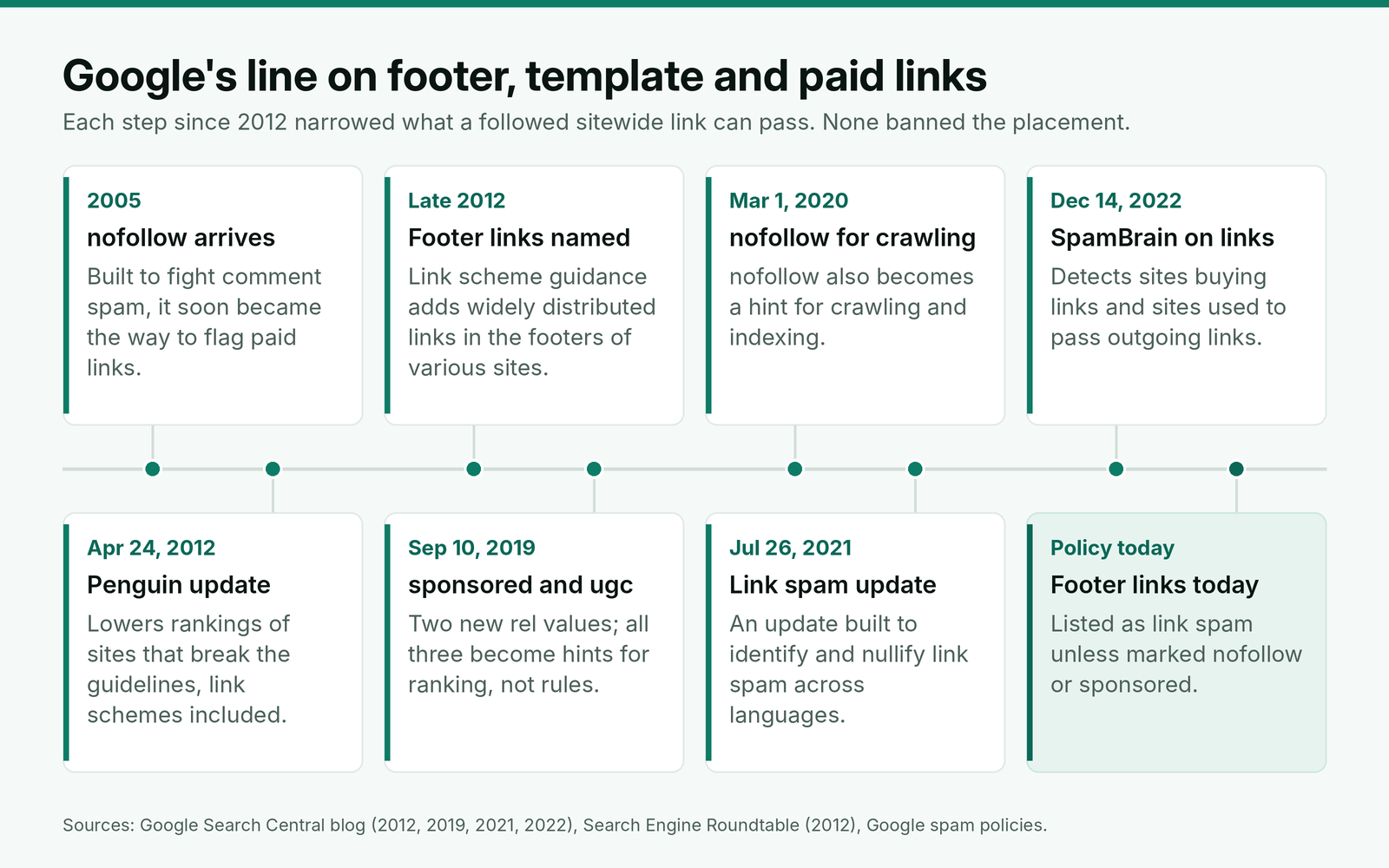
Two of those steps matter most to a buyer. Since September 2019, nofollow, sponsored and ugc are treated as hints rather than rules, and Google says any link that is clearly an ad or sponsored should carry sponsored or nofollow. Since December 2022, SpamBrain has been used to detect sites used to pass outgoing links, which describes most sites that sell footer and sidebar placements in bulk. The likely result of a paid followed sitewide link today is not a penalty. It is a link that passes nothing, bought at a price that assumed it would.
Why the mobile template decides whether the link exists
Google indexes and ranks the mobile version of a site's content. Many sites collapse or trim their footers, sidebars and blogrolls on small screens, and a sidebar link that only renders above a certain width is not in the page Google uses.
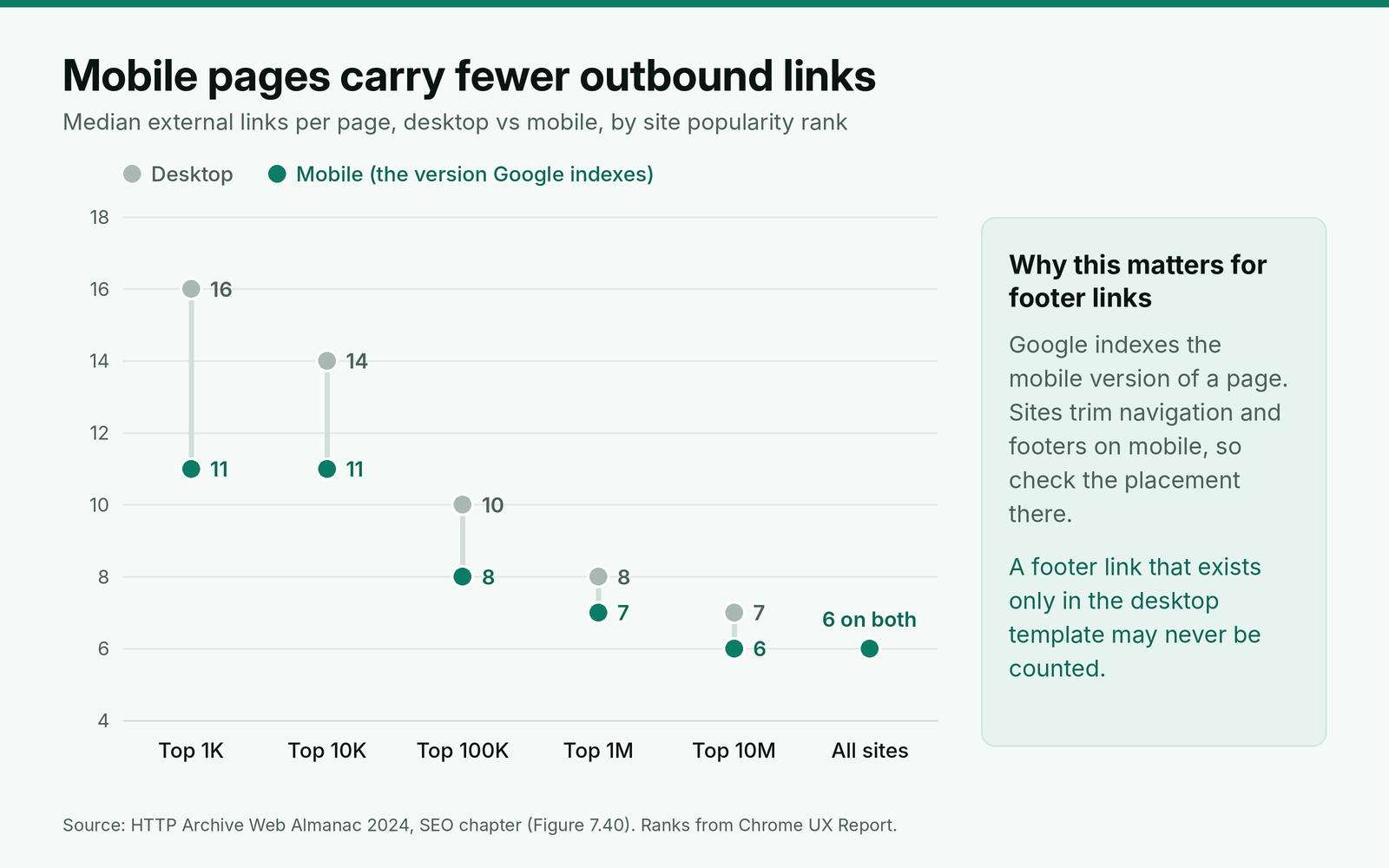
The HTTP Archive's crawl of millions of sites shows the pattern at scale. The median page on the top 1,000 sites carries 16 external links on desktop and 11 on mobile, and the report's authors put the matching gap in internal links down to sites "minimizing the navigation menus and footers on mobile." Before you pay for, or count, any sidebar or footer placement, load the page with a phone-sized viewport and confirm the link is in the rendered HTML.
How sitewide links distort link reports
Most of the trouble sitewide links cause for agencies is in reporting, not rankings.
Search Console sorts by link count. The Top linking sites table in the Links report shows the sites with the most links to your site, sorted by count of links. One footer link on a large site puts that site at the top of the list, above the publications that wrote about the client. The report is also a sample, so absence from it proves nothing either way.
Backlink totals swing for no reason. A site that adds or removes a footer link, or publishes 300 new pages, changes the client's backlink count by hundreds overnight. If a monthly report leads with backlinks, a single template change looks like a campaign win or a disaster. Lead with referring domains instead, the way we set up a report that counts referring domains first.
Anchor shares skew. Counted by backlink, one exact-match footer link can make 80% or 90% of a page's anchors look commercial. Counted by referring domain, it is one anchor among many. Make sure whoever reads the profile is counting anchor shares per target page by referring domain, or the next anchor plan will correct a problem that does not exist.
Most SEO tools let you group repeated links from one site into a single row. Turn that on before any review, then sort by linking pages per referring domain to find the sitewide ones.
When a sitewide link is fine and when it is a problem
Two questions settle almost every case: did anyone pay or trade for the link, and does the anchor try to rank for something?
Fine, leave it alone. A web designer's credit on a client site, a "built with" link from a theme or platform, a parent company linking to its brands, a blogger who lists the client in a blogroll because they read it. Nobody paid, the anchor is a brand name, and the link exists for readers. No action, and no disavow.
Fine if labeled. A sponsorship, a paid sidebar ad, a "partners" footer that exists because of a commercial deal. These are legitimate advertising and can send real referral traffic. They need rel="sponsored" or rel="nofollow" on the link, and our guide to choosing between sponsored and nofollow on a paid link covers how to check it on every placement.
A problem. A followed sitewide link the client or a previous agency paid for, especially with an exact-match anchor, and above all the same footer link on many sites. Shared footers across a set of sites with the same theme, the same owner and the same outbound links are one of the clearest signs of a network, and the same tests we use for spotting a blog network from shared templates apply.
Labeling is rare in practice, which is why the second group is usually the one to fix. In the Web Almanac's 2024 crawl, rel="sponsored" appears on 0.4% of sites, against 32.4% for nofollow.
| rel value on links | Share of sites, desktop | Share of sites, mobile | What it tells a buyer |
|---|---|---|---|
| nofollow | 32.4% | 32.7% | The default most publishers know; Google accepts it for paid links |
| sponsored | 0.4% | 0.4% | Almost no site uses it unprompted, so ask for it in writing |
| ugc | 0.4% | 0.3% | Rare outside forums and comment systems |
| noopener | 42.6% | 41.7% | A security value with no ranking meaning; not a substitute for sponsored |
The practical reading: a seller will not label a paid footer link unless the order says so. If your client's policy is to label paid placements, the rel value has to be on the order and checked on the live page.
When a vendor offers a sitewide link
When a vendor prices a sitewide placement, it is pricing the number of pages the link will appear on, not the value of the link. What you get is one referring domain, in a boilerplate block rather than in the content, on a site that has told anyone who looks that its template is for sale.
Our position for client work: do not buy followed sitewide placements. If a client wants a sitewide presence for brand exposure or referral clicks, buy it as advertising, with rel="sponsored", and report it as advertising rather than as a link. If a vendor pushes a sitewide package, ask these questions before you quote it to anyone:
- Which template block holds the link, and is it rendered on mobile?
- How many other outbound links share that block, and to which sites?
- Will the link carry rel="sponsored" if we ask, and is that in writing?
- Is the same footer or sidebar sold on other sites the vendor controls?
- What is the price of one in-content link on the same domain instead?
The last answer is usually the useful one. An in-content link on a relevant page of the same site is what the client needed, and it should never cost more than the sitewide version. We reject vendor sites that fail the checks we run on a site's outbound links before buying, and a footer full of unrelated paid links fails them on its own.
Worked example: fixing a paid footer link
Here is a made-up example. A new client, a restaurant payroll company, had a previous agency buy a followed footer link on a partner blog with about 1,800 indexed pages. The anchor is "restaurant payroll software" and it points at the pricing page. The pricing page has 40 referring domains in total.
In a backlink count, the footer accounts for about 1,800 of roughly 2,050 links to the pricing page, so the page looks almost entirely exact-match. By referring domain, it is 1 of 40. The audit question is not the count but the record: the client's invoices show the link was paid for, and it carries no rel value.
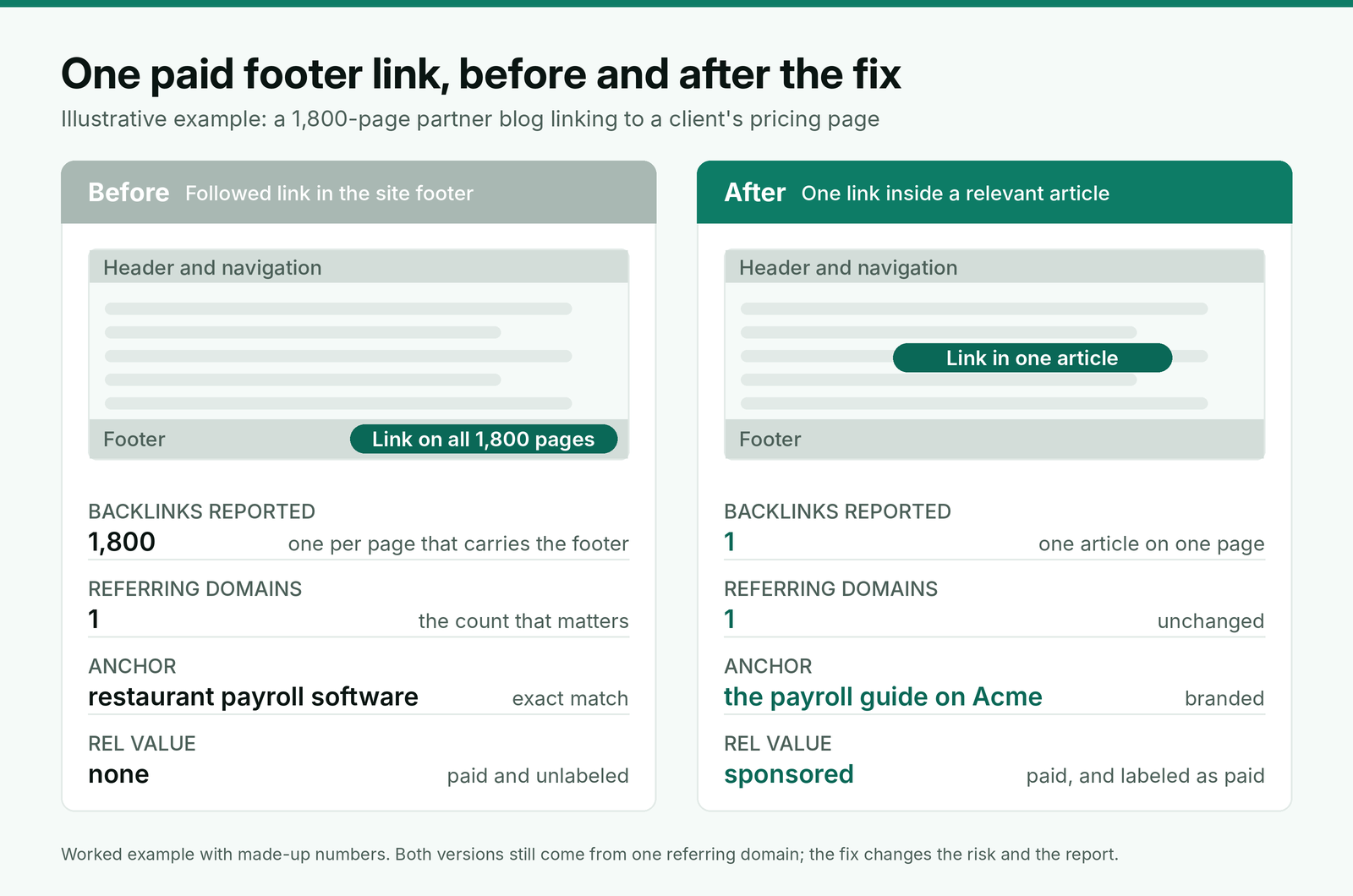
The agency asks the publisher to move the link into the one article on the site that covers restaurant payroll, with a branded anchor and rel="sponsored", and to remove the footer link. If the publisher refuses, the fallback is rel="sponsored" on the footer link; if they do not reply within 30 days, the domain goes into the referring-domain triage from our link audit guide and, as a paid unlabeled link, onto the disavow list. The request:
Subject: Footer link to [client domain]: moving it into [article title]
Hi [first name],
We now manage links for [client brand]. Your site has a footer link to [target URL] that was placed under an earlier agreement with [previous agency or "a previous agency"].
We would like to replace it with one link in [article URL], which covers [topic], using the anchor "[branded anchor]" and rel="sponsored". The footer link can then be removed. There is no change to the existing terms, and we are happy to send the exact sentence for the article.
If moving it is not possible, please add rel="sponsored" to the footer link instead. Could you confirm which option works by [date]?
Thanks,
[Your name]
[Agency, URL]
Keep the reply, the before and after HTML of the page, and the date in the client's file. The next agency, or the next audit, will need to see why the link changed.
How to audit sitewide links in a client profile
A sitewide review fits inside any link audit:
- Export links from Search Console and at least one link index, and group by referring domain.
- Flag any domain with more than about 50 linking pages to the client, or linking pages close to the domain's indexed page count. Those are almost always template links.
- Open three linking pages per flagged domain and note the block (footer, sidebar, header, blogroll), the anchor and the rel value, on desktop and on a phone-sized viewport.
- Check each flagged domain against the order log and old invoices. Paid and followed goes on the fix list; earned and branded stays.
- Look for the same footer block on other domains that link to the client. Three or more matching footers is a network, whoever placed them.
Record the result once, with dates, so quarterly checks only look at domains that are new since the last review.
Where BuildLinks fits
The question that decides what to do with a sitewide link is whether it was bought, and that answer comes from records, not from a crawl. In BuildLinks, every placement is an order with its target URL and anchor text locked once placed and a full history kept on the record, so a footer link that is not in the order list was not bought by you. Guest posts and niche edits are rechecked automatically the moment the link publishes.
We use each client's requirements page for the standing rules this post leads to: no followed sitewide placements, rel="sponsored" on paid links if the client's policy requires it, and any vendors excluded after an audit. BuildLinks does not crawl the web for links you did not order, so sitewide links placed by others still come from Search Console and your link index.
Conclusion
Treat a sitewide link as one referring domain, whatever the backlink count says, and judge it on two questions: was it paid for, and does the anchor try to rank? Earned credits and blogroll mentions need nothing. Paid sidebar, footer and partner placements need rel="sponsored" or nofollow, and a paid followed one with an exact-match anchor goes on the fix list.
Do not buy followed sitewide packages for clients. Ask for one in-content link on the same domain instead, check every template placement on a phone-sized viewport, and report referring domains rather than backlinks so a single footer never decides how a month looks.