PBN links are links from a private blog network: a group of sites one owner controls, usually rebuilt on expired domains, that exist to pass ranking credit to whoever pays. Google treats them as link spam, and most vendors never use the word, so the only reliable way to keep them out of a client's profile is to spot them before you buy. That takes four checks per site and one check across the whole vendor list.
This guide is for agencies and freelancers who buy placements. It covers what PBN links look like in a vendor's inventory, whether they still work, the checks we run to catch network sites, a clause to send vendors, and a worked audit of a 40-site list.
What PBN links are, and what vendors call them
A private blog network is built to look like a set of unrelated blogs. The owner buys domains that expired with backlinks still pointing at them, puts up a generic blog on each, publishes enough content to look alive, and sells links from the posts. The domains carry authority metrics from links the previous owner earned, which is the whole product.
That history is why network sites show up in vendor lists with strong numbers. A site can show a Domain Rating in the 40s or 50s while its current owner has earned none of the links behind it. The mechanics come down to what moves Domain Rating, which can rise on links the current owner never earned.
Vendors rarely list these as PBN posts. The same sites appear as "high DR general blogs", "authority network posts", "permanent links on our own sites", or a spreadsheet of lifestyle domains all priced within a few dollars of each other. The label tells you little. What gives a network away is the pattern across its sites, and the gap between the metrics and what the site does today.
Do PBN links still work?
Sometimes, for a while, and with less certainty every year. The bigger change for a buyer is what happens when Google catches them. In 2013 and 2014, Google penalized networks and the sites they linked to. A paid link network was penalized by name in December 2013. In September 2014 network owners reported "hundreds, if not thousands" of thin content manual actions within a few days.
Since then the default has shifted from punishment to quiet neutralization. When Penguin moved into the core algorithm, Google said it would devalue spam rather than demote the whole site. The December 2022 link spam update put SpamBrain on the job of finding both sites that buy links and sites used to pass them, and in March 2024 rebuilding an expired domain to rank low-value content became a named spam policy.
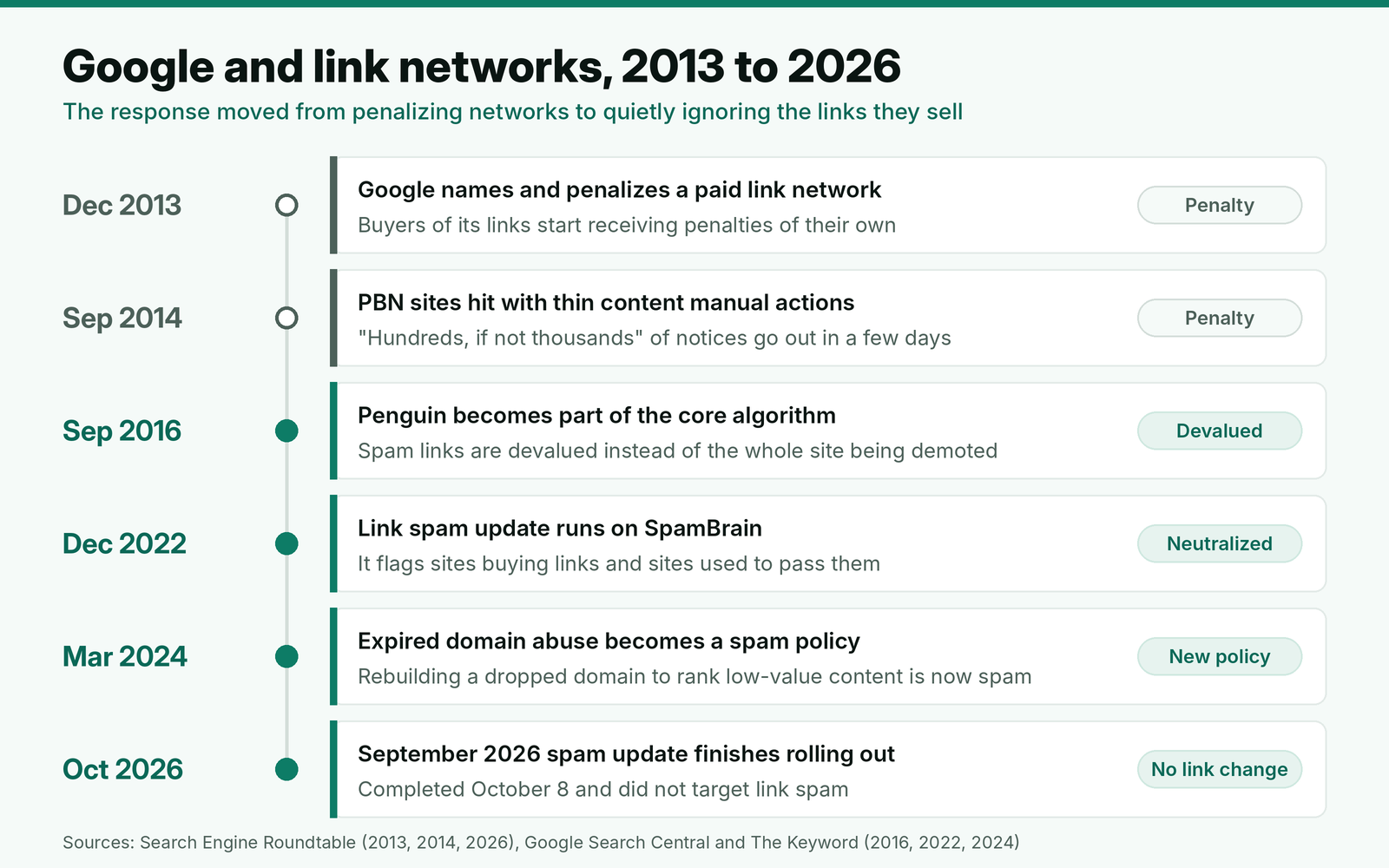
For an agency, neutralization is a quieter problem but still a problem. A link Google ignores was paid for and reported to the client as a win. A manual action is rarer now, but it is more likely when a client has many network links with commercial anchors, because that is a pattern rather than one bad placement.
The numbers behind Google's detection
| Figure | Number | What it means for a buyer |
|---|---|---|
| Spam sites SpamBrain caught in 2022 compared with 2021 | 5 times more (Google's 2022 webspam report) | Detection keeps getting better each year; a network that slipped through last year is not safe this year. |
| Spam sites caught compared with SpamBrain's 2018 launch | 200 times more | Old assumptions about which footprints Google can see are out of date. |
| Link spam sites detected compared with the July 2021 link spam update | 50 times more | Link sellers are a specific target, not a side effect. |
| Drop in low-quality, unoriginal content in results after the March 2024 update | 45% (Google) | The same update made expired domain abuse spam, so rebuilt domains face both the content and the link systems. |
| Web pages preserved in the Wayback Machine | More than one trillion (Internet Archive) | Almost every expired domain has a visible past. The history check is free and rarely comes back empty. |
Recent updates have not changed this picture. Google's September 2026 spam update finished rolling out on October 8 and did not target link spam. Network sites that kept their traffic through it have not been cleared; they just were not the subject of that update.
Why network sites end up in vendor lists
The economics favor the seller. An expired domain with a clean set of old links costs the network owner a domain fee and cheap hosting, and every post on it can be sold again and again. A real publisher has editors, an audience to protect and a limited number of slots. So network sites are cheap, always available and fast to publish, which are exactly the things a buyer under deadline wants to hear.
Price is the first hint. When a vendor offers a site with strong authority metrics for a fraction of what real publishers in that niche quote, ask why. We compare against real guest post prices at each tier. A site priced far below them, with no topic of its own, deserves the full set of checks below before it goes anywhere near an order.
How to spot a PBN site before you buy
These checks sit on top of the full website vetting process we run on every site before we pay. Each one takes a few minutes. Together they catch most network sites, because a network can fake one or two signals cheaply but not all of them at once.
Traffic that does not match the metrics
Pull the site's organic traffic estimate and its traffic history from your SEO tool. A real publisher with a Domain Rating of 40 or more usually has thousands of organic visits a month in its main country. Our rule: a site with a DR of 40+ and fewer than 500 estimated monthly organic visits is suspect until something else explains it, such as a newsletter-led publication or a brand-new section on an established site.
Then read the shape of the history. A traffic line that sat near zero for years and then jumped, or one that fell off a cliff in a single month and never came back, both point to a domain that changed hands. A slow, uneven climb with seasonal dips is what an audience looks like.
Ownership history and the expired domain test
Open the domain in the Wayback Machine and look at snapshots from three, five and eight years ago. Then run an ICANN registration lookup and note the creation date. When a domain is deleted and registered again, the creation date usually resets. A creation date from last year on a domain the archive shows was live a decade ago means it dropped and was rebuilt.
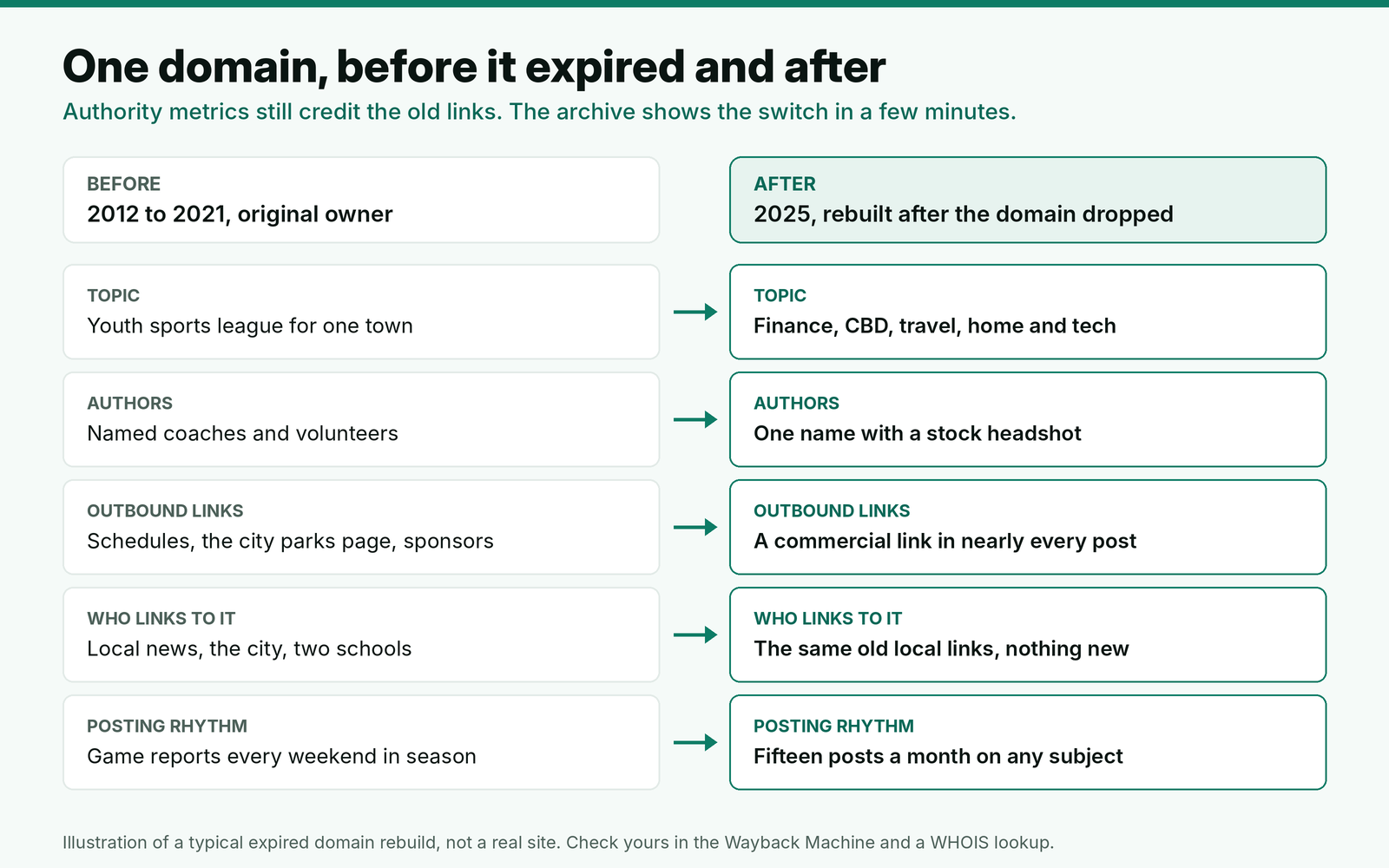
A rebuild is not proof of a network on its own. People buy expired domains for real projects too. What decides it is whether the new site continues the old one's topic and audience. A rebuilt domain whose old links point at content that no longer exists is selling a reputation it did not earn, and that is the case Google's spam policies now call expired domain abuse.
Outbound links in the last ten posts
Open the ten most recent posts and note every external link in the body. Real publishers link to sources, tools and other publications, and only some posts carry a paid link. Network sites exist to sell links, so almost every post has one commercial outbound link, often with a keyword anchor, to a site with no relation to the post's topic.
We reject a site when more than three of its last ten posts link to unrelated commercial sites, or when any recent post links to casino, payday loan, CBD or essay writing sites. The second rule is strict on purpose. A vendor who sells to those buyers will sell your client's placement next to them. If a client already has links on a site like this, treat them as toxic links and decide between a tag request, removal and a disavow.
Who writes it and who reads it
Check the author pages, the about page and the contact page. Network sites tend to have one or two author names with no other footprint on the web, stock headshots, an about page that could describe any blog, and a contact form but no named editor. Look for signs of readers too: comments, social accounts with real engagement, a newsletter. A site with none of these and fifteen posts a month across finance, health, home and travel is writing for buyers, not readers.
Topic spread is worth its own look. A general lifestyle site may cover several subjects, but a real one still has a center of gravity. We score topic fit with the backlink relevance layers we check at site, page and paragraph level, and network sites fail at the site layer almost every time.
Check the vendor's whole list, not one site at a time
The checks above work site by site. The strongest network signal only shows up when you put a vendor's sites side by side, because a network is a set of sites with one owner, and owners repeat themselves. Export the vendor's list and compare the sites on hosting, authors, registration dates, themes and links between them.
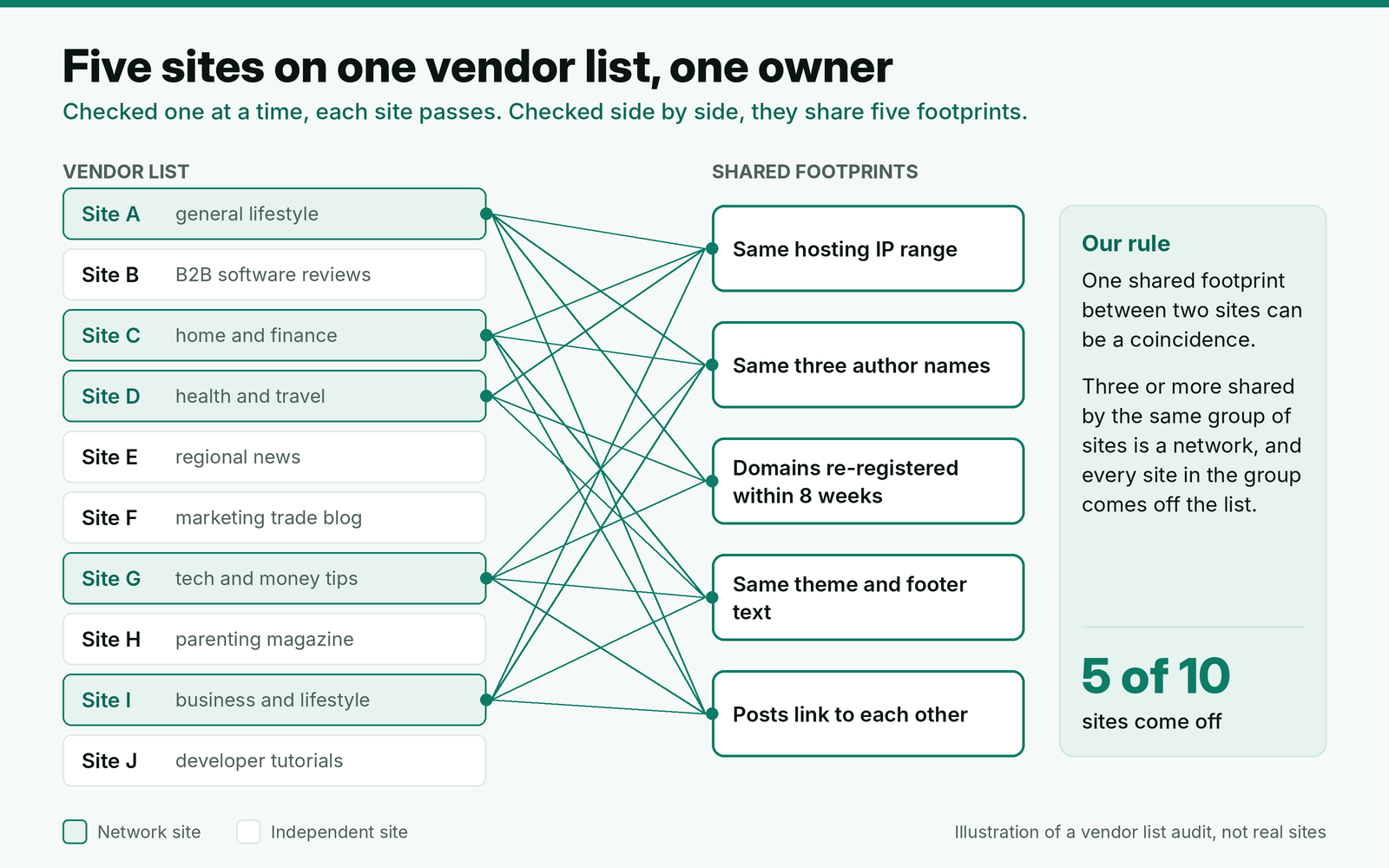
Our rule is in the diagram: one shared footprint between two sites can be a coincidence, since plenty of real blogs use the same popular theme or host. Three or more shared across one cluster of sites is a network, and every site in that cluster comes off the list, including any that passed on its own. Then ask what else the vendor has not told you.
Hosting overlap is the quickest to test. Run each domain through a reverse IP or hosting lookup and sort by IP range. Networks run by careful owners spread their sites across hosts, so a clean result here does not clear a list. A shared range across several sites does flag one.
A network clause for every vendor
Checks catch what is there on the day you look. A written policy makes the vendor responsible for what they know. We send this to every new vendor before the first order and repeat the first paragraph in each order note. It pairs with the delivery terms in a link building client contract, since a placement on a network site cannot meet its definition of a delivered link.
Site policy: no private blog networks
We do not buy placements on sites that are part of a private blog network: sites owned or controlled together, built or rebuilt mainly to sell links, or rebuilt on expired domains with a different topic from the original site. This applies to every site you quote us, including sites you resell from another supplier.
Before we approve a site, please confirm who owns it, how long they have run it, and whether you or the owner run other sites on your list. We check hosting, authors, registration dates and outbound links across your whole list.
If we find that a site we bought on is part of a network, we will ask you to remove the link and refund the placement, and we will remove every site on your list that shares the network.
[Your name]
[Title, agency, URL]
Most good vendors answer the ownership question in one line. A vendor who will not say who owns the sites on their list has told you what you need to know.
Example: auditing a 40-site vendor list
Here is a made-up example. A vendor sends a list of 40 general and business blogs for a SaaS client, priced from $80 to $350 per post. The account lead runs the site checks first, then the list comparison.
| Stage | Sites removed | Why | Sites left |
|---|---|---|---|
| Traffic against metrics | 4 | DR above 40 with under 500 organic visits a month | 36 |
| Outbound links in the last ten posts | 3 | Casino or loan links in recent posts | 33 |
| Ownership history | 2 | Re-registered domains with a different original topic | 31 |
| Footprints across the list | 5 | Same IP range, authors and theme across five sites | 26 |
| Relevance to the client | 8 | No posts on the client's topic | 18 |
Fourteen of the 40 sites failed a network check, and all 14 sat in the cheaper half of the price list, averaging $95 a post against $260 for the 18 sites that passed every stage. The five network sites had each passed the site-level checks. The audit took about two and a half hours, most of it on the history and footprint stages, and the vendor stays on the approved list only for the 18 sites that passed.
The cheap end of a vendor list is where networks sit, so audit it first. If the cheaper half is clean, the rest of the list usually is too.
Where BuildLinks fits
Catching a network once is not enough. The same domains come back through a different vendor six months later unless the decision is recorded where everyone ordering can see it. That is the job we built BuildLinks to do. In BuildLinks, new domains wait in the shared inventory for approval before anyone can quote them, so a site rejected in your network check never reaches a client order. The inventory filters by DR, traffic, service type, turnaround and country, which makes the traffic against metrics check a filter rather than a spreadsheet exercise.
The footprint checklist and the vendor clause can live on each client's requirements page as SOPs, next to the brief. Each order keeps its domain, target URL, anchor and full history, so if a site later turns out to be part of a network, the record of which clients have links on it already exists. BuildLinks does not run hosting or WHOIS lookups, so keep those tools in the SOP for the checks themselves.
Conclusion
Treat every site with strong metrics and a low price as a possible network site until it passes four checks: traffic that fits the metrics, a history that continues the old site's topic, no more than three unrelated commercial links in the last ten posts, and real authors and readers. Then compare the vendor's whole list, and remove every site in any group that shares three or more footprints.
Send the network clause before the first order, ask who owns the sites, and start each audit at the cheap end of the list. A placement Google ignores still costs the full price, so the time to catch it is before you pay.