URL Rating (UR) is a 0 to 100 score for the links pointing at one URL, internal and external, published by the same SEO tool that publishes Domain Rating. For a link buyer it answers one narrow question: how strong is the exact page my link will sit on? That makes it useful for a niche edit, where the page already exists, and close to useless for a new guest post, which goes live with a UR of zero whatever the site's DR.
This guide covers what goes into URL Rating, how it relates to Google's PageRank, how it differs from DR, what counts as a good score, and how we use it when pricing placements. Two charts model how much value a new post can receive from its host, because that, not the post's starting UR, is what decides whether a guest post link is worth buying.
What URL Rating measures
UR scores the link profile of a single address. The tool's own documentation describes five properties that matter for buyers:
- It is page level. Checking a domain shows the UR of its homepage, not of the site. A vendor who quotes "site UR 45" is quoting the homepage.
- Internal links count. Links from the same site feed UR alongside external links, so a page in the main navigation of a strong site can score well with no external links of its own.
- Only followed links count. Links marked nofollow do not pass anything into the score.
- The scale is logarithmic. Moving from 20 to 30 is far easier than moving from 70 to 80, so compare scores within a band, not on a straight line.
- The current version dates from August 2022. The tool rebuilt the metric then and says the legacy score is not expected to match, so old screenshots and old vendor sheets are not comparable with today's numbers.
Two practical details follow. HTTP and HTTPS versions of a page get the same UR, but other duplicates, such as a URL with and without a trailing slash or with tracking parameters, can show different scores. Always check the canonical address of the page you are buying on, not the variant a vendor pasted.
How URL Rating is calculated: the PageRank idea
The formula is not public, but the tool says UR follows the same basic principles as PageRank: it counts links between pages, respects nofollow, applies a damping factor, and cuts off loops where two sites pass score back and forth. PageRank itself is public. Larry Page and Sergey Brin set it out in their 1998 paper on the prototype Google search engine, and Google still names it among its core systems.
| Source | Figure | What it means for UR |
|---|---|---|
| Brin and Page (1998) | Damping factor d = 0.85 | Each hop keeps 85% of what a page can pass, so value fades with every click. |
| Brin and Page (1998) | PageRank for 26 million pages, over link maps of up to 518 million links | The method was built to score individual pages across the whole web, which is what UR imitates. |
| Google's ranking systems guide | PageRank "continues to be part of our core ranking systems" | A page-level link score still maps to something Google uses, even though Google's version has changed since 1998. |
| Gary Illyes at Pubcon Pro, 2023 | Links are not in Google's top 3 ranking factors | A strong link profile helps a page, but no link score on its own predicts rankings. |
In the paper, a page passes 0.85 of its score, divided equally among the links on it. That one rule explains most of what UR does.
A worked example
Take a hypothetical page with a score of 10 and 20 outbound links. Each link passes 0.85 × 10 / 20 = 0.425. Put the same page in a template with 200 links, which is common on pages that carry a sitewide footer, a tag cloud and a long sidebar, and each link passes 0.0425, a tenth as much. The page's own UR does not change. What changes is the share your client's link receives.
That is why we never price a niche edit on the host page's UR alone. Count the links on the page, and count how many of them point at commercial sites. Two UR 40 pages are not the same buy when one carries 15 editorial links and the other 300.
Why click depth matters
Damping also works across a site. Value that enters through the homepage loses 15% at every internal click, before it is split again on each page along the way.
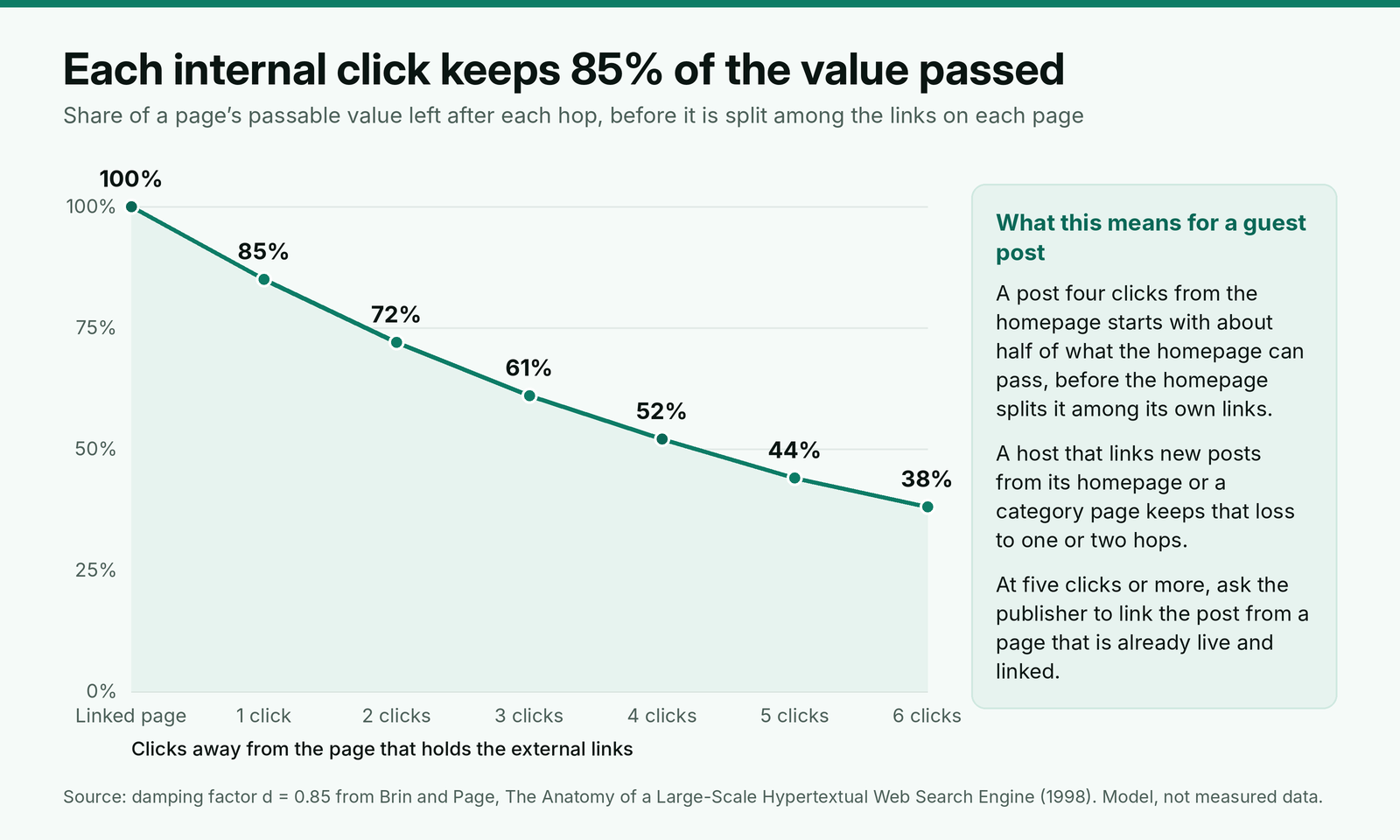
The chart understates the loss, because it ignores splitting. A homepage with 80 links passes a fraction of its score to each, and every page on the path splits again. Pages deep in an archive end up with very little, which is exactly where many publishers file paid posts.
URL Rating vs Domain Rating
DR scores a whole domain's external link profile against every other domain the tool tracks. UR scores one page, using internal links as well. Our guide on how Domain Rating is calculated covers the domain side; the differences that matter when buying are these:
| URL Rating (UR) | Domain Rating (DR) | |
|---|---|---|
| Scores | One URL | A whole domain |
| Internal links | Count | Do not count |
| New guest post | Zero until links arrive | Unchanged by your post |
| Easy to inflate by | Sitewide navigation links to the page | Bulk links from link-selling networks |
| Best use when buying | Judging a niche edit on a live page | First filter on a list of sites |
A page's UR can be higher than its site's DR. It happens when one page, often a free tool, a study or a homepage, attracts most of the site's links. It also happens on small sites where internal links concentrate on a few pages. Neither case is a red flag on its own, but it tells you the site's strength is concentrated: a link on that one page is worth far more than a link anywhere else on the domain.
What is a good URL Rating?
There is no fixed number, for the same reason there is no fixed good DR: the score is relative and logarithmic. Three comparisons tell you more than any threshold.
- Against the pages that rank. Look up the UR of the pages in the top 10 for the query the host page targets. If the host page sits in that range, its links are doing what links do for that topic.
- Against the site's own pages. A niche edit page that scores well below the site's typical articles is usually orphaned or deep in an archive. Ask why before you pay.
- Against its own history. A page whose UR dropped sharply has lost links or been cut from internal navigation. Both reduce what your link would receive.
As a working rule for niche edits, we want the host page to have at least a few followed links from other domains, a UR in the range of pages ranking for its topic, and search traffic of its own. A page that meets all three is a page Google already treats as worth visiting.
How to use URL Rating when you buy links
The placement type decides whether UR applies at all. Our guide to choosing between a guest post and a niche edit covers price and control; this is the metric side of the same decision.
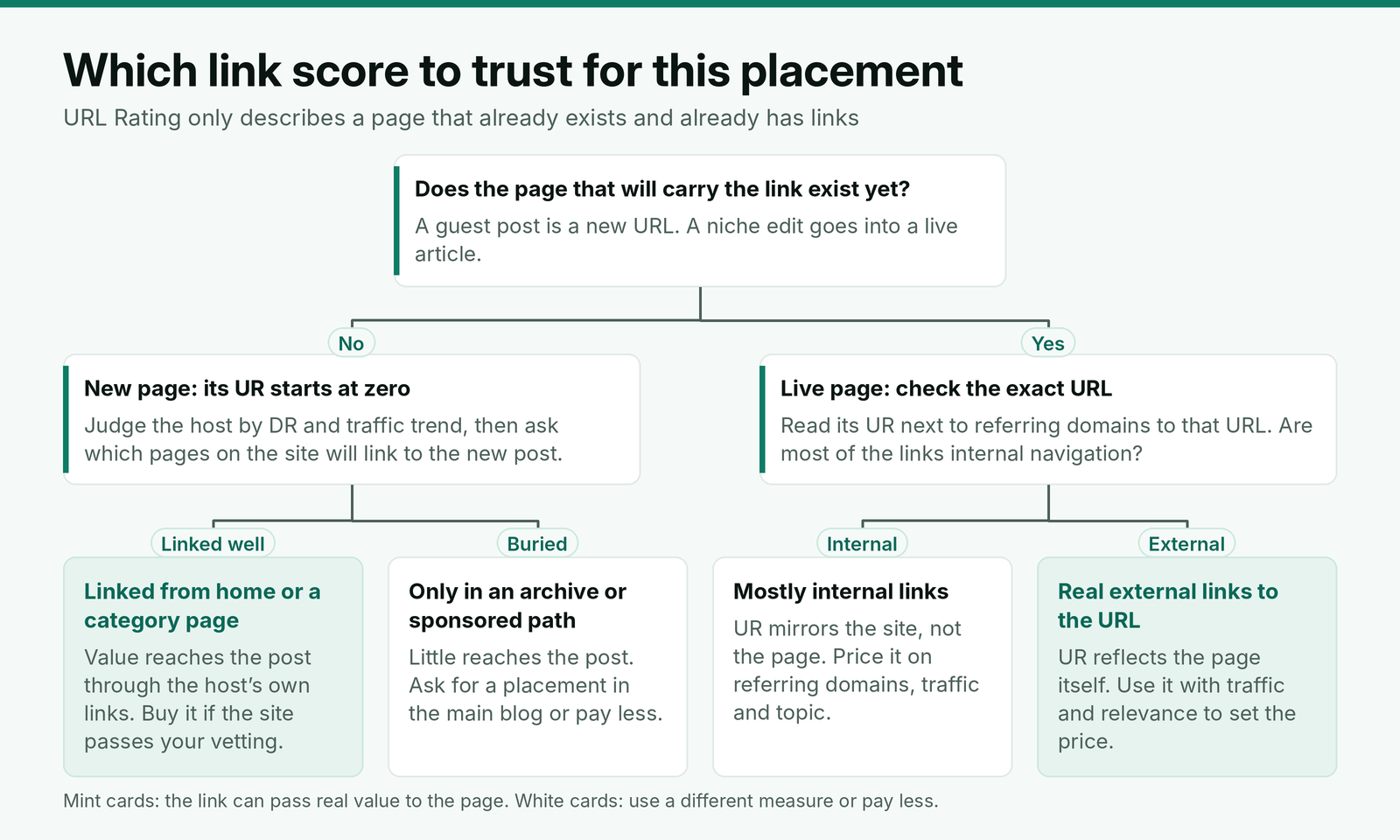
Guest posts: ask where the post will be linked from
A new guest post has a UR of zero on the day it goes live. Whatever value it eventually passes to your client comes from the host's own links to it, so the question that replaces UR is where the publisher will link it from. We modeled one new post on a small blog using the 1998 formula, changing nothing but the host's internal links.
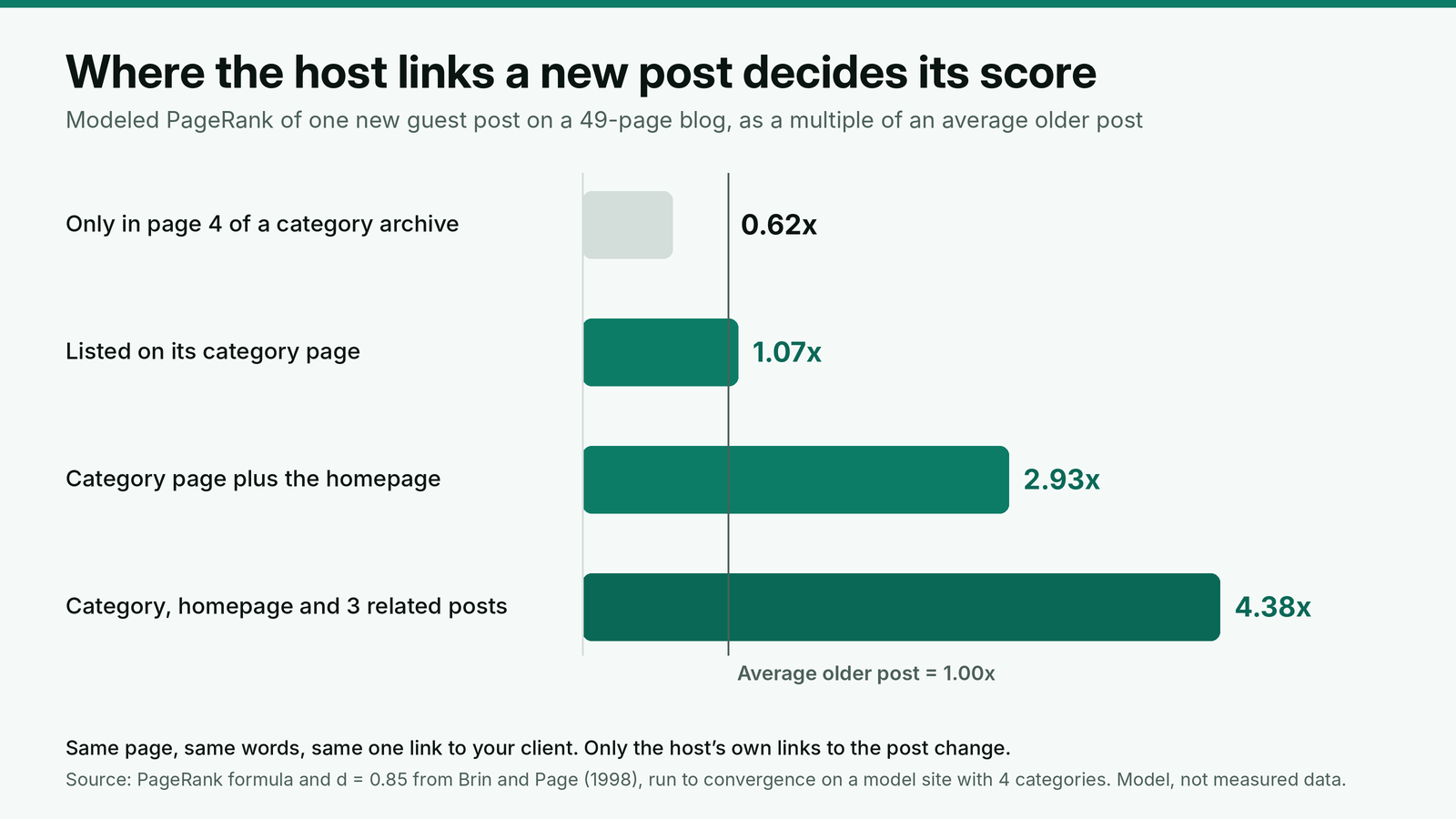
The spread is the point. A post filed only in a deep archive receives less than an average article on the site. A post the publisher features on its homepage and links from related articles receives several times more. Real sites are larger and messier than the model, but the direction holds: a strong domain that buries paid posts can pass less than a smaller site that links to them properly. Our notes on where a guest post sits on the host site cover the URL path checks that catch this before you pay.
Ninety days after the post goes live, check its UR. A post still at or near zero has few or no internal links pointing at it, so ask the publisher which pages link to it and request one from a related article.
Niche edits: check the exact URL, then what feeds it
For an existing page, UR is the first number to read, and referring domains to that URL is the second. If the page has a decent UR but no followed links from other domains, its score comes from the site's navigation. That still passes something, but you are paying for the site's internal linking, which the publisher can change at any time. Price those pages closer to a guest post than to a page with its own external links.
Then confirm the page is indexed, canonical to itself and still getting search traffic. A page that has dropped out of the index passes nothing, whatever its UR. Our vetting routine we run before every purchase covers the site-level checks that come before any of this.
A request to send with every niche edit offer
Most vendors send a domain, a DR and a price. This is what we ask for before quoting a niche edit to a client:
Subject: Niche edit details for [client name] before we order
Hi [vendor name],
Before we confirm, please send the exact live URL for the edit, not the domain. We will check its canonical address, index status and URL Rating on our side.
Please also tell us how many outbound links the page carries today, whether any of them are paid placements, and whether the page is linked from the site's navigation, a category page or other articles.
The link will be one sentence in an existing paragraph about [subject], pointing to [target URL] with the anchor [anchor]. Tag: [rel="sponsored" / no qualifier], per the client's paid link policy.
Thanks,
[Your name]
[Agency, URL]
The outbound link count and the paid placement question are the two lines vendors leave blank most often. A page with a long list of commercial links in recent edits is a page that sells to everyone, and Google's spam policies name buying links that pass ranking credit as link spam. If the client's policy calls for a tag, our guide to sponsored and nofollow tags on paid links shows how to confirm it on the live page; a tagged link will not add to UR.
Where URL Rating misleads
UR is a link count with weights. It says nothing about the things that decide whether a link helps a client:
- Topic. A UR 40 page about casino bonuses passes the same score into the formula as a UR 40 page about payroll software. Google does not treat them the same for a payroll client.
- Where the links come from. Expired domains rebuilt as blogs keep the UR their old pages earned. The score survives; the reason for it does not.
- Whether Google counts the links. UR has its own spam filters, but they are not Google's, so a link the tool counts can be one Google discounts.
- Redirect chains. A page that inherited links through a redirect can carry a score from a page that no longer exists, about a topic it no longer covers.
One recent event shows why a UR change after a Google update is not proof of anything. Google's September 2026 spam update ran for about 13 days, from September 24 to October 8, and did not target link spam. If a host page's UR moved in those weeks, the cause was links the tool gained or lost, not a Google judgment on the page. Read UR changes against the page's backlinks and traffic, not against update dates.
Recording URL Rating in reports
Clients see UR in their own tools and ask about it. Record two numbers for every placement: the host page's UR on the day the link went live, and at 90 days. For guest posts the first number is zero by definition, so the 90-day figure is the useful one: it shows whether the publisher linked the post into the site. We report it as a column next to referring domains and traffic in the monthly report we send clients, never as a headline result, because a score from a third-party tool is not what the client is paying for.
Where BuildLinks fits
UR is a page number and most link inventories, ours included, are lists of domains. In BuildLinks, a filterable domain inventory holds your prices and lets you filter sites by DA, DR, traffic, service type, turnaround and country, and a new domain is held for approval before anyone can quote it. That is where the domain-level filter belongs.
The page-level rules in this guide belong on each client's brief and SOP page, so whoever places the next niche edit checks the exact URL, its outbound links and its internal links the same way. Each placement is then an order with a status: the target URL and anchor lock once it is placed, and guest posts and niche edits are rechecked automatically the moment the link publishes, so the 90-day UR check starts from a link you know went live as agreed.
Conclusion
Use URL Rating where it measures something: a niche edit on a live page. There, read UR with referring domains to that URL, the number of outbound links on the page and its search traffic, and price pages fed mostly by navigation closer to a guest post. Check the canonical address, not the variant a vendor sent.
For guest posts, ignore the starting UR, which is always zero, and ask where the host will link the post from. A post on the homepage and a category page can receive several times what an archive post receives. Recheck every placement's UR at 90 days and report it beside referring domains and traffic, not as the result.