SEO client management software keeps each client's brief, approvals, work status, messages, reports and invoices in one place. For a link building agency the test is narrower than most buying guides suggest: can it treat every link as its own order, with a client price, a vendor cost the client never sees, a record of who approved the site and a verified live URL? Most general agency tools handle tasks and dashboards well and stop short of that.
This guide covers the six jobs the software has to do, what an SEO client portal should show, what access to ask clients for, the questions to ask in a demo, how to move clients over without a gap, a weighted scorecard you can copy and a worked example that compares two common setups on score and on monthly cost.
What SEO client management software covers
The label gets used for four different kinds of product. Each one handles part of the job, and most agencies end up running two or three of them side by side.
| Type of tool | What it does well | Where it stops for link building |
|---|---|---|
| Reporting dashboards | Pull rankings, traffic and Search Console data into branded client reports | Count links as a metric, not as orders with a price, an approval and a status |
| Project and task boards | Assign work, set due dates, show who is doing what | Know nothing about the domain, anchor, target URL or cost unless someone types it in |
| CRMs | Track leads, deals and contacts until a client signs | Stop at the sale; delivery and billing live somewhere else |
| Link building management platforms | Orders, domain inventory, client prices, invoices and client logins | Do not track rankings, so you still need Search Console or a rank tracker |
A general SEO agency can run well on a dashboard plus a task board. A link building agency sells a stream of individual purchases, and that changes what the client needs to see. If order handling is your gap, start with our link building management software comparison.
Why link building clients are harder to manage
An SEO retainer sells hours and outcomes. A link building retainer sells units, and every unit has a cost behind it. That creates three pressures a general tool was not built for.
First, money moves on every line. In a 2025 survey of 518 SEO professionals reported by Search Engine Land, agencies put 32.1% of their SEO budget into links, 56% of respondents outsourced at least part of their link building, and the average acceptable price for one high-quality link was $508.95. When a client pays around $500 a placement, they want to see each placement, not a monthly total.
Second, the client has opinions on every placement. Clients reject sites, swap target pages and push back on anchors. If those decisions live in email, the person placing next week's orders will not see them.
Third, results trail delivery by months. A client cannot judge you on rankings in month two, so they judge you on what they can see: whether links arrived, whether they matched the brief, and whether the invoice matches the links. Agree those as delivery KPIs such as live rate and time to live before the first order.
The payoff for getting this right is a longer relationship. An ANA and 4As study found that average agency of record tenure rose from 3.2 years in 2016 to about 7 years in 2025. Media-only agencies averaged 3.7 years, and clients that review their agencies often kept them for as little as 3.8 years, against 8.1 years for clients with no mandatory review.
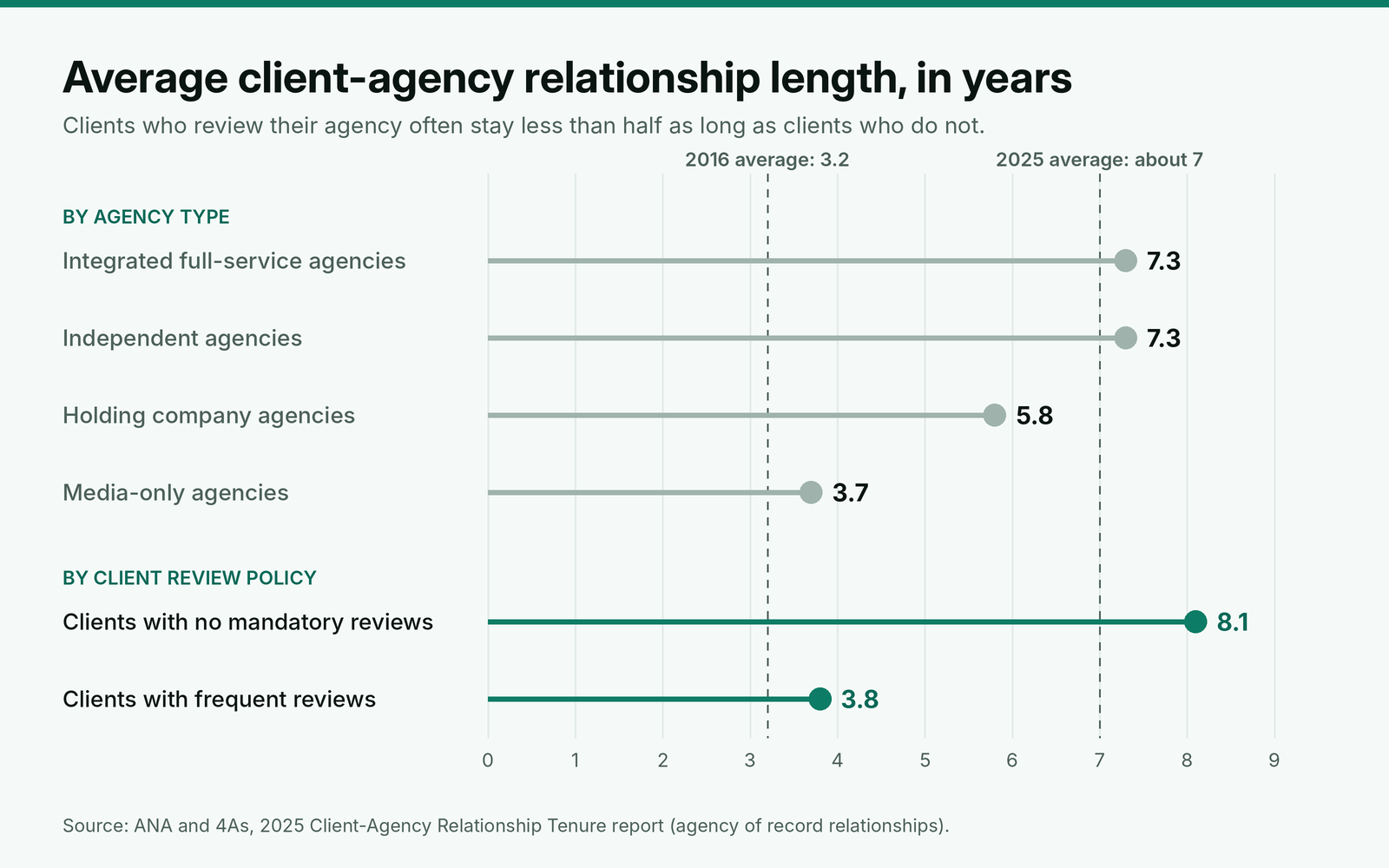
Those numbers describe large brand accounts, not link building retainers. The pattern still carries over. A client who has to ask whether the links went live is running a small review every month. A client who can open a portal and see every order has fewer reasons to start one.
The six jobs the software has to do
Judge any tool, or any stack of tools, against these six jobs. A job no tool covers falls back on email and spreadsheets, which is where the errors start.
1. Hold the brief where the next person will see it
Each client needs one record with target pages, anchor rules, sites to avoid, the tag policy (rel="sponsored" or not) and the maximum cost per link. It has to sit on the client account, not in a kickoff deck. This is the brief we write before ordering any link in our backlink buying process from brief to live link; whatever software you pick should store that text and show it whenever someone opens an order for that client. Most of it comes straight out of the intake questions in a 14-day onboarding plan for link building clients, and the links per month and budget come from the SEO proposal that set the per-link scope.
2. Record approvals
Before a site is bought, someone approves it: the client, your account lead or both. The record should show who approved which domain and when, so a dispute in month five takes one search to settle. A tool that only lets you comment on tasks will cope, but you will rebuild the approval log by hand every quarter.
3. Track each link as an order
One record per placement holds the domain, target URL, anchor, link type, status, live URL and dates. Status should change when the link is verified live, not when a vendor sends an email. Lock the target URL and anchor once the link is placed, so nobody rewrites history after the fact. The trigger for "delivered" should match the wording in your client agreement's delivery and replacement clauses, or the status on screen and the contract will disagree the first time a link drops. The same record tells you when to file the replacement claims your vendors owe you, because the live date starts the clock.
4. Keep two prices apart
You pay a vendor one price and bill the client another. The client should see only their price, and the vendor cost should be visible to you and nobody else. This is the job general tools fail most often, because one shared spreadsheet tab is enough to leak your margin. The fields that keep vendor costs out of sight matter most when you resell placements through white label link building programs. The markup itself comes from pricing link building services per link, and the vendor side of the same records feeds scoring each vendor on live rate and survival every quarter.
5. Answer questions next to the work
A question about one link should be answered on that order, by the person who owns it. Messages tied to an order give you a record. Messages in a shared inbox give you a search problem when the client asks the same thing two months later.
6. Turn finished work into reports and invoices
The report and the invoice should both come from completed orders, so the invoice can never list a link the report does not show. Rankings and clicks still come from Search Console and a rank tracker. A six-section monthly report shows what to put in front of link clients.
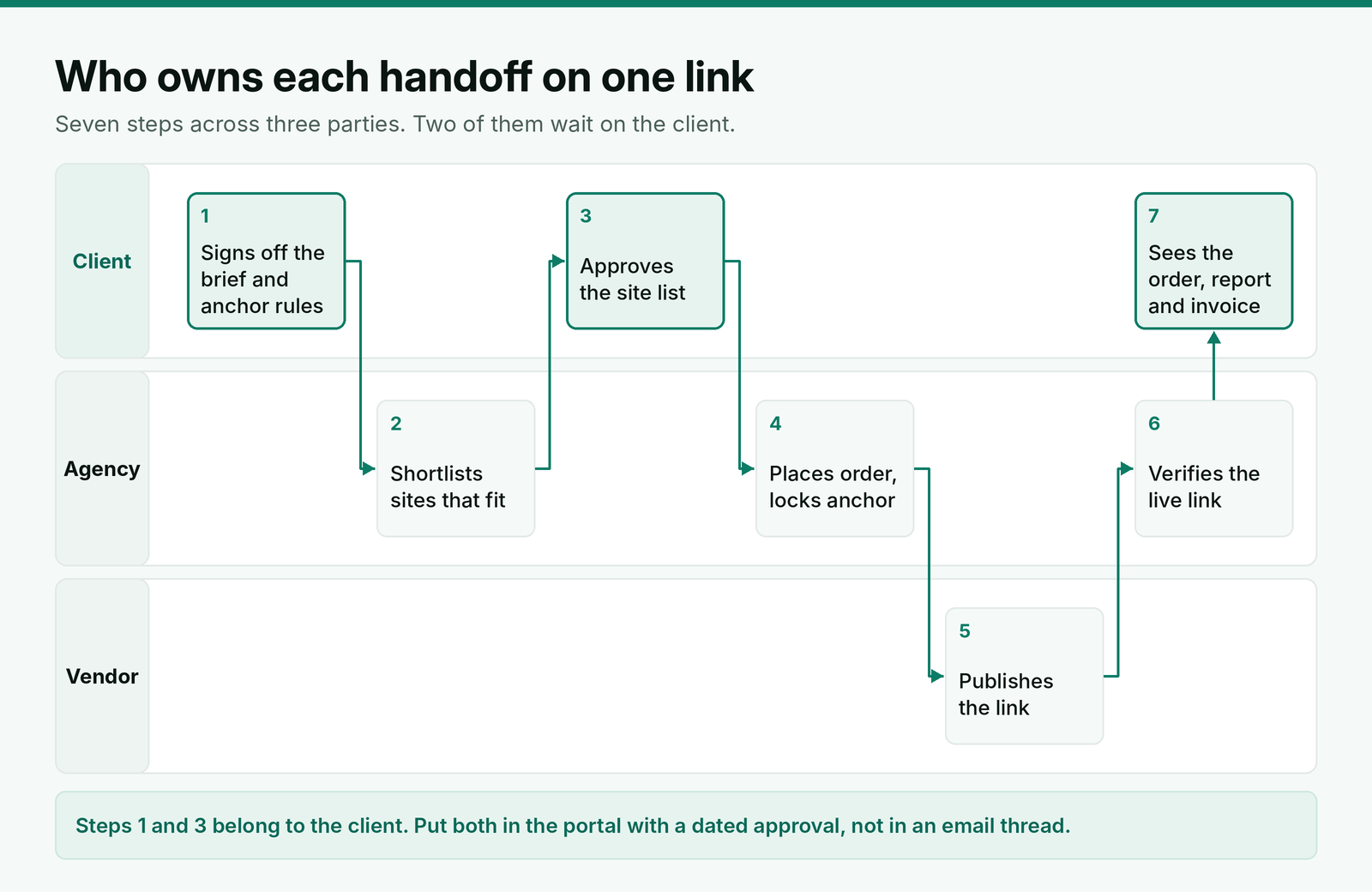
Map who owns each handoff before you shortlist tools. Vendor steps are covered by your contract with the vendor. The client steps have no contract behind them, so they stall unless approving a site takes one click.
What an SEO client portal should show for link building
A client portal earns its place when it answers the three questions clients email most: where is my link, did it go live as agreed, and what am I paying for. Build the client's view around the order, not around a dashboard of metrics, and decide what stays hidden on the same screen.
| What the client sees | Which email it replaces | What must stay hidden on that screen |
|---|---|---|
| Each order with its status, site, target URL and anchor | "Where is the link for the pricing page?" | The vendor's name and contact details |
| The live URL and the date it was verified | "Can you send proof it went live?" | The vendor cost and your margin |
| Sites waiting for approval, with the date the approval window closes | "Did you need something from us?" | Sites you rejected for other clients |
| Invoices built from completed orders, at the client's price | "Which links is this invoice for?" | Other clients' orders and prices |
| Messages on each order | The same question asked again two months later | Internal notes on vendors and site quality |
Give each person on the client side their own login. The marketing manager approves sites, the finance contact pays invoices, and the approval log then shows a name instead of "the client". Show the approval deadline on every pending site. We give clients two business days, after which a site that meets the signed standard goes ahead, and a visible date stops that rule from feeling like a surprise.
What access to ask clients for
Client management starts with access, and most agencies ask for more than they need. Ask for the lowest level that lets you do the work, and log what you were given so you can hand it back cleanly when the account ends.
| Tool | Level to request | What it allows | When you need more |
|---|---|---|---|
| Search Console | Restricted user | View most data, including the Performance and Links reports | Full user, if you submit sitemaps, send reconsideration requests or use the disavow tool |
| Search Console | Full user | All data plus actions such as sitemaps and disavow; no user management | Owner, only if the client wants you to manage their users |
| Google Analytics 4 | Viewer | See reports and settings, and build your own explorations | Marketer or Editor, only for setup work such as key events |
| Google Analytics 4 | No Cost Metrics and No Revenue Metrics restrictions | Hide those values, which show as 0 in reports | Lift them only if you report on revenue |
Search Console levels are taken from Google's help page on owners, users and permissions. GA4 levels come from its page on Analytics access and data restrictions. A Search Console property can have up to 100 non-owner users, so even a large team will not run out of seats on one client.
Offboarding matters as much as onboarding. Removing a verified owner in Search Console does not revoke their verification token: while the HTML file, meta tag or DNS record stays on the site, the removed owner can verify again. If your team verified a client's property, remove your token when the contract ends and tell the client in writing. Put that on your offboarding checklist next to returning GA4 access.
Recent changes clients will ask about
Google rolled out its generative AI performance reports to every Search Console property by August 31, 2026. They show impressions, pages, countries, devices and dates for appearances in AI Overviews, AI Mode and Discover. Clients will ask whether your links help there. Your client software does not need to measure it, but your report template needs a place for it, and you should agree up front that it is a trend to watch, not a target you sell.
The September 2026 spam update finished rolling out on October 8 after about 14 days, and the November 2026 core update began rolling out on November 10, with Google expecting the rollout to take about two weeks. Neither was described as a link spam update, but clients rarely make that distinction. When one emails to ask whether their links caused a drop, a record of every order with its site, live date and rel tag lets you answer that day, from facts instead of memory. If the drop is real and lasting, auditing the links behind a traffic drop is the next step, once the rollout has finished.
Questions to ask in a demo
Sales demos show the admin view with clean sample data. These questions move the conversation to the parts that break with real clients.
| Question | A good answer | A warning sign |
|---|---|---|
| Can you log in as one of my clients and show me an invoice? | They switch to a client view and no vendor cost appears anywhere | "Clients only see what you share with them", with no demo |
| What changes an order to live? | A recheck of the live page, or a person confirming the URL | A vendor's status update, taken as fact |
| Can I import my current domain list and open orders? | CSV import for domains and prices, with a template | "Our team can help with migration", with no format |
| Can I export everything if I leave? | Orders, domains, clients and invoices as files you keep | Exports limited to reports or a higher plan |
| What is capped on each plan? | A published limit on orders, clients and seats | Limits that appear only at checkout |
| Whose brand does the client see in emails? | Your domain, logo and sender address on the plan you are pricing | The vendor's name in the footer of system emails |
Ask every question with a real client's data open in a trial account. An answer you cannot test is a promise, and promises are what the scorecard below is meant to replace.
How to move clients over without a gap
Most switches fail in the overlap, when half the orders live in the old tool and nobody knows which record is current. Run the move in four parts over about one month.
Start with the domain list and prices, because every new order depends on them. Load them by CSV, then check ten domains by hand against your old sheet before anyone quotes from the new list. Next, move the client accounts and briefs, one client at a time, starting with the one that orders most often, so problems show up early and on a client who is used to you.
Then move open orders only. Orders that are already completed and invoiced can stay in the old tool as a read-only archive; rebuilding a year of history costs more than it saves. From the day a client moves, every new order for that client starts in the new tool, with no exceptions. Invite the client to the portal last, once their open orders and briefs are in place, so the first thing they see is complete.
Keep the old tool for one billing cycle after the last client moves. If an invoice dispute comes up in that month, you still have the record it refers to.
A scorecard you can copy
Score each tool or stack from 1 to 5 on every row during a trial, multiply by the weight, add the results and divide by 5 to get a score out of 100. These weights suit an agency that resells placements. If you build most links in-house, move points from the second row to the fifth and sixth.
| Requirement | Weight | What to test in the trial |
|---|---|---|
| Each link is an order with a status and a verified live URL | 25 | Place a test order and mark it live. Check what triggers the status change. |
| Client price and vendor cost kept apart | 20 | Log in as a client. Confirm no cost appears anywhere, including exports and invoices. |
| Client brief and approvals on the account | 15 | Add a brief and approve a domain, then open a new order as a teammate and see if both show. |
| Invoices from completed orders | 15 | Complete two orders and check the invoice builds without retyping. |
| Client portal under your brand | 10 | Check the domain, logo and system emails the client receives. |
| Messages tied to orders | 10 | Ask a question on an order as the client and see who gets it. |
| Reporting by date range | 5 | Pull spend, link count and turnaround for one client for last month. |
| Total | 100 | Divide the weighted sum by 5. |
Run every test logged in as a client, not as an admin. Most failures only show from the client's side: a cost column in an export, a vendor name in an email footer, an invoice that lists a link still in progress.
Example: scoring two setups
Here is a made-up example. An agency has 14 clients, places about 70 links a month and resells most of them from vendors. It compares two setups.
- Setup A: a reporting dashboard, a task board and accounting software.
- Setup B: a link building management platform, with Search Console and a rank tracker for results.
| Requirement (weight) | Setup A | Setup B |
|---|---|---|
| Orders with verified status (25) | 2: task cards, status set by hand | 5 |
| Prices kept apart (20) | 2: margin sits in a spreadsheet | 5 |
| Brief and approvals (15) | 3 | 3: approvals still partly in email |
| Invoices from orders (15) | 2: retyped monthly | 5 |
| Branded portal (10) | 4 | 4 |
| Messages on orders (10) | 3 | 4 |
| Reporting (5) | 5 | 2: no rankings inside |
| Score out of 100 | 52 | 87 |
Setup A wins on reporting and loses on almost everything a link client checks. The weights decide the outcome, so test them. For an agency selling SEO retainers where links are a small add-on (orders 10, prices 5, brief 15, invoices 15, portal 15, messages 15, reporting 25), the same scores give Setup A 67 and Setup B 73. The gap narrows but holds, because invoices still come out of completed work.
What the two setups cost
Setup A is cheaper in cash. Below are list prices at monthly billing for a five-person team, before any introductory discount, using one general task board and one accounting package as examples. Both setups still need a rank tracker, so it is left out of both.
| Job | Setup A | A per month | Setup B | B per month |
|---|---|---|---|---|
| Client reports | Google's report builder, free for creators and viewers | $0 | BuildLinks reports, plus Google's report builder for rankings | $0 extra |
| Work tracking | Asana Starter, 5 users at $13.49 | $67.45 | BuildLinks Agency: orders, task board, branded portal and invoices, with 20 Sub Admins | $249 |
| Client invoicing | QuickBooks Online Essentials, 3 users | $85 | Included | $0 |
| Total | $152.45 | $249 |
The $96.55 difference pays for the four rows where Setup A scored 2. Spread over 70 links a month, that is about $1.38 per link, under 0.3% of the $508.95 the average respondent in the survey above would pay for one high-quality link. Seat pricing also moves differently: Setup A's task board adds $13.49 a month for every person you hire, while BuildLinks Agency includes 20 Sub Admins and is capped by volume instead, at 500 orders a month.
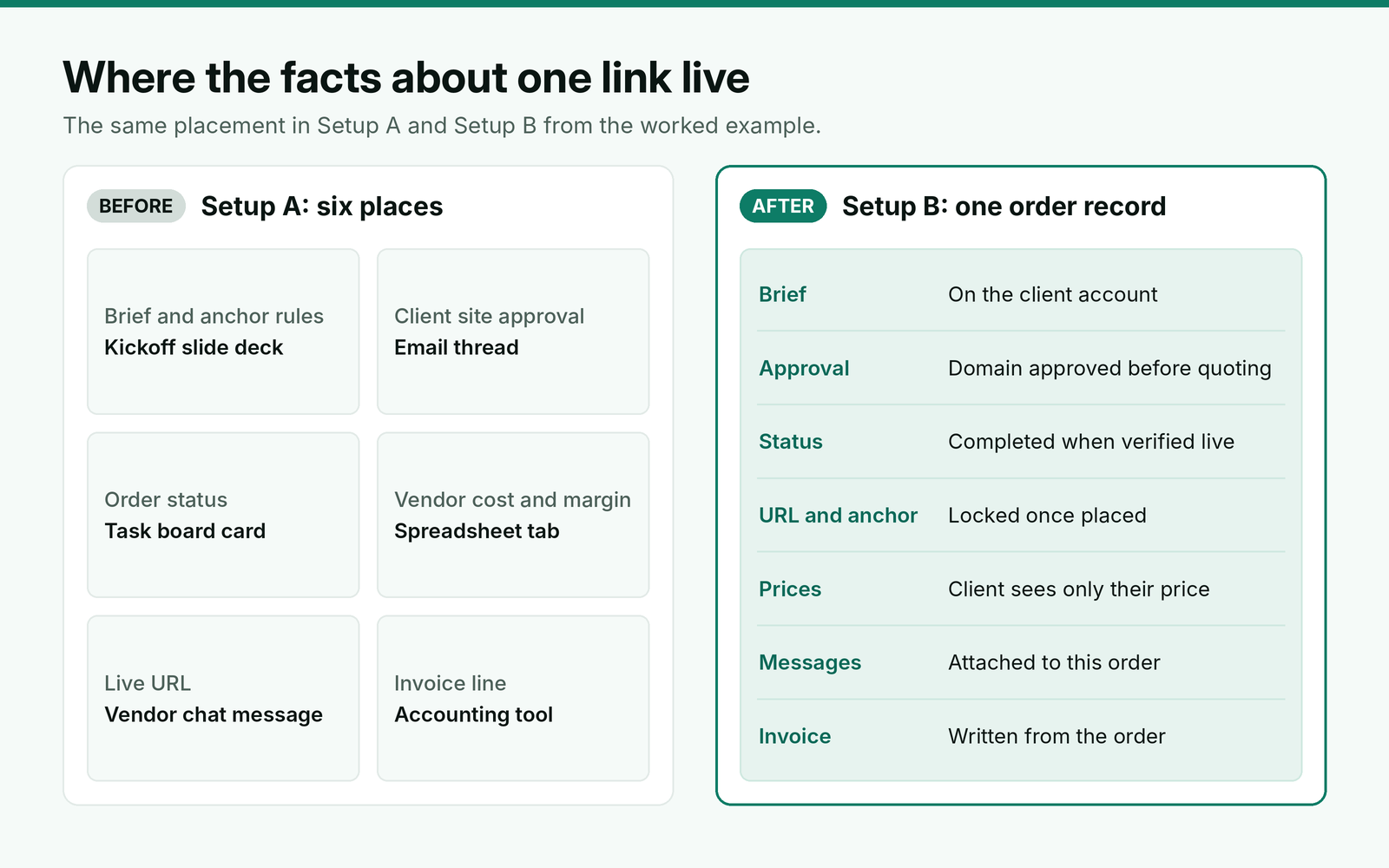
Score the setup you run today before you trial anything. If it lands above 75 with your own weights, fix the weakest row instead of switching tools.
Where BuildLinks fits
We built BuildLinks for the top four rows of that scorecard. In BuildLinks, each link is an order with a status (Pending, In Progress, Completed or Rejected). A guest post or niche edit is rechecked when it publishes, before the order is marked Completed, and the target URL and anchor are locked once placed. Each client has a brief page with reference links and SOPs that whoever picks up the next order can read, and a new domain needs approval before anyone can quote it. Domains and prices load in bulk through CSV import and export, which covers the first step of a move.
Clients log in to see their own orders and invoices at your price, while the vendor cost stays on your side of the account. Invoices are written when an order completes, direct messages and tickets sit next to the order they concern, and task board cards tied to an order carry its anchor and target URL, so nobody switches tabs to find them. On the Agency and Custom plans, the client portal runs on your own domain, logo and email.
Plans start at $99 a month for Starter, $249 for Agency and $449 for Custom, and the limits for each plan list orders, clients and seats. BuildLinks does not track rankings or AI visibility, so pair it with Search Console and a rank tracker for the results side of the report.
Conclusion
Choose SEO client management software by what a link building client can see, not by the dashboard demo. Each link should be an order with a verified live URL, the client price should be the only price the client can find, and every site approval should carry a name and a deadline. If you resell placements, give those three jobs 60 of your 100 points and test each one while logged in as a client.
Weigh the score against the bill: a task board and accounting stack runs about $152 a month for five people, against $249 for a link platform, and the gap shrinks per link as volume grows. If you switch, move domains first, then briefs, then open orders, and keep the old tool for one billing cycle. Ask for a Restricted Search Console user, and remove your verification token when an account ends.