SEO project management for link building means running every link as an order that moves through fixed stages, each with one owner, a definition of done and a time limit. The work itself is rarely the problem. Orders stall in the gaps between people: a shortlist waiting on a client, a placement waiting on a publisher, a live link nobody checked.
This guide is for agencies and freelancers who run link building for several clients at once. It covers what makes link projects different from other SEO work, the eight stages we use with a target time for each, the capacity math that tells you how many orders you can keep open, who owns what, a weekly review that takes 30 minutes, and a client status update you can copy.
What makes link building projects different
Most SEO project management advice is written for audits, content calendars and technical fixes, where your own team does the work and controls the timeline. A link program breaks that model in four ways.
- Most of the waiting happens outside your team. Publishers, vendors and the client's approver each hold the order for days at a time, and none of them report to you.
- Every unit carries money. A stalled content task costs time. A stalled order can cost a deposit, a refund dispute or a month of reporting with nothing to show.
- Delivered work can disappear. A live link can be edited out, tagged or deleted months later, so a link is never fully closed until its replacement window ends.
- Each client has its own rules. Banned sites, anchor limits, rel requirements and approval steps differ by account, and they have to travel with every order.
That is why a task list alone does not hold a link program together. Tasks describe what someone has to do. Orders describe where the money and the link are, who is holding them and for how long.
Where the time goes when nobody owns the status
Coordination is the largest hidden cost in this work, and the numbers on knowledge work in general show how large it can get. Asana's Anatomy of Work Index of more than 10,000 knowledge workers measured how much of the week goes to communicating about work, searching for information and chasing status rather than doing the job.
| Finding | Figure | What it looks like in a link program |
|---|---|---|
| Share of time spent on work about work | 60% | Emailing vendors for status, asking clients to approve sites, rebuilding the same tracker |
| Hours a year talking about work | 352 | Status calls that a shared order record would answer |
| Hours a year on duplicative work | 209 | Two people vetting the same site, or checking the same live link |
| Hours a year in unnecessary meetings | 103 | A weekly call that reads the tracker aloud |
| Workers who say time-sensitive projects fell behind | 88% | Monthly link targets missed because orders sat in one stage too long |
| Apps the average employee uses every day | 10 | Inbox, spreadsheet, chat, SEO tool, invoicing tool and a client folder per account |
Those figures are for knowledge work in general, not link building, but the pattern is the same. The fix is not more meetings. It is a status that answers itself: every order shows its stage, its owner, how long it has been there and what it is waiting on.
The eight stages of a link order
We split every order into eight stages. Each one ends with something you can check, which is what makes the status trustworthy. The target times are the working limits we use for guest posts and niche edits bought from vetted sites; digital PR and earned links need their own, longer clock.
| Stage | Owner | Done when | Target time |
|---|---|---|---|
| 1. Brief | Account manager | Target URL, anchor, topic and client rules are written on the order | 2 business days from kickoff |
| 2. Shortlist | Link coordinator | Candidate sites listed with price and turnaround | 3 business days |
| 3. Vetting | Vetter (or a second person) | Each site passes or fails the standard checks, with a note | 1 business day per batch |
| 4. Client approval | Client, chased by the account manager | Client approves or swaps each site in writing | 3 business days |
| 5. Placement | Vendor or publisher, chased by the coordinator | The publisher or vendor reports the link live, with the URL | 10 to 14 days for a guest post, 5 to 7 for a niche edit |
| 6. Live check | Link coordinator | URL, anchor, target and rel value match the order | Same business day as the live report |
| 7. Reported and billed | Account manager | The link is in the client report and on an invoice | By the next monthly report |
| 8. Monitoring | Link coordinator | The replacement window ends with the link still live | Recheck monthly until the window closes |
Two stages deserve a note. Vetting sits before client approval on purpose: a client should only ever choose between sites you would already buy on, which also stops them approving a site you would reject. Use the same checks on every batch, from the five checks we run before any order down to a spam score reading that decides how deep the vetting goes.
The live check is the stage teams skip. A vendor's "it's live" message is a claim, not a delivery. Until someone has opened the page and confirmed the anchor, the target and the rel value, the order is still in stage 5.
Where orders loop back
A straight line of stages hides the expensive part: the loops. A rejected site sends the order back to the shortlist, a draft the client rewrites sends it back to the publisher, and a failed live check reopens placement. Each loop restarts a clock, which is why a program with a 30% rejection rate at client approval runs late even when every stage meets its target.
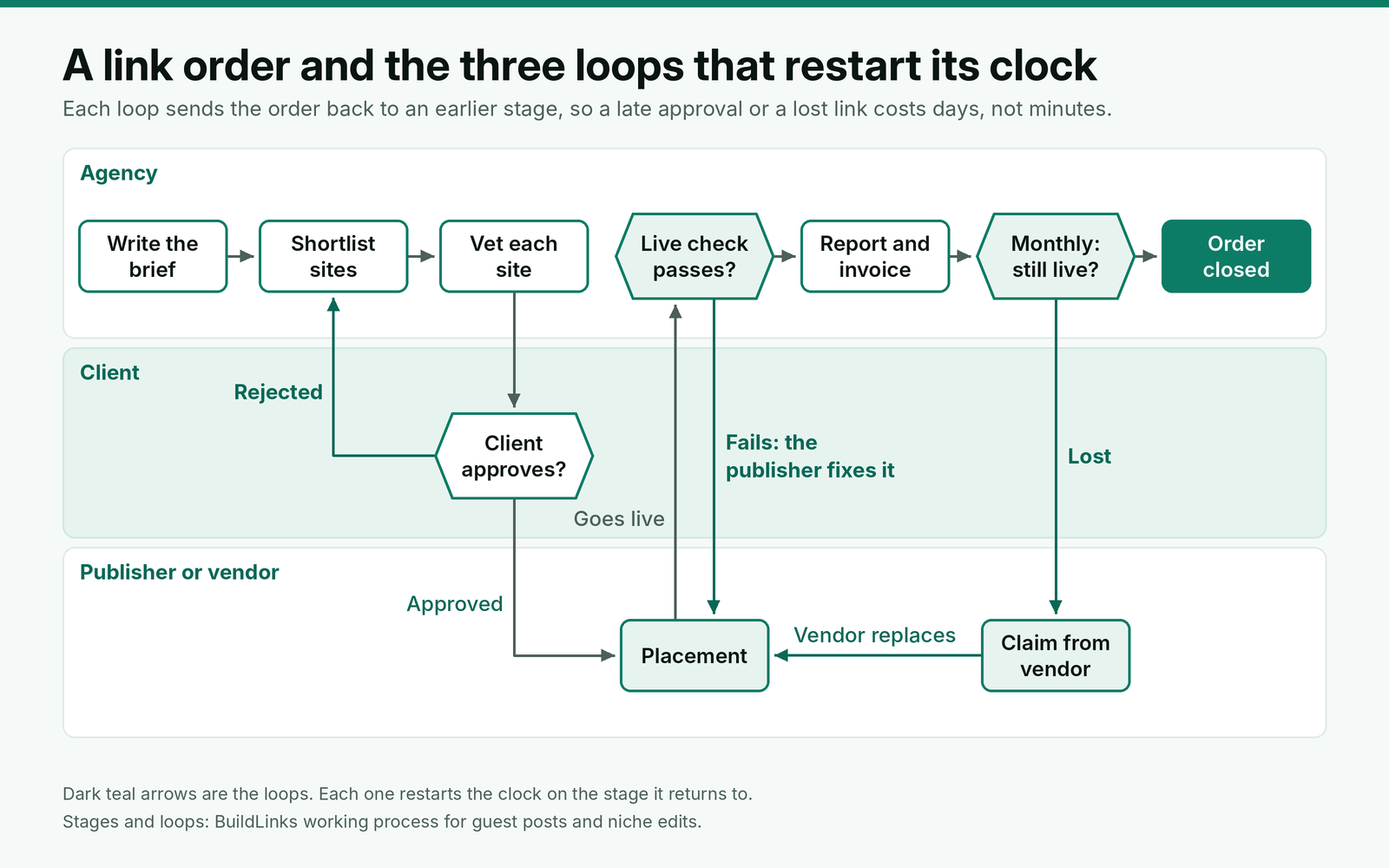
Track how often each loop fires. If clients reject more than one site in four, the brief is missing a rule; if live checks fail more than one in ten, the problem is the vendor, and the order notes will show which one.
A status that answers "where is this link?"
The question every account manager dreads comes from a client who has seen nothing new in two weeks. An order record that can answer it without a call needs a few things a spreadsheet row usually lacks: the date the order entered its current stage, the person holding it, the date it is due out of that stage and what it is waiting on.
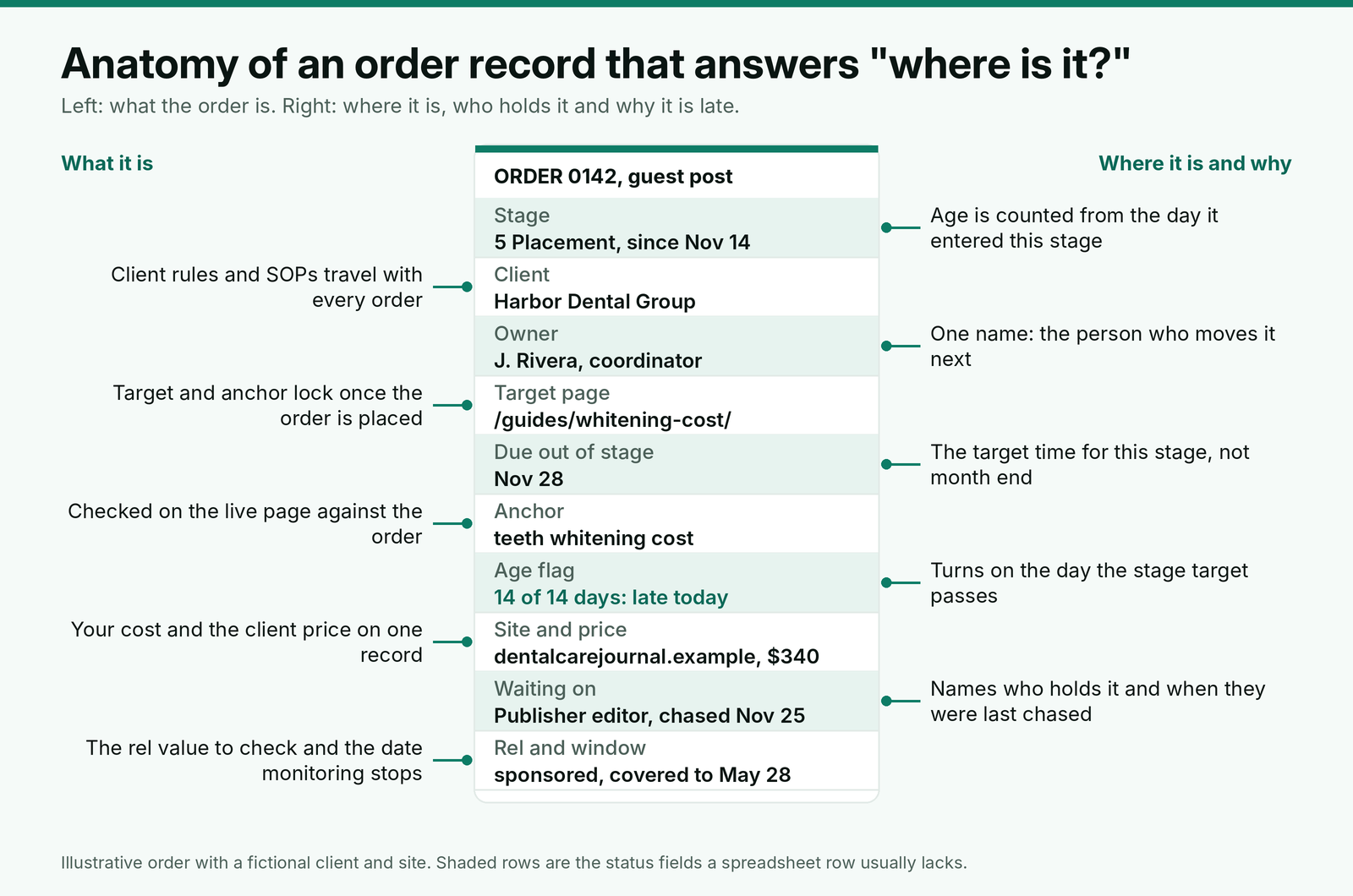
The age flag matters most. An order is late when it has been in one stage longer than that stage's target, not when the month ends. Flagging by stage age catches a stuck approval on day four instead of on the last day of the month, when there is no time left to swap the site.
How many orders can you keep open?
Capacity planning for link building comes down to one relationship. Little's law says that the average number of items in a system equals the rate they leave it multiplied by the average time each one spends inside. For a link program: open orders = live links delivered per day x average days from brief to live.
Worked example: 30 live links a month
Say an agency sells 30 live links a month across six clients, and its orders take 24 calendar days on average from brief to live check. That is one link a day leaving the system, so at any moment about 24 orders are open: 1 x 24.
Now add the loops. Suppose clients reject one proposed site in five and one vendor order in ten stalls or gets cancelled. To deliver 30 links, the team has to propose 30 / (0.8 x 0.9), or about 42 sites, and open about 34 orders with vendors, because a cancelled order gets replaced with a new one.
The numbers point at the lever that matters. If the team cuts the average from 24 days to 16, mostly by shortening client approval and same-day live checks, open orders fall from 24 to 16 while output stays at 30 links. Fewer open orders means fewer status questions, fewer stale approvals and fewer deposits sitting with vendors.
The same math tells you when to hire. If your coordinator can keep about 20 orders moving well, an average of 24 open orders means someone is already over that line, and selling a seventh client without cutting cycle time pushes it further. Track the average with cycle time and the other delivery KPIs we report, and set the open-order ceiling before you sign the next retainer, not after.
Who owns what
Every stage needs one owner, even when several people touch it. The owner is the person who moves the order to the next stage or flags it late. In a team of three or four, the split usually looks like this:
- Account manager: owns the brief, client approval, the report and the client relationship. Chases the client, never the vendor.
- Link coordinator: owns the shortlist, placement, live check and monitoring. Chases vendors and publishers, never the client.
- Vetter: owns the pass or fail on each site. Ideally not the person who found the site, so nobody approves their own shortlist.
- Writer: owns guest post drafts inside the placement stage, with a deadline set by the coordinator.
The rule that keeps this working is that a client never talks to the coordinator about vendors and a vendor never hears about the client. Freelancers hold every role, so the split becomes a split of time instead: vet and shortlist on fixed days, chase approvals and placements daily, and run live checks the same day a link is reported.
Client approval is the stage most often blamed on the client and most often fixable by the agency. Batch the shortlist so the client approves a week's sites in one reply, and put an approval deadline written into the client contract so a site counts as approved after five business days of silence. Agree both during onboarding, before the first shortlist goes out.
The 30-minute weekly review
A weekly review should only discuss exceptions. If the order record is current, the team already knows what is on track. The agenda we use:
- Aged orders (10 minutes). Every order past its stage target, oldest first. For each one, decide: chase, swap the site or cancel.
- Loops (5 minutes). How many sites were rejected, live checks failed and replacements claimed this week, and by which client or vendor.
- Pace against target (5 minutes). Live links this month per client against the number sold, and open orders against your ceiling.
- Monitoring (5 minutes). Links found missing or changed in the monthly recheck, and replacement windows closing in the next 30 days.
- Blockers for next week (5 minutes). Anything that needs a decision from the owner or the client.
The monitoring item is easy to drop when the month is busy. A link that disappears inside the vendor's window is a free replacement; one found a week after the window closes is a loss, so tie the recheck to the recheck routine for links that vanish after delivery.
Indexing needs patience rather than a meeting. Google says crawling can take anywhere from a few days to a few weeks, so we check whether a new placement is indexed 30 days after it goes live, not the week it is delivered.
A weekly status update to copy
Send the client the same short update every week, from the order record, before they ask. It replaces most status calls and gives the client one place to approve sites.
Subject: [Client] link building: week of [date]
Hi [first name],
This month so far: [x] of [y] links live, [x] in placement with publishers and [x] waiting on your approval.
Needs you this week: please approve or swap the [x] sites in the attached shortlist by [date]. Anything not answered by then goes ahead under our approval terms.
Went live this week: [URL], linking to [target page] with the anchor "[anchor]". Each one has been checked on the live page.
Running late: [site], waiting on the publisher since [date]. We will swap it for an approved alternative if it is not live by [date].
Full details are in your monthly report on [date].
[Your name]
[Title, company, URL]
Keep the "running late" line even when it is uncomfortable. A client who hears about a stalled order from you, with a swap date attached, rarely escalates; one who notices it in the monthly report usually does.
Spreadsheet, project tool or link building software
The method above works in any tool, and the right one depends on volume.
- A spreadsheet holds up to roughly one client and a handful of orders a month, as long as one person keeps it current. It breaks when two people edit it, because nobody can see who changed a status or when.
- A general project tool such as Asana, Trello, ClickUp or monday.com handles tasks, owners and due dates well. It has no idea what a live link is, so prices, vendor costs, rel values and replacement windows end up in custom fields someone has to maintain by hand.
- Link building software treats the order as the record, with the site, price and link attached, and checks the link itself. If you are comparing options, start with software that tracks every link order by stage, and read what to look for in SEO client management software if the client side matters more than the vendor side.
Where BuildLinks fits
We built BuildLinks for exactly this part of the job. In BuildLinks, every link is an order that moves through Pending, In Progress, Completed and Rejected, with the target URL and anchor locked once it is placed. When a guest post or niche edit publishes, the order rechecks the link before it is marked Completed, so stage 6 happens without anyone opening the page, and each order keeps its full history.
The internal stages, from brief to vetting, live on task cards attached to each order, on a board with columns set up the way your team works and @mentions to pull in a teammate. Each client's rules sit on one requirements page with its SOPs, and the reports show average turnaround and a status breakdown for any date range, which is the data the weekly review needs. For teams, roles that give each account manager their own book of clients keep the account manager and the coordinator in their own lanes.
Conclusion
Manage link building by stage, not by task. Give each of the eight stages one owner, a definition of done you can check and a target time, and flag an order late the day it passes that target rather than at month end. Put vetting before client approval, and do the live check the same day a link is reported.
Then size the program with Little's law: open orders equal links per day times days from brief to live. Cutting cycle time from 24 to 16 days removes a third of open orders at the same output, which is usually cheaper than hiring. Keep the weekly review to exceptions and send the client an update before they ask.