A backlink marketplace is a platform that lists thousands of sites selling guest posts and link insertions, each with a price and a few metrics, so you can filter, order and pay in one place. It is the fastest way to find placements and the easiest way to overpay, because most of the inventory is weak and the listing shows you the seller's numbers rather than the site's current state.
This guide is for agencies and freelancers who buy links for clients. It covers how the main marketplace models work, what the data says about the sites they list, how to work out what a marketplace link really costs, how to vet a listing before you order, which terms to get in writing, and when a site should move off the marketplace and into your own inventory.
How a backlink marketplace works
Publishers, or people reselling access to publishers, list sites with a price for each service: a guest post, a link insertion into an existing article, sometimes a sponsored label or a homepage mention. The platform shows filters for metrics, niche, country and turnaround. You pick a site, send a brief or an article, the seller publishes, and the platform releases your payment once you confirm the live URL.
The word "marketplace" covers three different businesses, and each one puts a different amount of checking on your side of the table.
| Model | Who picks the site | Who writes the content | What the platform checks | What is left to you |
|---|---|---|---|---|
| Open listing marketplace | You, from the catalog | You, or the seller for a fee | That the link went live before releasing payment | Site quality, page quality, rel value, survival |
| Managed marketplace | The platform's team, from your brief | The platform | Delivery against the brief | Whether its site choices fit your client |
| Seller network sold as a marketplace | You, from a list run by one operator | The operator | Very little; the seller and the platform are the same business | Everything, starting with who owns the sites |
The third row is the one to spot early. A catalog where most sites share an owner, a theme and the same set of advertisers is a private network with a storefront, and the checks in spotting a private blog network before you buy apply to every site on it. A marketplace is also only one kind of supplier. If you buy from publishers, brokers and agencies as well, a weighted scorecard for every supplier you buy from lets you compare a marketplace's results with theirs on the same numbers.
What a backlink marketplace lists
Most of it is weak. One outreach software company analyzed 257,267 sites from a major link marketplace that had complete DR, organic traffic and price data, and the distribution is the most useful thing a marketplace buyer can know before opening a catalog.
| Finding from the 257,267-site sample | Figure |
|---|---|
| Average Domain Rating across the marketplace | 24 |
| Sites with fewer than 1,000 organic visits a month | About 78% |
| Sites with more than 50,000 organic visits a month | 3% |
| Sites rated High Quality or Top Tier (DR 71 or higher with at least 50,000 monthly visits) | 1.37% |
| Average guest post price charged by vendors | $461 |
| Average of the lowest vendor price for each site | $295 |
The last two rows matter more than they look. The study used the lowest price any vendor asked for a site as its stand-in for buying direct, so the gap between $295 and $461 is the spread between the cheapest and the typical seller of the same placement: the average asking price runs about 56% above the average lowest price. On a marketplace, the site is not the only thing you choose. You also choose which seller of that site you pay.
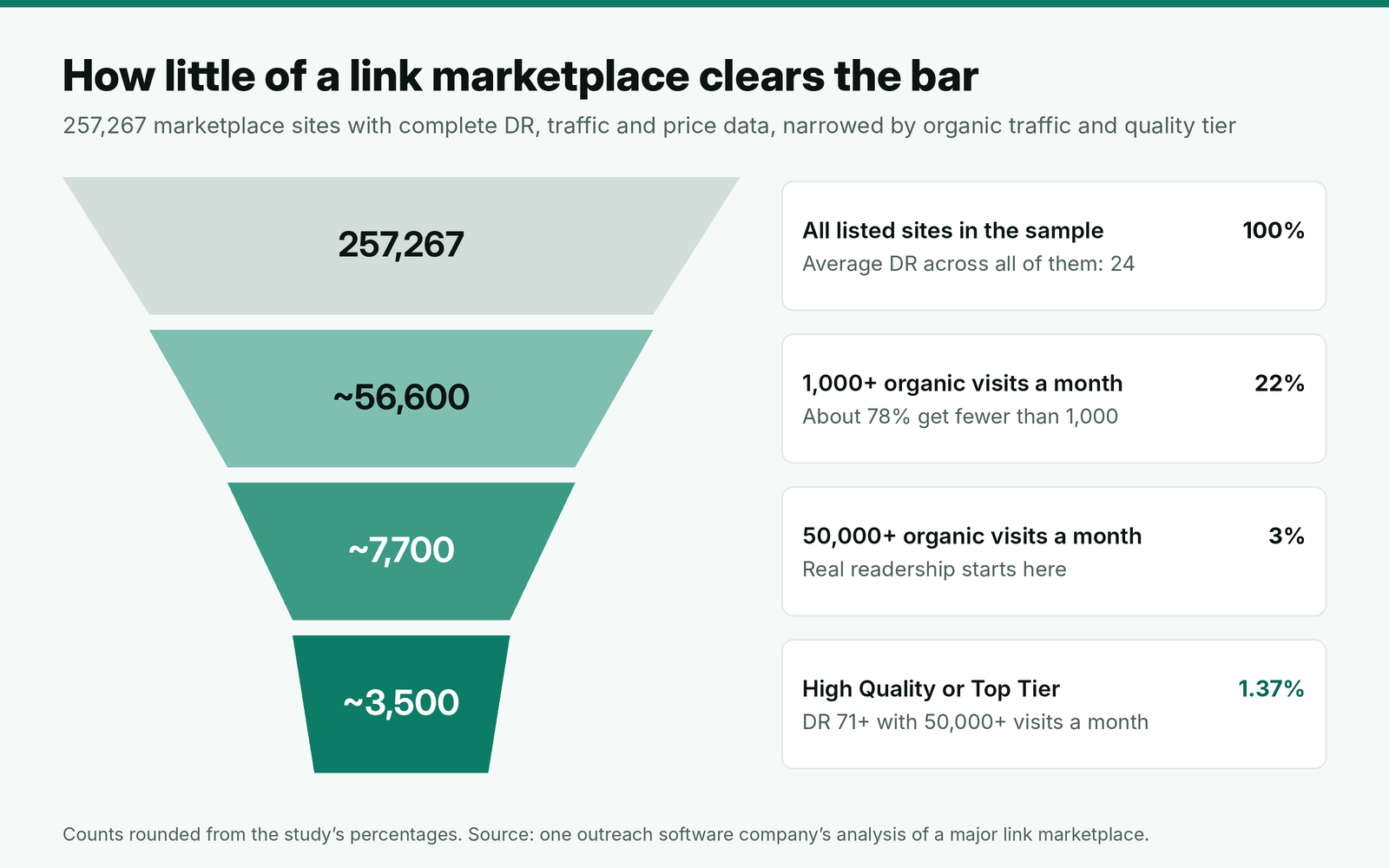
That shape explains why marketplace prices look cheap. The average order is placed on the large bottom of the funnel, where a site has a respectable DR and almost nobody reads it. A DR filter alone does not move you up the funnel either, since the score can be propped up by links from other sites that sell. Filter on organic traffic first and DR second, then run the full site checks we run before any order on what is left.
Listing metrics also lag. Scores are refreshed on the platform's schedule, not yours, and Domain Rating itself moves to a new model, DR4, on December 1, 2026, and many sites will get a lower score or none at all. A listing that says DR 55 next month may be quoting the old model, so read how the DR4 switch changes the scores on a listing before you trust a DR filter on any catalog.
What the top end of the market sells
Higher prices buy a different product, not just a stronger version of the same one. A link building agency priced 16,625 publisher sites in 53 languages and published the results in Entrepreneur: the median quote for one sponsored article was $570, with the middle half of the market between $250 and $1,290. The more revealing numbers are about what those publishers allow.
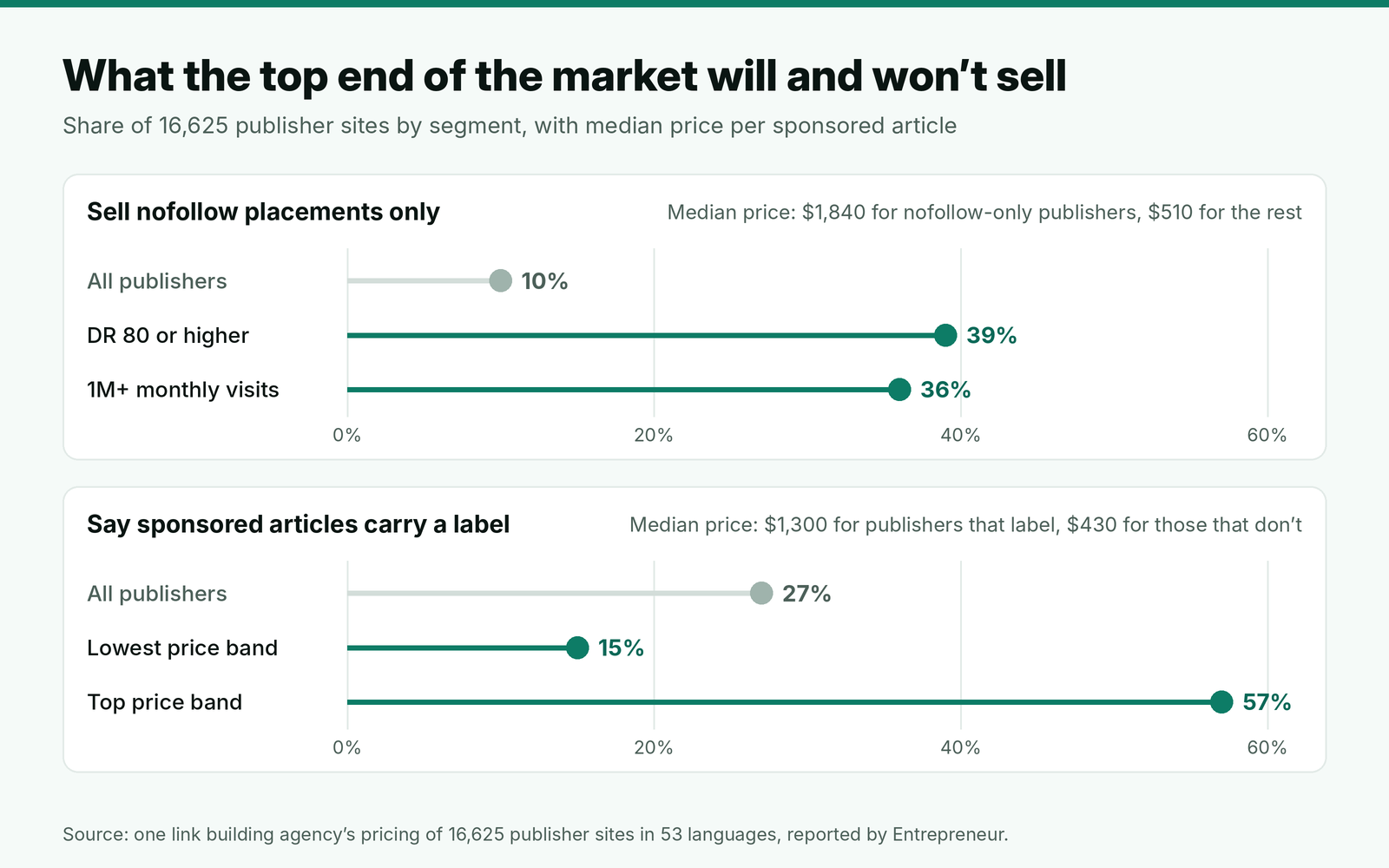
Two practical points follow. First, a marketplace listing for a major publisher that offers a cheap followed link with no label deserves suspicion, because many real publishers at that level label sponsored posts or sell only nofollow links. It may be a contributor account or a reseller with access that can be revoked. Second, a premium placement that arrives labeled and nofollowed is not a failed order. It is what that publisher sells, and it should be priced and reported as coverage, not as a ranking link.
What a marketplace link really costs
The listed price is the start of the sum. The number that matters is cost per link that still counts at day 90: total spend divided by the links that went live, got indexed and survived. Marketplace orders lose value at each of those steps, and the listing shows none of them.
Here is a made-up month. An agency buys 10 guest posts for a SaaS client from one marketplace at an average listed price of $280, plus $30 per post for the seller to write the article.
| Step | Links left | Running spend | Cost per link at this step |
|---|---|---|---|
| Ordered (10 at $280 plus $30 content) | 10 | $3,100 | $310 |
| Live within the agreed turnaround | 9 | $3,100 | $344 |
| Placement page indexed at day 30 | 7 | $3,100 | $443 |
| Still live and unchanged at day 90 | 6 | $3,100 | $517 |
A $280 listing became a $517 link. That assumes the order that never went live was not refunded; claimed inside the platform's window, it comes back and the figure drops to $465, which is why the claim window matters as much as the price. Indexing is where most of the loss sits; checking each placement page at day 7, 30 and 90 shows when to claim and what to ask the seller to fix.
Run this sum by seller, not by marketplace. Two sellers on the same platform can produce very different cost per counting link, and the cheapest listing is often the most expensive result.
How to compare marketplaces by price
Price comparisons across platforms are only fair on the same domain and the same service. For each site you plan to buy on, compare:
- The same domain on each platform. A site listed on three marketplaces can carry three prices. Search for it by domain, not by metric filter.
- The all-in price. Add content writing, any platform fee or deposit charge, and the cost of a rush turnaround if you need one.
- The replacement window. A $260 link with no replacement is dearer than a $280 link with 12 months of cover, once one in ten goes missing.
- The rel value on offer. Compare followed with followed and sponsored with sponsored, never across the two.
Then compare the all-in figure with what guest posts cost through each buying route for the same DR and traffic band, to see whether the platform is cheap or just has cheap sites on it.
How to vet a marketplace listing before you order
A listing is the seller's description of a site. Treat every number on it as a claim to check on the live site, and record what you checked on the order.
| The listing says | Check on the live site | Walk away if |
|---|---|---|
| DR and DA | Current scores in your own tool, and the gap between them | The listing is more than 10 points above your reading |
| Monthly traffic | The 12-month organic trend, and which pages earn it | Traffic fell by more than half, or comes from one unrelated page |
| Niche or category | The five newest posts and what they are about | The recent posts cover casinos, loans and pets on a "business" blog |
| Sample posts | The newest post with a paid link: is it indexed, and in the main blog path? | Paid posts sit in a separate folder no other page links to |
| Dofollow | The rel value on recent sponsored posts | The seller will not state the rel value in writing |
| Turnaround | The seller's completed orders and response time on the platform | No completed orders, or a new account selling a large site |
The sample post check catches the most bad listings. A site with good traffic can still publish paid posts into a section Google does not trust, and the listing will never say so.
Before the first order with a new seller, send the same short message through the platform's chat and keep the reply on the order:
Subject: Before we order on [domain]
Hi [seller name],
We would like to order a [guest post / link insertion] on [domain] for a client in [niche]. Before we do, could you confirm four things?
1. Do you own or manage [domain] directly, or do you place through someone else?
2. Which rel value will the link carry, and will the post carry a sponsored label?
3. Will the post sit in the main blog, at a URL like [example of a recent post on the site]?
4. If the link is removed, changed or the page drops out of Google's index within 90 days, will you replace it?
If those fit, we will place the order today.
[Your name]
[Agency]
A seller who answers all four plainly is worth a trial order. One who answers only the first, or replies with a price list, has told you what you need to know.
Seller red flags on a backlink marketplace
- One seller, dozens of unrelated high-DR sites at the same price. Real publishers rarely own a spread like that. A network or a reseller usually does.
- A big publisher at a small price. A followed, unlabeled link on a household-name site for a three-figure price may come through a contributor account, which can be closed and the post removed.
- Prices that change after the order. A seller who asks for more once the brief is in, or adds a "content approval" fee, will do it again.
- The anchor or target changes on the live page. Check the live link against the order, not against the seller's confirmation.
- Pressure to confirm delivery early. If the platform releases payment when you confirm, confirm only after your own live check.
- An offer to deal outside the platform at a discount before you have a history with the seller. You lose the platform's dispute route and gain nothing you can verify.
Sites in a seller network often share more than a seller: the same theme, the same authors and the same advertisers in every post. That is the pattern of a link farm, and it shows up on marketplaces more than anywhere else.
Terms to settle before you pay
Platform terms protect the platform first. Read the refund and dispute section once, then write down the four answers that decide every order: how long you have to report a missing link, what counts as missing (removed, changed anchor, changed rel value, page no longer indexed), whether the remedy is a refund or a replacement, and whether the seller or the platform pays for it. If your client contract promises 90 days of cover and the platform gives you 30, every loss after day 30 comes out of your margin.
Agree the rel value too. Google's spam policies list buying or selling links for ranking purposes as link spam, and say paid links are not a violation when they carry rel="nofollow" or rel="sponsored". The same page's site reputation policy covers third-party content published on a host site mainly to benefit from that host's ranking signals, so a sponsored section full of unrelated paid posts puts the host site, and your link with it, at risk. Decide your client's rel policy before the first order, note it on each order, and check it on the live page.
Timing matters for the results you report. Google's November 2026 core update finished rolling out on November 24 after 14 days. Ranking changes from that window say little about one month's marketplace orders, so judge those orders on live, indexed and surviving links for now.
When to move a site off the marketplace
A marketplace is a good place to find a site and a poor place to keep buying on it. Once a site has passed your checks and you expect to keep ordering, its cost, terms and history are better held in your own records than on a platform you do not control.
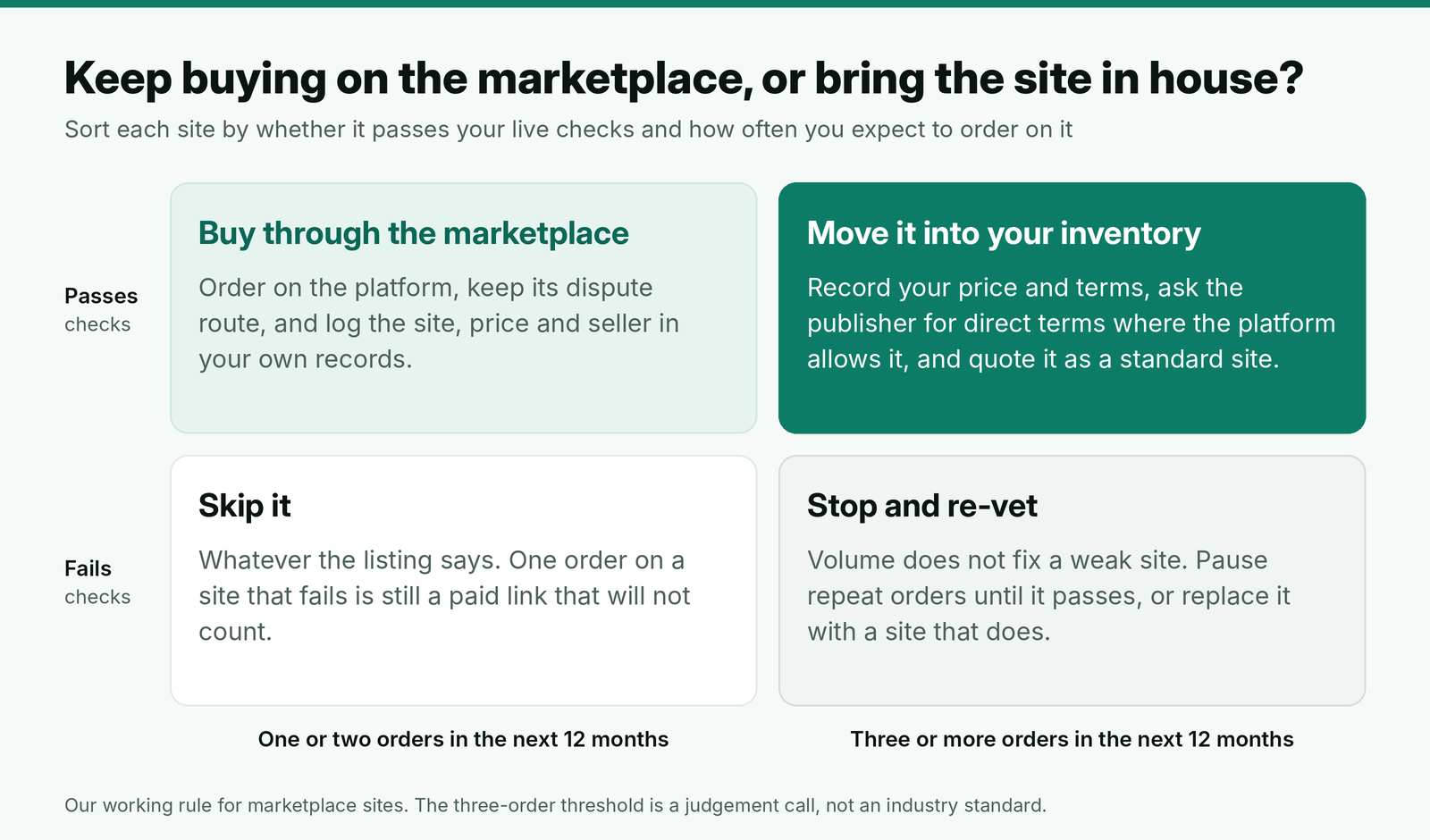
Moving a site does not have to mean leaving the platform. Read its terms on off-platform contact first. Where they allow it, ask the publisher for direct terms after two or three clean orders. Where they do not, keep buying through the platform but record the site, your price, the seller and every order in your own inventory, so the history survives if the seller leaves the platform or the listing disappears. Either way, the price you pay sits beside the price you charge, which is how we turn a marketplace cost into a client rate.
Where BuildLinks fits
Marketplaces are good at listing sites. They do not keep your agency's record of which sites passed, what each costs from which seller, what you charge each client and what happened to every link. That is the job we built BuildLinks to do. In BuildLinks, every site you buy on, from any marketplace, publisher or broker, sits in one inventory with your own price on every site, filterable by DA, DR, traffic, service type, turnaround and country. A new domain is held for approval before anyone on the team can quote it, so a site found on a marketplace goes through vetting before it reaches a client, and rate changes load in bulk through CSV.
Each order moves through Pending, In Progress, Completed or Rejected, and guest posts and niche edits are rechecked the moment the link publishes, so the live date your day 30 and day 90 checks count from is recorded on the order. Reports show total spend, average cost and average turnaround for any date range. On the agency side, the vendor cost stays on your side of the account: clients see the price you set in a portal on your domain, never what the marketplace charged you.
Conclusion
Use a backlink marketplace to find sites, not to judge them. Filter on organic traffic before DR, expect fewer than 1 site in 70 to clear both, and check every listing claim on the live site, starting with the newest paid post. Compare the same domain across sellers and platforms on the all-in price, rel value and replacement window.
Judge each seller on cost per link still counting at day 90, not on the listed price, and claim inside the platform's window. Get the seller's answers on ownership, rel value, placement path and replacement in writing before the first order. Once a site passes and will take three or more orders a year, move it into your own inventory with your own terms.